

A cross-platform writing and formatting tool that simplifies the path from draft to published book, offering a modern, one-time-payment alternative to Vellum for non-Mac users.
Excellent for indie authors who want a single tool for writing and professional formatting, weaker for those needing complex research management or advanced collaborative editing.
Analysis based on product data, pricing structure, traffic signals, and public user sentiment.
Who Should Use Atticus?
Typical users
Indie authors and self-publishers ranging from debut novelists to prolific 'rapid release' creators who manage their own production.
Maturity fit
beginner to advanced
Choose this if…
- You want professional-grade formatting without paying a recurring subscription
- You work on Windows or Linux and need a Vellum-like experience
- Your priority is a streamlined workflow from first draft to print-ready PDF
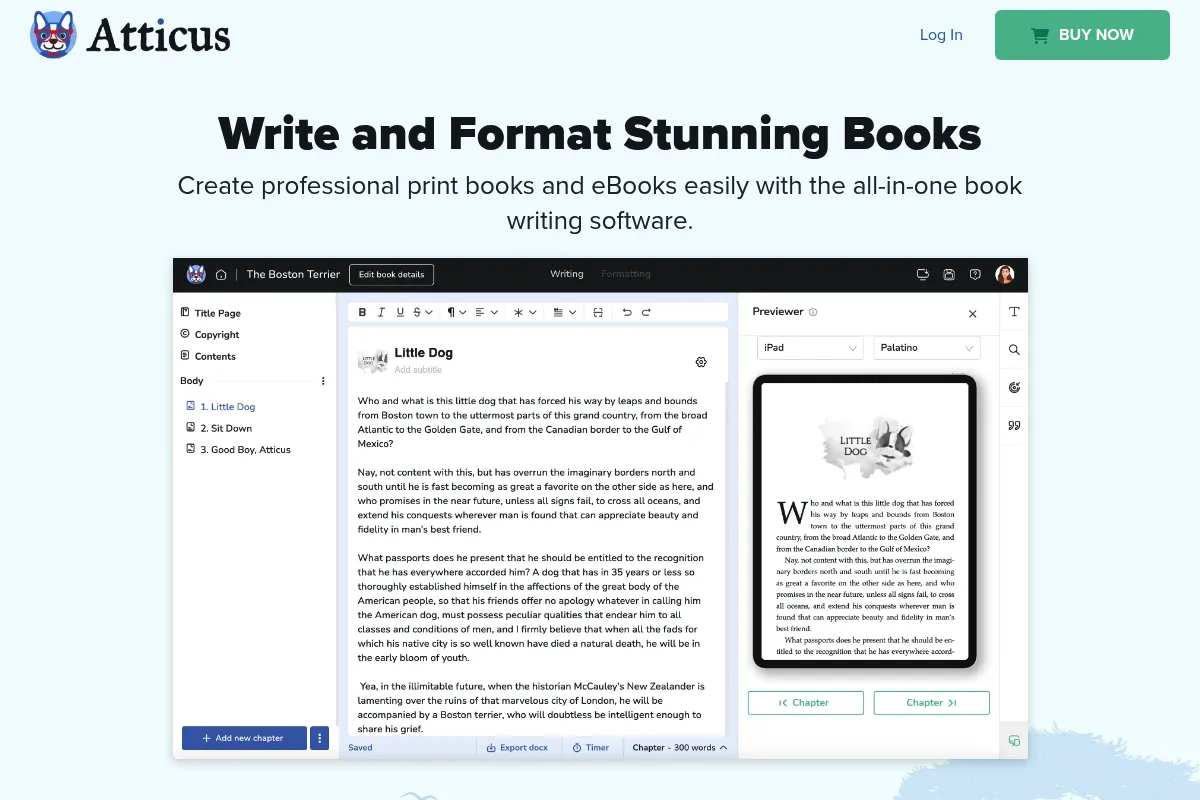
- You want to see exactly how your book looks on a Kindle while you are still writing
Skip this if…
- You need a deep database for world-building or character bibles (use Scrivener instead)
- Your workflow requires advanced 'Track Changes' for professional editor collaboration
- You require a native desktop application rather than a web-based PWA wrapper
- You are formatting highly complex non-fiction with heavy data tables and nested charts
About Atticus
Atticus is a browser-based writing and formatting application designed specifically for the self-publishing workflow. It was built to provide a platform-agnostic solution for authors who need professional typesetting without the steep learning curve of Adobe InDesign or the Mac-exclusivity of Vellum.
Official profiles
What it actually does
It provides a distraction-free writing environment integrated with a professional typesetting engine. Users can write their manuscript from scratch or import a Word doc, apply pre-designed themes, and export industry-standard EPUB and print-ready PDF files.
What makes it different
The primary differentiator is its 'Vellum for everyone' positioning; it brings high-end, automated book design to Windows and Linux users. Unlike Scrivener, which focuses on the 'messy middle' of writing and research, Atticus focuses on the 'final mile' of publishing, allowing authors to format as they write.
Ratings across the web

Ratings aggregated from independent review platforms.
Key Features
Device Previewer
View your manuscript instantly as it would appear on a Kindle, iPad, or phone.
One-Click Formatting
Apply professional styles to chapters, drop caps, and ornamental breaks without manual CSS.
Goal Tracking
Set word count targets and deadlines with visual progress bars to maintain momentum.
Reusable Elements
Save 'About the Author' or 'Also By' pages to automatically sync across multiple book projects.
Custom Theme Creator
Design unique chapter headers and font combinations to create a consistent brand across a series.
ProWritingAid Integration
Check grammar and style directly within the writing interface.
Auto-save and Backups
Continuous cloud syncing with the ability to export local backups for security.
Pricing
Atticus Lifetime
- Writing & Formatting features
- Unlimited eBooks & Print books
- All future updates included
- Use on unlimited devices
- 1,200+ unique formatting combinations
Pricing checked 6 months ago
Pricing guidance
- N/A - All features are unlocked at the single price point.
- No multi-user collaboration seats
- Limited to 50MB image uploads per book
- Requires internet connection for initial login and syncing
Aggressively competitive one-time pricing designed to undercut subscription-based writing tools and the high entry cost of Vellum.
Pros & Cons
Strengths
-
One-time payment model
Avoids the subscription fatigue common in SaaS; authors pay once and own the software for life, including future updates.
-
Platform agnostic
Works seamlessly on Windows, Mac, Linux, and Chromebooks, which is a major advantage over its primary competitor, Vellum.
-
Professional output quality
Produces clean, validated EPUBs and PDFs that meet the strict requirements of KDP, IngramSpark, and Apple Books.
-
Intuitive interface
The learning curve is significantly lower than Scrivener or InDesign, making it accessible for authors who aren't tech-savvy.
Weaknesses
-
PWA architecture
As a Progressive Web App, it can occasionally feel less responsive than a native application, especially with very large manuscripts.
Affects: Users with older hardware or those who prefer the 'snappiness' of native software.
-
Limited research tools
Lacks the split-screen views, corkboards, and deep folder nesting found in dedicated writing software like Scrivener.
Affects: Complex fiction writers or non-fiction authors with extensive source materials.
-
Basic collaboration
While it allows for importing/exporting, it lacks real-time multi-user editing or robust internal commenting systems.
Affects: Authors working closely with co-writers or editors within the same file.
Real User Sentiment
Users generally view Atticus as the best 'all-in-one' solution for authors who find Scrivener too complex and Vellum too restrictive.
Users tend to like
- The beautiful and simple user interface
- The speed of going from a Word doc to a finished book
- The responsive customer support team
- The lack of a monthly subscription
Users commonly complain about
- Occasional lag when typing in very long chapters
- Desire for more advanced find-and-replace options
- The lack of a dedicated mobile app for writing on the go
Recurring tradeoffs
- Users trade deep organizational features (Scrivener) for ease of formatting and visual output (Atticus).
Happiest users
Indie novelists who want to focus on writing and produce professional-looking books without hiring a formatter.
Often frustrated
Technical writers or academic authors who need complex citations, tables, and native app performance.
Use Cases
Fiction Series
Using reusable front/back matter to quickly format a 10-book series with consistent branding.
Switching from Mac to PC
Authors who previously used Vellum but moved to a Windows environment.
Rapid Release Authors
Using the goal tracker and streamlined formatting to publish multiple books per year.
Lead Magnet Creation
Quickly turning a short story or novella into a professional EPUB for newsletter signups.
Print-on-Demand
Generating high-quality PDFs specifically sized for KDP or IngramSpark trim requirements.
Frequently Asked Questions
How does Atticus compare to Vellum?
Atticus is cross-platform (Windows/Mac/Linux) while Vellum is Mac-only. Atticus includes a full writing interface and goal tracking, whereas Vellum is primarily for formatting. Atticus costs $147 once, while Vellum's full version is $249.
Can I use Atticus offline?
Yes. While it is a web-based app, you can install it as a PWA on your desktop. Once loaded, you can write and format without an internet connection; your changes will sync to the cloud once you are back online.
Is there a free version or trial?
There is no free version or trial period. However, Atticus offers a 'no-questions-asked' 30-day money-back guarantee, which functions as a de facto trial for new users.
Does Atticus replace Scrivener?
It depends on your needs. If you use Scrivener for its deep research folders and corkboard, Atticus may feel too simple. If you only use Scrivener to write and then struggle with its formatting, Atticus is a more modern and user-friendly replacement.
Can I import my existing books into Atticus?
Yes, you can import .docx, .rtf, and .epub files. Atticus will attempt to automatically break the file into chapters based on your heading styles, though some manual cleanup is usually required for complex layouts.
Does Atticus support images and pictures?
Yes, it supports images for chapter headers, full-page inserts, and inline graphics. However, it is not a full layout tool like InDesign, so it is better suited for novels and simple non-fiction than image-heavy coffee table books.
Why trust this page?
This evaluation combines product positioning, pricing analysis, traffic and market signals, and public user sentiment into a single decision-support page. Content is generated editorially — not copied from the vendor's website.
Funding & Company
Founded
—
Stage
Bootstrapped
Total Raised
Bootstrapped
Latest Round
—
Atticus is a bootstrapped company with no external funding, founded by Dave Chesson, a known entrepreneur in the self-publishing software space. Its stability is tied directly to its product revenue from one-time sales, rather than venture capital, suggesting a focus on sustainable, customer-funded growth.
Market Signals & Traffic
Estimated visits, global rank, geography, traffic sources, monthly visit trends, and organic search keywords (Similarweb)—on a dedicated page built for depth and search.
- Estimated visits
- 363,815
- Global rank
- #88,725
- Snapshot
- Apr 2026
- Traffic trend
- Surging
Estimated monthly visits
Similar Tools
MarketMuse
Content Creation, Productivity

AI-powered platform for content strategy, planning, and optimization.
Surfer SEO
Content Creation, Productivity

AI-powered tool for data-driven content optimization and SEO.
Moises
Content Creation, Productivity

Isolate vocals and instruments from any song for musical practice.
Frase
Content Creation, Productivity

AI-powered platform for content research, writing, and SEO optimization.
Clearscope
Content Creation, Productivity

AI-powered SEO content optimization platform for better search rankings.
Kimi
AI Assistant, Research, Productivity

Intelligent assistant for long-context document analysis and web research