

A no-cost, open-source editor that handles almost any file format without a forced import process—best for Linux users and budget-conscious creators who prioritize functionality over interface polish.
Excellent for multi-format timeline editing on a zero budget, weaker for collaborative workflows or high-end motion graphics.
Analysis based on product data, pricing structure, traffic signals, and public user sentiment.
Who Should Use Shotcut?
Typical users
Solo content creators, Linux enthusiasts, and hobbyists who need a capable editor without subscription fees or heavy hardware requirements.
Maturity fit
beginner to advanced
Choose this if…
- You need to edit niche or legacy file formats without transcoding
- Your primary workstation runs on Linux
- You want a lightweight footprint compared to DaVinci Resolve
- You require a completely free tool with no watermarks or export limits
Skip this if…
- You need cloud-based collaboration or team project sharing
- Your workflow relies on advanced AI-driven rotoscoping or object removal
- You prefer a modern, streamlined UI like CapCut or Premiere Pro
About Shotcut
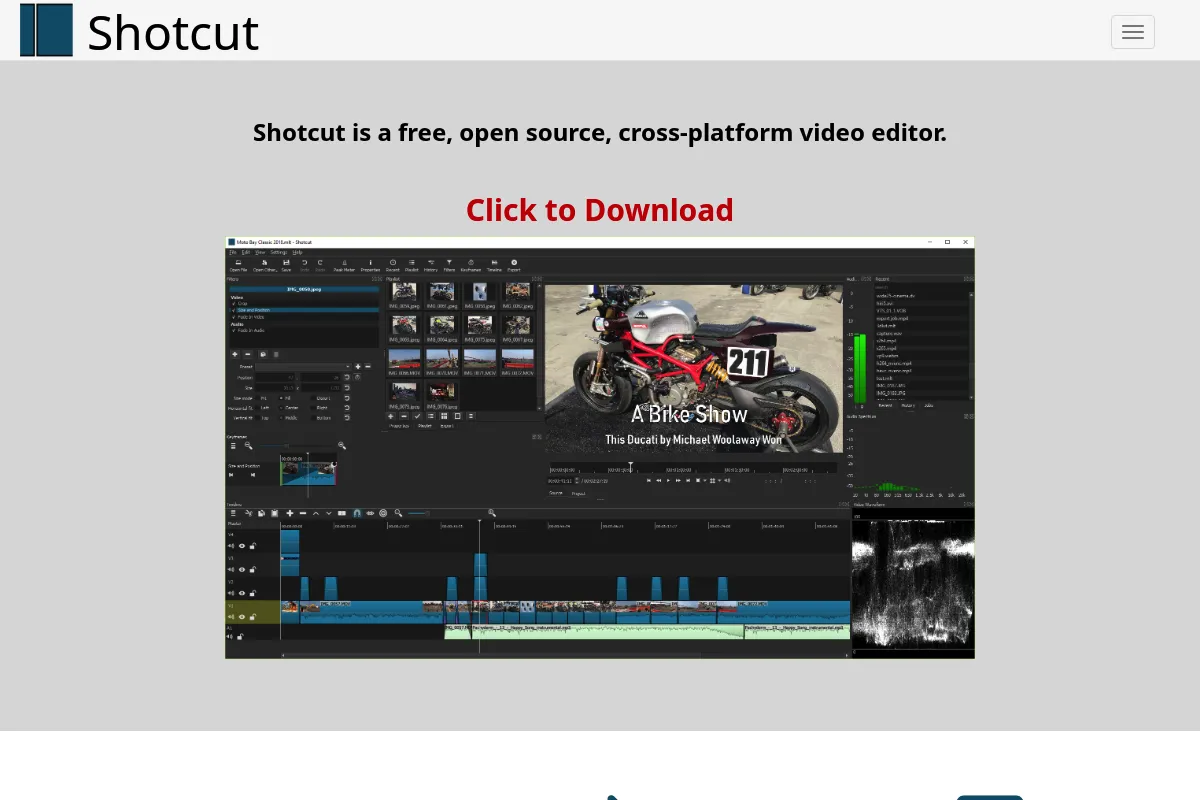
Shotcut is a free, open-source, non-linear video editor built on the MLT Framework. It provides professional-grade editing capabilities across Windows, macOS, and Linux without the overhead of a subscription model. It exists to provide a high-utility alternative to commercial software, focusing on broad format support and technical flexibility.
Official profiles
What it actually does
It allows users to arrange video, audio, and images on a multi-track timeline to create complex sequences. The software handles everything from basic trimming and transitions to advanced keyframe-based filtering and hardware-accelerated encoding.
What makes it different
Unlike most editors, Shotcut does not require an 'import' step; it uses native file seeking to allow immediate editing of files on your drive. Its architecture is heavily reliant on FFmpeg, giving it wider out-of-the-box format support than almost any commercial competitor.
Ratings across the web


Ratings aggregated from independent review platforms.
Key Features
Format Agnostic Timeline
Mix and match different resolutions and frame rates in a single project without pre-rendering.
Keyframe Animation
Precise control over filters and effects over time for custom transitions and motion.
Hardware Encoding
Uses your GPU to speed up exports, reducing wait times for high-resolution renders.
History View
Unlimited undo and redo with a visible list of actions to quickly revert complex mistakes.
Audio Scopes
Includes Peak, Loudness, and Spectrum Analyzers for technical audio mastering.
Filter Stack
Layer multiple video and audio filters like color grading, sharpening, and noise reduction in a non-destructive way.
Glaxnimate Integration
Support for 2D vector animations directly within the video timeline.
Pricing
Open Source
- Full feature set included
- No watermarks on export
- Unlimited tracks and projects
- Commercial use allowed
- Community-driven updates
Pricing checked 5 months ago
Pricing guidance
- Not applicable as there are no paid tiers
- No cloud storage included
- No official technical support (community forums only)
- No stock media library integrated
Completely free and open-source under the GPL license.
Pros & Cons
Strengths
-
Zero cost with no strings attached
There are no watermarks, no 'pro' features locked behind a paywall, and no subscription fees, making it the most accessible high-power editor for beginners.
-
Exceptional format compatibility
Because it uses FFmpeg, it can open and export almost any codec, including ProRes, DNxHR, and obscure legacy formats that crash other editors.
-
Low system overhead
It runs efficiently on older hardware and mid-range laptops where DaVinci Resolve or Premiere Pro would struggle with lag.
-
Portable version available
You can run the entire application from a USB stick without installation, which is ideal for restricted work environments or shared computers.
Weaknesses
-
Utilitarian and clunky UI
The interface uses a modular 'dock' system that can feel cluttered and unintuitive compared to modern, design-focused editors.
Affects: New users and those accustomed to Adobe/Apple software
-
Stability issues on complex projects
Users frequently report crashes when stacking too many heavy filters or working with high-bitrate 4K footage without proxies.
Affects: Professional editors working on long-form content
-
Steep learning curve for filters
Applying simple effects often requires navigating multiple menus and understanding technical terminology that isn't always user-friendly.
Affects: Casual creators looking for quick edits
Real User Sentiment
Users appreciate the technical depth and lack of monetization, though they frequently warn about the interface's learning curve.
Users tend to like
- No forced account creation
- Wide range of export presets
- Frequent updates and bug fixes
- Ability to handle 4K footage on modest hardware
Users commonly complain about
- Occasional crashes during rendering
- Lack of built-in motion graphics templates
- Non-standard keyboard shortcuts compared to industry leaders
Recurring tradeoffs
- You trade a polished user experience for total technical control and zero cost.
Happiest users
Linux users and hobbyist YouTubers who want a 'one-and-done' tool without recurring costs.
Often frustrated
Professional editors coming from Premiere Pro who find the workflow logic and stability insufficient for client work.
Use Cases
YouTube Content Creation
Trimming, adding overlays, and exporting in 4K for social platforms.
Linux Video Production
Using a native, high-performance editor on distributions like Ubuntu or Fedora.
Legacy Format Conversion
Opening old video files and converting them to modern H.264 or HEVC formats.
Educational Projects
Teaching video editing basics in schools without budget for software licenses.
Quick Social Media Edits
Applying basic filters and text overlays to raw footage for fast turnaround.
Frequently Asked Questions
Is Shotcut really free or is there a catch?
Shotcut is 100% free and open-source under the GPL license. There are no watermarks, no hidden fees, and no features locked behind a subscription. The project is funded by donations and ad revenue from their website.
How does Shotcut compare to DaVinci Resolve?
Shotcut is much lighter and runs on weaker hardware, whereas DaVinci Resolve requires a powerful GPU. However, Resolve offers far superior color grading and professional audio tools (Fairlight). Choose Shotcut for simple-to-medium tasks and Resolve for high-end cinematic work.
Does Shotcut put a watermark on exported videos?
No. Unlike many 'free' commercial editors, Shotcut does not add any watermarks or branding to your exported files, regardless of the resolution or length.
Can Shotcut edit 4K video?
Yes, Shotcut supports 4K resolution and high frame rates. It also includes a 'Proxy' feature that creates lower-resolution copies of your footage for smoother editing, which is essential for 4K work on average computers.
What are the system requirements for Shotcut?
It requires at least 4GB of RAM (8GB for 4K) and a 2GHz CPU. It is significantly less demanding than Adobe Premiere Pro, making it a better choice for older laptops.
Does Shotcut support hardware acceleration?
Yes, it supports hardware-accelerated encoding via NVIDIA (NVENC), AMD (AMF), and Intel (QuickSync). This significantly speeds up the final export process if you have a compatible graphics card.
Why trust this page?
This evaluation combines product positioning, pricing analysis, traffic and market signals, and public user sentiment into a single decision-support page. Content is generated editorially — not copied from the vendor's website.
Funding & Company
Founded
2011
Stage
Bootstrapped
Total Raised
Bootstrapped
Latest Round
—
Shotcut is a free, open-source video editor that is not backed by venture capital. The project is developed by Meltytech, LLC and has been sustained since 2011, funded through website advertising, paid sales on app stores like the Microsoft Store, and community support. [12, 14] This model ensures its independence and availability as a free tool.
Market Signals & Traffic
Estimated visits, global rank, geography, traffic sources, monthly visit trends, and organic search keywords (Similarweb)—on a dedicated page built for depth and search.
- Estimated visits
- 811,982
- Global rank
- #68,115
- Snapshot
- Apr 2026
- Traffic trend
- Cooling
Estimated monthly visits
Similar Tools
Kite
Video Creation, Content Creation

A screen recorder that creates polished, professional product demo videos with 3D animations and AI voiceovers.
Viggle AI
Video Creation, Content Creation

AI tool to animate static images and create videos from motion.
Higgsfield
Video Creation, Content Creation

Generate cinematic videos using text prompts and image references.
Kaiber
Video Creation, Content Creation

AI-powered platform for creating dynamic videos from text, images, and audio.
Genmo
Video Creation, Content Creation

AI-powered platform to create videos from text or images.
Wonder Studio
Video Creation, Content Creation

Automatically animates and composes CG characters into live-action footage.