

Microsoft Copilot is an AI assistant deeply integrated into the Microsoft 365 ecosystem, designed to boost productivity by assisting with content creation, data analysis, and workflow automation within familiar applications.
Best for Microsoft 365 users seeking AI assistance within their existing workflow; less ideal for those outside the Microsoft ecosystem or needing highly specialized AI capabilities.
Analysis based on product data, pricing structure, traffic signals, and public user sentiment.
Who Should Use Copilot?
Typical users
Individuals and teams heavily reliant on the Microsoft 365 suite (Word, Excel, Outlook, Teams). This includes business professionals, content creators, and developers working within this ecosystem.
Maturity fit
beginner to advanced
Choose this if…
- You are deeply invested in the Microsoft 365 ecosystem and want AI assistance within Word, Excel, Outlook, and Teams.
- Your primary need is to automate routine tasks and improve content creation within existing Microsoft applications.
- You require AI to summarize documents, meetings, and email threads to save time.
- You need AI to assist with data analysis and report generation within Excel.
Skip this if…
- You do not use Microsoft 365 applications extensively.
- You require highly specialized AI functionalities not directly related to office productivity.
- You prefer a standalone AI chatbot for general-purpose brainstorming and creative writing outside of an integrated workflow.
- Cost is a primary concern and you are looking for a free, highly capable AI assistant for non-integrated tasks.
About Copilot
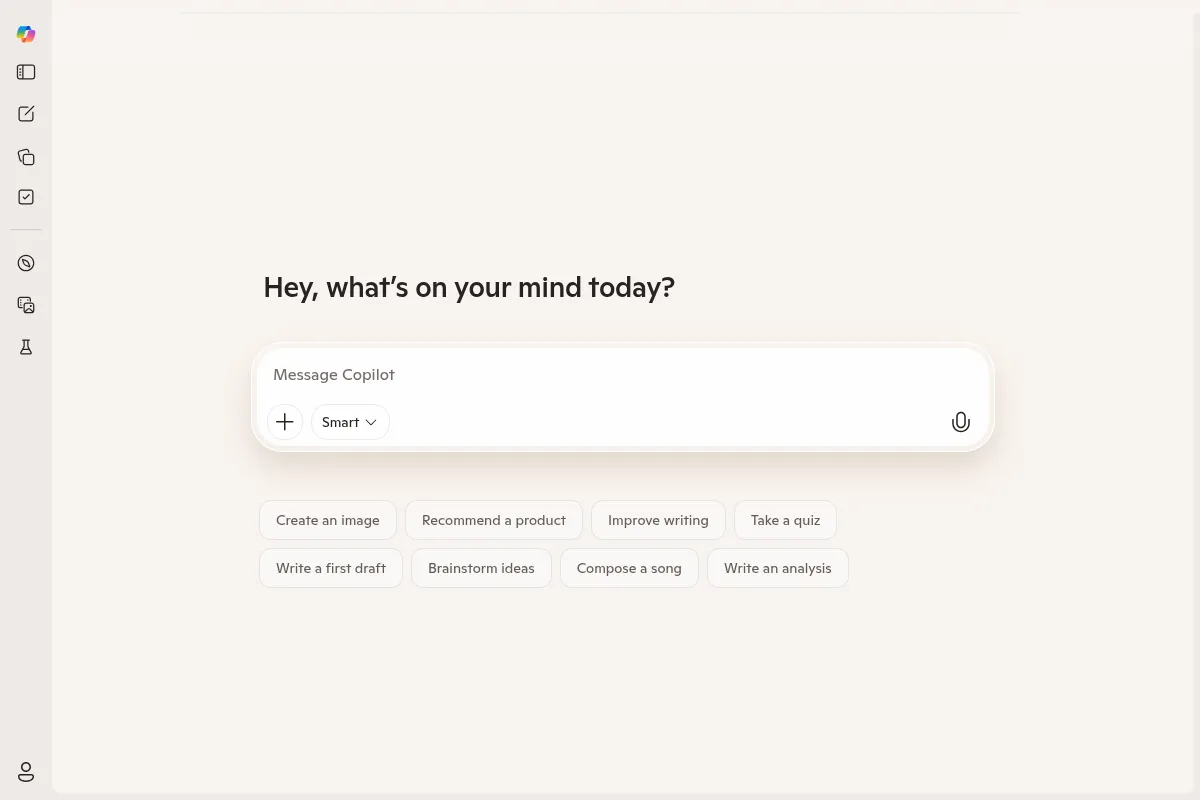
Microsoft Copilot is a generative AI chatbot integrated across Microsoft products to enhance productivity, creativity, and collaboration. It acts as an intelligent companion within the Microsoft ecosystem, assisting with tasks like drafting documents, analyzing data, generating content, and automating routine workflows.
What it actually does
Copilot assists users by generating text drafts, summarizing documents and conversations, analyzing data in spreadsheets, creating presentations, and automating routine tasks within Microsoft 365 applications. It aims to streamline workflows and improve efficiency by providing AI-powered support directly within the user's existing work environment.
What makes it different
Copilot's primary differentiator is its deep integration within the Microsoft 365 suite, allowing it to access and process user data (with permissions) across applications like Word, Excel, Outlook, and Teams. This contextual awareness within the Microsoft Graph enables more personalized and relevant assistance compared to standalone AI chatbots.
Ratings across the web


Ratings aggregated from independent review platforms.
Key Features
Microsoft 365 Integration
Seamlessly works within Word, Excel, Outlook, Teams, and other Microsoft applications, leveraging your work data (with permissions) for context-aware assistance.
Content Generation
Assists in drafting emails, documents, presentations, and even code, significantly speeding up the initial creation process.
Summarization
Quickly condenses long documents, email threads, and meeting transcripts, saving users time and ensuring they don't miss key information.
Data Analysis in Excel
Helps users analyze data, identify trends, and generate insights or charts, making complex data more accessible.
Meeting Assistance in Teams
Provides real-time summaries, identifies action items, and helps users catch up on missed discussions.
Web Grounding
Pulls in real-time information from the web to supplement its knowledge base and provide up-to-date answers.
Pricing
Copilot Chat (Free)
- Web-grounded AI assistance
- General purpose AI chat
- Image generation (with limits for non-licensed users)
- No integration with Microsoft 365 apps or organizational data
Copilot Pro
- Priority access to latest AI models (e.g., GPT-4o)
- Faster AI image creation
- Enhanced AI features in Copilot app
- Requires Microsoft 365 Personal or Family subscription
Copilot for Microsoft 365
- Integration with Word, Excel, PowerPoint, Outlook, Teams
- Access to work content and organizational data (with permissions)
- AI-powered chat with Work IQ
- Reasoning AI for research and data analysis
- Requires a qualifying Microsoft 365 Business or Enterprise license
Copilot Studio
- Build custom AI agents
- Integrate with Microsoft 365 apps
- Deploy agents to websites or social channels
- Low-code graphical interface
Pricing checked 6 months ago
Pricing guidance
- When you need AI assistance directly within Microsoft 365 applications (Word, Excel, Outlook, Teams).
- When you need Copilot to access and reason over your organization's specific data and documents.
- When you require advanced AI features like priority access to the latest models or faster image generation (Copilot Pro).
- When you need to build custom AI agents for specific workflows (Copilot Studio).
- Image generation limits for users without a Microsoft 365 Copilot license.
- Copilot Studio has session limits per user per 24 hours, though these can be increased with add-ons.
- The 'free' Copilot Chat does not access organizational data, limiting its utility for work-specific tasks.
- While Microsoft 365 Copilot aims for deep integration, its memory and context can be fragmented across applications and sessions.
Microsoft positions Copilot as a premium add-on for its existing Microsoft 365 users, with tiered pricing that scales from basic free access to comprehensive enterprise integration.
Pros & Cons
Strengths
-
Deep Microsoft 365 Integration
Copilot's ability to work directly within Microsoft applications like Word, Excel, and Outlook provides contextual assistance and streamlines workflows for users already invested in the ecosystem. This integration allows it to leverage user data (with permissions) for more relevant outputs.
-
Productivity Enhancement
Features like document drafting, email summarization, and meeting recaps significantly reduce the time spent on routine tasks, allowing users to focus on more strategic work.
-
Content Creation Assistance
Copilot can generate initial drafts for various content types, which is particularly helpful for overcoming writer's block or for users who need to produce content quickly.
-
Data Analysis Capabilities
In Excel, Copilot can assist with data analysis, formula suggestions, and chart generation, making it valuable for users who need to extract insights from data but may not be Excel power users.
Weaknesses
-
Limited Task Execution
Copilot primarily provides suggestions and drafts; it cannot execute tasks directly, such as sending emails or scheduling meetings. Users must manually complete these actions.
Affects: Users expecting full automation
-
Accuracy and Nuance Challenges
While generally competent, Copilot can sometimes produce inaccurate or generic outputs, requiring manual review and editing. Its ability to grasp complex nuances or adhere to specific brand guidelines can be inconsistent.
Affects: Users needing high precision or strict adherence to specific styles
-
Contextual Memory Limitations
Copilot's memory can be fragmented across different applications and sessions, meaning it may not always retain context from previous interactions or across different Microsoft products, impacting the continuity of complex tasks.
Affects: Users working on multi-step, context-dependent tasks
-
Cost
The premium Microsoft 365 Copilot license is an additional cost on top of existing Microsoft 365 subscriptions, which can be prohibitive for some individuals or smaller organizations.
Affects: Budget-conscious individuals and small businesses
Real User Sentiment
User sentiment is mixed, with appreciation for its integration and productivity gains, but also frustration regarding accuracy, limitations, and cost.
Users tend to like
- Deep integration within Microsoft 365 applications.
- Time-saving features like meeting summaries and email triage.
- Assistance with drafting content and overcoming writer's block.
- The ability to quickly access and summarize information from various sources.
Users commonly complain about
- Inconsistent accuracy and occasional 'hallucinations'.
- Limitations in executing tasks directly (e.g., sending emails).
- Fragmented memory and context across different applications.
- The cost of the premium license, especially for smaller teams or individuals.
- Generic or overly formal outputs that require significant editing.
Recurring tradeoffs
- Deep Microsoft 365 integration vs. standalone AI flexibility.
- Productivity gains vs. the cost of the premium license.
- Convenience of AI assistance vs. the need for manual review and editing.
Happiest users
Users who are heavily invested in the Microsoft 365 ecosystem and whose primary needs align with Copilot's strengths in content generation, summarization, and data analysis within those applications.
Often frustrated
Users who expect fully automated task execution, require highly specialized AI capabilities beyond office productivity, or find the accuracy and editing requirements too time-consuming for the cost.
Use Cases
Meeting Summarization
Automatically generate meeting notes, action items, and key decisions from Microsoft Teams calls.
Email Triage and Drafting
Quickly summarize long email threads, draft replies, and refine email tone in Outlook.
Document Creation and Editing
Draft initial versions of documents, reports, or proposals in Word, or summarize lengthy texts.
Data Analysis in Excel
Assist with data exploration, formula generation, and creating charts or insights from spreadsheets.
Presentation Generation
Create initial drafts of PowerPoint presentations from prompts or existing Word documents.
Research and Information Retrieval
Quickly find and synthesize information from internal documents and the web.
Code Assistance
(GitHub Copilot, a related product) Assist developers in writing and debugging code.
Frequently Asked Questions
What is the difference between free Copilot and Microsoft 365 Copilot?
The free version of Copilot (often referred to as Copilot Chat) is a general-purpose AI assistant accessible via web browsers or apps. It provides answers, generates ideas, and creates content but does not integrate with your Microsoft 365 applications or organizational data. Microsoft 365 Copilot, on the other hand, is a paid add-on that deeply integrates with Word, Excel, Outlook, Teams, and other Microsoft 365 apps. It can access and reason over your work content (with permissions) to provide context-aware assistance, significantly enhancing productivity within your existing workflow.
How much does Microsoft 365 Copilot cost?
Microsoft 365 Copilot for businesses is priced at $30 per user per month. This is an add-on license that requires a qualifying Microsoft 365 subscription (such as Business Standard, Business Premium, or Office 365 E3/E5). There is also Copilot Pro for individuals at $20 per user per month, which offers enhanced features for personal Microsoft 365 subscribers. A free version of Copilot Chat is available, but it lacks integration with Microsoft 365 apps.
Can Copilot execute tasks directly, like sending emails?
No, Microsoft 365 Copilot primarily acts as an assistant that provides suggestions, drafts, and information. It can draft an email for you to review and send, or summarize a meeting, but it cannot directly perform actions like sending the email, scheduling the meeting, or submitting a report on its own. Users must manually complete these final execution steps.
What integrations does Microsoft 365 Copilot have?
Microsoft 365 Copilot is designed for deep integration within the Microsoft ecosystem. It works directly with applications such as Word, Excel, PowerPoint, Outlook, Teams, and OneDrive. It can also leverage data from Microsoft Graph, which includes your work emails, chats, and documents (subject to your permissions). Microsoft also offers Copilot Studio for building custom AI agents that can be integrated with various business apps and workflows.
Is Microsoft 365 Copilot accurate?
Copilot's accuracy can vary. While it often provides helpful and relevant information, users report that it can sometimes produce inaccurate outputs or 'hallucinate' information. It's crucial to review and fact-check Copilot's responses, especially for critical tasks. The accuracy can also depend on the quality and accessibility of the data it's processing. Microsoft is continuously working to improve its accuracy.
What are the limitations of Microsoft 365 Copilot?
Key limitations include its inability to execute tasks directly, potential for inaccuracies, fragmented memory across applications, and the need for manual review and editing. It also has a knowledge cut-off date, though it uses web searches to supplement this. For enterprise deployments, governance of custom agents and consistency across different product variants can also be challenges. Users are advised not to input confidential or PII data into prompts.
How does Microsoft 365 Copilot compare to ChatGPT?
ChatGPT is a standalone conversational AI chatbot, versatile for general-purpose brainstorming, creative writing, and coding outside a specific ecosystem. Microsoft Copilot is deeply integrated into the Microsoft 365 suite, making it ideal for in-app productivity tasks like drafting documents, summarizing emails, and analyzing data within Word, Excel, and Outlook. While both leverage OpenAI models, Copilot's strength lies in its contextual awareness within the Microsoft Graph, whereas ChatGPT offers more flexibility for open-ended tasks.
Why trust this page?
This evaluation combines product positioning, pricing analysis, traffic and market signals, and public user sentiment into a single decision-support page. Content is generated editorially — not copied from the vendor's website.
Company
Founded
1975
Stage
Public
HQ
Redmond, Washington, USA
Copilot is a flagship product of Microsoft Corporation, a publicly traded company and one of the most valuable in the world. Its stability is not dependent on venture capital; instead, it is backed by Microsoft's immense corporate resources, multi-billion dollar annual revenues, and a strategic multi-billion dollar investment in its key technology partner, OpenAI.
Market Signals & Traffic
Estimated visits, global rank, geography, traffic sources, monthly visit trends, and organic search keywords (Similarweb)—on a dedicated page built for depth and search.
- Estimated visits
- 130,014,155
- Global rank
- #353
- Snapshot
- Apr 2026
- Traffic trend
- Surging
Estimated monthly visits
Alternatives to Copilot
View all alternativesChatGPT
AI Assistant, Content Creation

AI-powered conversational chatbot for generating text and assisting with various tasks.
Gemini
AI Assistant, Content Creation

An experimental AI-powered conversational chatbot from Google.
Claude
AI Assistant

A conversational AI assistant for writing, analysis, coding, and more.
Similar Tools
Grammarly
AI Assistant, Content Creation

AI-powered writing assistant for clear, effective, and authentic communication.
ChatGPT
AI Assistant, Content Creation
AI-powered conversational chatbot for generating text and assisting with various tasks.
Anything
AI Assistant, Content Creation

An AI-powered platform that builds web and mobile applications from text prompts.
HyperWrite
AI Assistant, Content Creation

AI-powered writing assistant for content creation, research, and task automation.
Speechify
AI Assistant, Content Creation

AI-powered text-to-speech reader and voice generator.
Writesonic
AI Assistant, Content Creation

AI-powered platform for content creation, SEO, and AI search visibility.