
Modyfi
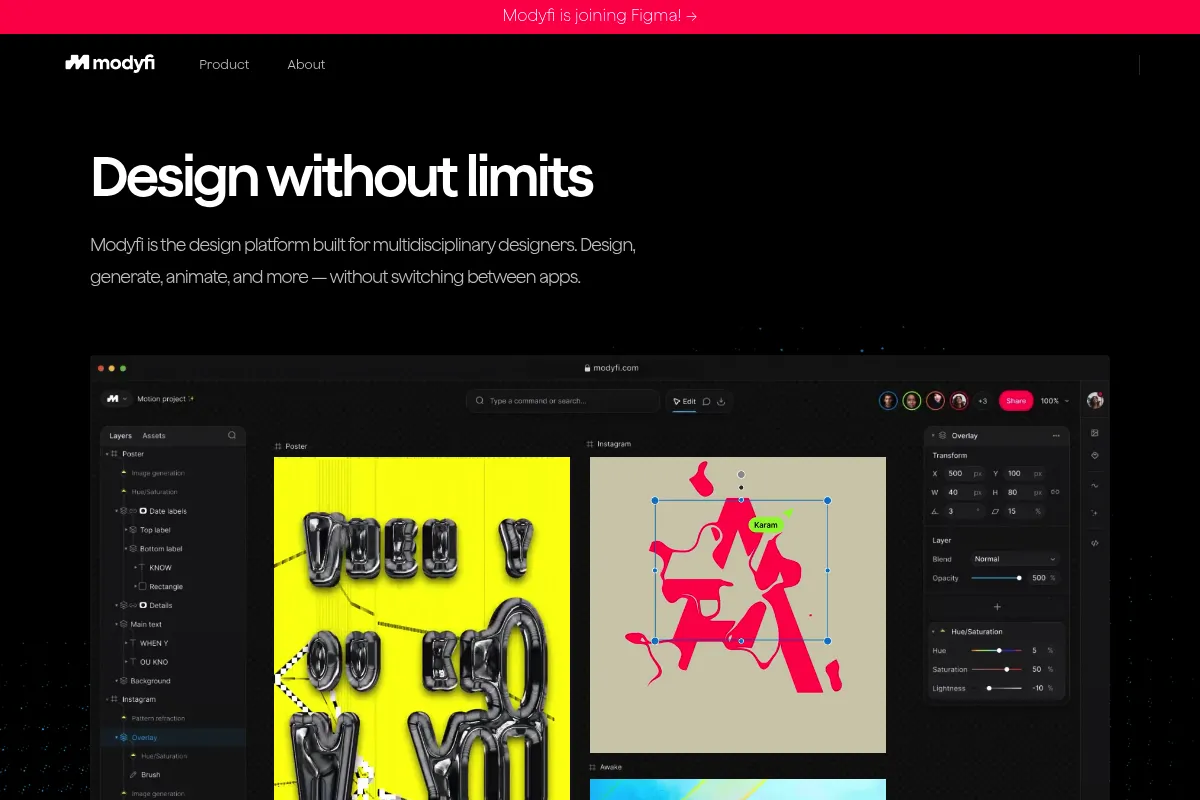
A browser-based design suite that merges raster editing, vector tools, and motion graphics into a single collaborative canvas—best for digital-first creative teams, though not yet a full replacement for the Adobe suite's depth.
Excellent for multidisciplinary designers needing speed and real-time collaboration, weaker for high-end professional photo retouching or complex print production.
Analysis based on product data, pricing structure, traffic signals, and public user sentiment.
Who Should Use Modyfi?
Typical users
Solo designers, social media managers, and small creative agencies who need to move between image editing and animation without switching apps.
Maturity fit
beginner to scaling
Choose this if…
- You want a Figma-like collaboration experience for creative design and motion work
- Your workflow requires frequent switching between vector and raster assets
- You want generative AI tools integrated directly into your design layers
Skip this if…
- Your primary output is high-end print requiring CMYK or Pantone color management
- You need to work offline or in environments with unstable internet
- Your workflow depends on specific legacy Photoshop plugins or advanced 3D features
About Modyfi
Modyfi is a web-based design platform built to eliminate the friction between different creative disciplines. It provides a non-destructive, high-performance workspace where designers can handle image manipulation, vector illustration, and motion graphics simultaneously.
Official profiles
What it actually does
It provides a unified canvas where users can perform photo editing, create vector graphics, and apply motion effects in real-time. The platform uses a WebGL-powered engine to ensure that all edits—from color grades to blurs—remain live and editable without permanently altering the original assets.
What makes it different
Unlike Figma, which focuses on UI/UX, or Photoshop, which is raster-centric, Modyfi treats pixels, vectors, and motion as equal citizens on one canvas. Its architectural choice to be entirely non-destructive means users never have to 'commit' to an edit, allowing for infinite iteration within a browser.
Key Features
Unified Canvas
Edit photos, draw vectors, and animate in one file without switching modes.
Non-Destructive Engine
Every filter and adjustment remains live and editable at any time.
Real-Time Collaboration
Multiple users can edit the same project simultaneously with visible cursors.
Integrated Generative AI
Generate and modify assets using text prompts directly within the layer stack.
Motion Graphics Timeline
Add animation to any layer with a dedicated keyframe interface.
Shared Libraries
Maintain brand consistency with team-wide access to assets and components.
High-Resolution Exports
Export projects in various formats including PNG, JPG, and SVG.
Smart Selection Tools
AI-driven tools for quick masking and object isolation.
Pricing
Free
- Up to 5 projects
- 2 editors per project
- Basic AI credits
- Core design tools
Pro
- Unlimited projects
- Unlimited editors
- Increased AI credits
- Version history
- Priority support
Enterprise
- SSO and advanced security
- Custom AI credit pools
- Dedicated account manager
- Custom onboarding
Pricing checked 5 months ago
Pricing guidance
- Reaching the 5-project limit
- Needing more than 2 editors on a project
- Requiring extended version history for client work
- AI generation credits are capped monthly even on Pro
- Extremely large files may hit browser-specific memory limits
Competitive with Canva Teams or Figma Professional, positioned as a premium 'pro' creative tool.
Pros & Cons
Strengths
-
Zero-export workflow
Moving from a vector logo to a photo-based social post to an animated ad happens in one file, saving hours of file management and versioning.
-
High-performance browser engine
Uses WebGL to handle complex effects and large files smoothly without requiring a high-end desktop application or local installation.
-
Iterative AI integration
Generative AI is a layer property rather than a one-off tool, allowing users to tweak prompts and see results update within the context of the design.
Weaknesses
-
Limited print support
Lacks the advanced CMYK controls and pre-press features found in Adobe Illustrator or InDesign, making it less suitable for physical media.
Affects: Print designers and production artists
-
Feature depth vs. specialists
While versatile, it doesn't yet match the deep photo retouching capabilities of Photoshop or the complex vector math of Illustrator.
Affects: High-end specialist designers
-
Ecosystem lock-in
Exporting complex projects back to Adobe formats can result in lost editability due to Modyfi's unique non-destructive engine.
Affects: Teams working with external agencies on legacy software
Real User Sentiment
Generally positive, with users frequently describing it as 'Figma for creative design.'
Users tend to like
- Speed of the browser interface
- Non-destructive workflow
- Seamless transition between vector and raster
- Real-time collaboration
Users commonly complain about
- Occasional browser crashes on heavy files
- Missing niche tools like mesh gradients
- Learning curve for the motion timeline
Recurring tradeoffs
- Convenience of the browser vs. the raw processing power of desktop RAM
Happiest users
Social media designers and digital-first creative agencies.
Often frustrated
Print-heavy designers and those requiring offline access.
Use Cases
Social Media Content
Rapidly creating variations of posts with combined photo and vector elements.
Ad Creative Production
Designing and animating display ads in a single collaborative environment.
Brand Identity Design
Developing logos and brand assets that need to be tested across different media.
AI-Assisted Prototyping
Using generative AI to quickly mock up visual concepts for client approval.
Collaborative Moodboarding
Teams gathering and editing visual inspiration in real-time.
Frequently Asked Questions
Is there a free version of Modyfi?
Yes, Modyfi offers a free tier that includes all core design tools but limits you to 5 projects and 2 editors per project. It also includes a basic allotment of AI credits for generative features.
How does Modyfi compare to Adobe Photoshop?
Modyfi is browser-based and collaborative like Figma, whereas Photoshop is a desktop-first tool. Modyfi excels at speed and multi-user workflows, while Photoshop still holds the edge for deep, technical photo retouching and legacy plugin support.
Can I use Modyfi for print design?
While you can export high-resolution files, Modyfi lacks professional CMYK and Pantone color management. It is primarily designed for digital outputs like web, social media, and video.
Does Modyfi work offline?
No, Modyfi is a browser-based platform and requires an active internet connection to function, sync changes, and access its collaborative features.
What are the AI credit limits?
Both Free and Pro plans have monthly credit limits for generative AI features. The Pro plan offers a significantly higher limit, but users who do heavy AI generation may still hit caps.
Can I import Figma files into Modyfi?
Modyfi supports SVG and image imports, which allows you to bring in assets from Figma. However, it does not currently offer a full, native Figma file conversion that preserves all layer logic.
Why trust this page?
This evaluation combines product positioning, pricing analysis, traffic and market signals, and public user sentiment into a single decision-support page. Content is generated editorially — not copied from the vendor's website.
Funding & Company
Founded
2021
Stage
Acquired
Total Raised
$31.7M
Latest Round
Series B (Apr 2024)
Notable Investors
Modyfi raised a total of $31.7 million across five funding rounds, including a notable $7 million Seed round in August 2023. This funding supported its development as a collaborative, AI-native design platform before its acquisition by Figma in April 2025. The diverse group of investors, including New Enterprise Associates and General Catalyst, indicated strong early-stage confidence in the company's vision.
Market Signals & Traffic
Estimated visits, global rank, geography, traffic sources, monthly visit trends, and organic search keywords (Similarweb)—on a dedicated page built for depth and search.
- Estimated visits
- 35,633
- Global rank
- #693,593
- Snapshot
- Apr 2026
- Traffic trend
- Surging
Estimated monthly visits
Alternatives to Modyfi
View all alternativesCanva AI
Content Creation

Online design tool for creating graphics, presentations, videos, and websites.
Figma AI
Developer Tools, Content Creation
Collaborative interface design and prototyping tool for digital products.
Similar Tools
Canva
Design, Content Creation, Video Creation
Visual communication platform for creating professional designs, videos, and documents.
Placeit
Design, Content Creation, Video Creation

Design platform for creating mockups, logos, and social media graphics.
Pica AI
Design, Content Creation, Video Creation
Face swapping and image generation tool for creative visual content.
ImagineArt
Design, Content Creation, Video Creation

Create and edit high-quality digital art and videos from text.
Piktochart
Design, Content Creation, Video Creation

Create professional infographics, presentations, and reports with visual design tools.
Stockimg AI
Content Creation, Design, Automation

AI-powered platform for generating visuals and automating social media content.