

A specialized diagramming tool that prioritizes automated formatting and technical layouts over freeform whiteboarding—best for structured documentation and floor plans.
Excellent for technical diagrams and floor plans, weaker for creative brainstorming or real-time collaborative whiteboarding.
Analysis based on product data, pricing structure, traffic signals, and public user sentiment.
Who Should Use SmartDraw?
Typical users
Project managers, facilities planners, and IT admins in mid-to-large organizations needing standardized documentation.
Maturity fit
scaling to advanced
Choose this if…
- You need automated alignment for complex flowcharts
- Your workflow requires specific CAD-like features for floor plans
- You want a Visio alternative that works natively on Mac and Web
- You prefer a flat-rate site license for an entire organization
Skip this if…
- You need a free-form digital whiteboard for unstructured brainstorming
- You are a solo user on a tight budget requiring a permanent free tier
- Your team prioritizes a modern, minimalist UI over deep feature sets
About SmartDraw
SmartDraw is a veteran diagramming application designed to bridge the gap between simple flowcharting and complex CAD software. It focuses on a template-driven approach where the software handles object alignment and connection logic automatically.
What it actually does
It generates over 70 different diagram types, including flowcharts, floor plans, and network maps, using an automated formatting engine. Users can import Visio files, connect to data sources for automated org charts, and export visuals directly to Microsoft Office or Google Workspace.
What makes it different
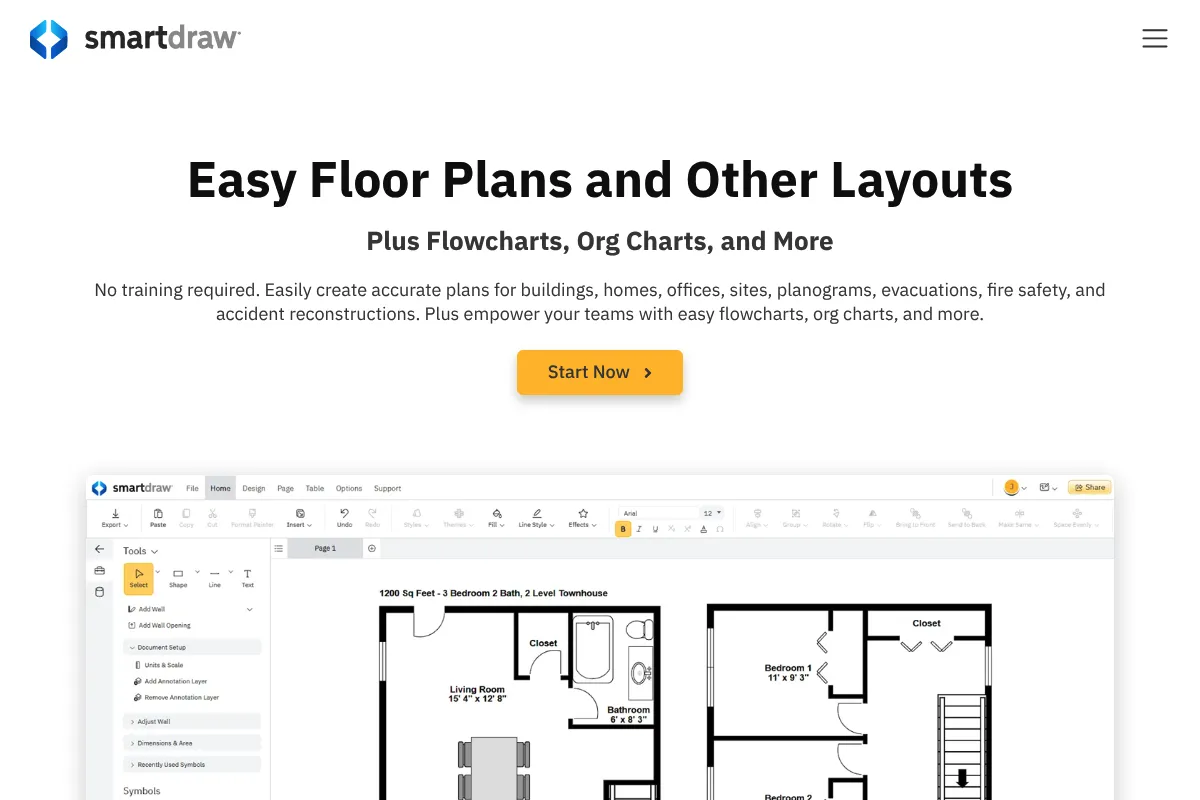
Unlike general whiteboarding tools, SmartDraw includes a legitimate floor plan engine with architectural scales and specialized symbols. Its automation allows users to build complex diagrams by clicking directional arrows rather than manually dragging and dropping every individual line.
Ratings across the web


Ratings aggregated from independent review platforms.
Key Features
SmartPanel Automation
Automatically adds and aligns shapes to maintain diagram structure without manual adjustment.
Architectural Scaling
Provides precise floor plan measurements and CAD-lite tools for facility management.
Visio Power User Support
Imports and exports VSDX files with higher fidelity than most web-based competitors.
Data-to-Diagram
Generates org charts and ERDs directly from data imports like CSV or Excel.
Extension Ecosystem
Integrates directly with Trello, Jira, and Microsoft Teams to embed diagrams in workflows.
Enterprise Site Licensing
Offers a fixed annual cost for unlimited users across an entire domain.
Extensive Symbol Library
Includes over 34,000 professional symbols for engineering, healthcare, and IT.
Pricing
Individual
- 70+ diagram types
- 4,500+ templates
- Visio import/export
- Standard integrations
Team
- Minimum 3 users
- Shared team folders
- Administrative controls
- SSO and SAML support
- Document retention rules
Site
- Unlimited users for entire domain
- Enterprise-wide sharing
- Dedicated account manager
- Consolidated billing
Pricing checked 6 months ago
Pricing guidance
- When you need to manage permissions across a team
- When you require SSO for security compliance
- When your organization exceeds 50 active users (Site license trigger)
- Team plan requires a 3-user minimum purchase
- Individual plan lacks shared folders and administrative oversight
- Trial period is strictly enforced and short
Mid-market pricing that becomes highly aggressive and cost-effective at the enterprise level via site licensing.
Pros & Cons
Strengths
-
Automated formatting saves significant time
The engine handles spacing and connections automatically, preventing the need for manual pixel-pushing when adding new steps to a process.
-
Superior floor plan capabilities
Includes specialized tools for electrical, HVAC, and room layouts that general-purpose diagramming tools lack.
-
High Visio compatibility
It is one of the few tools that can handle complex Visio imports without breaking the layout or losing metadata.
-
Predictable enterprise pricing
The site license provides a fixed cost regardless of headcount growth, making it easier for procurement to budget.
Weaknesses
-
Dated User Interface
The ribbon-style menu feels like legacy desktop software, lacking the fluidity and speed of modern SaaS tools.
Affects: Users accustomed to modern web apps like Figma or Miro
-
No meaningful free tier
Unlike Lucidchart or Miro, there is no 'free forever' plan, only a short 7-day trial that requires a credit card for some features.
Affects: Solo creators and small startups
-
Collaboration feels secondary
While it supports multi-user editing, the experience is less intuitive and more prone to lag than dedicated whiteboarding platforms.
Affects: Teams requiring high-frequency real-time brainstorming
Real User Sentiment
Users respect the tool for its technical depth and automation but frequently complain about the aging interface and lack of a free tier.
Users tend to like
- Automated shape alignment
- Comprehensive floor plan templates
- Reliable Visio file conversion
- Flat-rate pricing for large companies
Users commonly complain about
- Clunky and dated UI
- Steep learning curve for CAD features
- Occasional performance lag in the web version
- No free-forever version
Happiest users
IT managers, facilities planners, and engineers who need precise, structured diagrams.
Often frustrated
Creative teams and marketers looking for a digital 'napkin' for quick, messy brainstorming.
Use Cases
Facilities Management
Designing office layouts with precise architectural measurements.
IT Infrastructure
Mapping AWS or Azure networks using automated data imports.
HR Operations
Maintaining large, data-driven organizational charts for thousands of employees.
Software Engineering
Creating UML diagrams and ERDs for technical documentation.
Project Management
Building Gantt charts and timelines that integrate with Jira and Trello.
Frequently Asked Questions
Is there a free version of SmartDraw?
No, SmartDraw does not offer a free-forever plan. It provides a 7-day full-featured trial, after which you must purchase an Individual, Team, or Site license to continue using the software.
How does SmartDraw compare to Microsoft Visio?
SmartDraw is generally more affordable, works natively on Mac and in web browsers, and features more automation for shape alignment. It can also import and export Visio VSDX files with high accuracy.
Can I use SmartDraw offline?
SmartDraw is primarily a web-based application now. While a legacy Windows desktop version exists, the company's focus and latest features are centered on the Cloud version which requires an internet connection.
Does SmartDraw support SSO?
Yes, Single Sign-On (SSO) via SAML is supported on both the Team and Site plans, allowing for secure enterprise-wide deployment.
Is SmartDraw good for floor plans?
Yes, it is one of the strongest diagramming tools for floor plans, offering architectural scales, specialized symbols for walls/windows, and automated measurement tools.
What integrations are available?
SmartDraw integrates with Microsoft Office, Google Workspace, Atlassian (Jira/Confluence), Trello, Slack, and Box, allowing you to embed diagrams directly into your existing documents.
Why trust this page?
This evaluation combines product positioning, pricing analysis, traffic and market signals, and public user sentiment into a single decision-support page. Content is generated editorially — not copied from the vendor's website.
Funding & Company
Founded
1994
Stage
Bootstrapped
Total Raised
Bootstrapped
Latest Round
—
SmartDraw has been bootstrapped and privately held since its founding in 1994. The company has grown for over three decades by relying on its own revenue, signaling significant stability and long-term viability based on a proven, profitable business model rather than external capital.
Market Signals & Traffic
Estimated visits, global rank, geography, traffic sources, monthly visit trends, and organic search keywords (Similarweb)—on a dedicated page built for depth and search.
- Estimated visits
- 1,924,825
- Global rank
- #24,817
- Snapshot
- Apr 2026
- Traffic trend
- Rising
Estimated monthly visits
Alternatives to SmartDraw
View all alternatives
Similar Tools
Granica
Privacy & Compliance, Developer Tools, Automation

Optimize enterprise data efficiency, privacy, and cloud storage costs.
Workato
Automation, Automation & Agents, Developer Tools

Enterprise platform for integrating applications and automating complex business workflows.
Lex
AI Assistant, Content Creation, Productivity

Modern word processor with integrated writing and editing assistance
Tome
Content Creation, Productivity, Design

AI-powered storytelling and presentation tool.
Inferact
Data Extraction, Automation, Workflow

Automated data extraction and analysis for complex documents
Symbolic
Content Creation, Workflow, Automation & Agents

Streamline publishing workflows by capturing and reusing institutional editorial knowledge.