

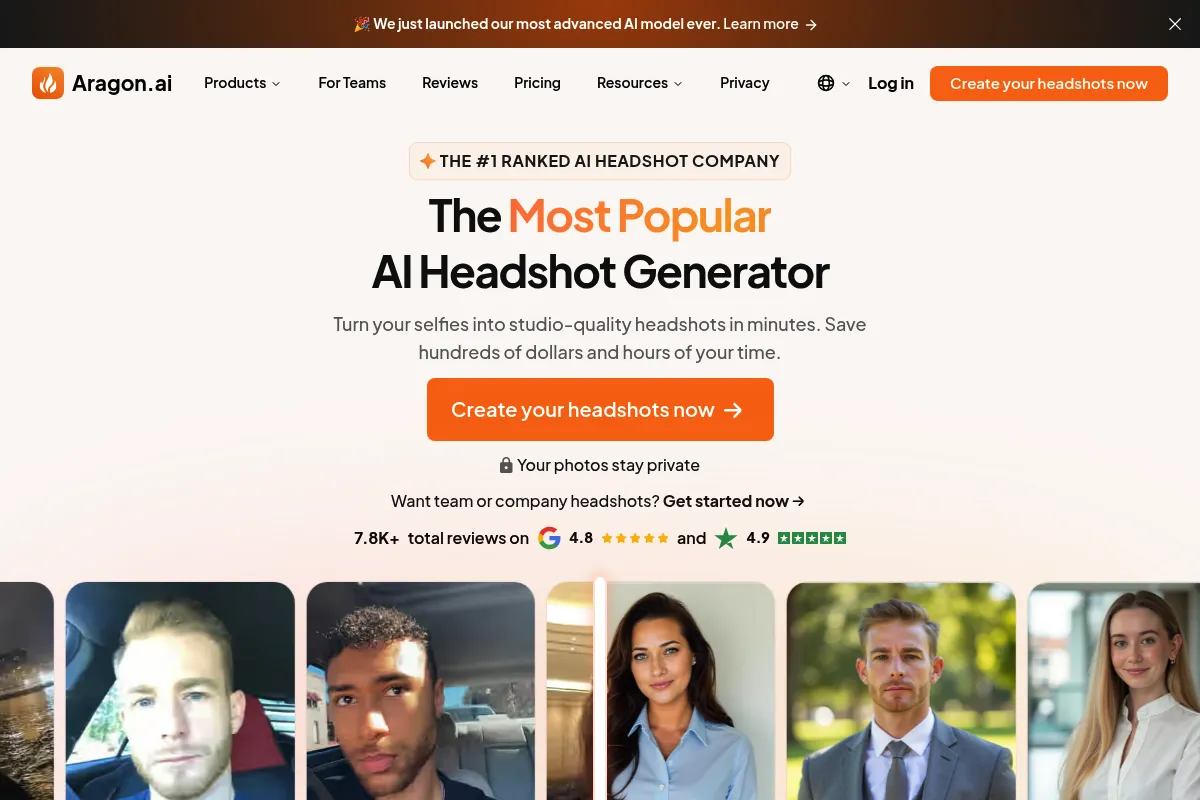
A specialized AI portrait generator that replaces expensive studio sessions with a fast, algorithmic alternative for LinkedIn and resumes.
Excellent for job seekers needing immediate professional photos, weaker for users with unique physical features that AI frequently misinterprets.
Analysis based on product data, pricing structure, traffic signals, and public user sentiment.
Who Should Use Aragon AI?
Typical users
Job seekers, remote employees, and small business owners who need a professional digital presence without the cost of a photographer.
Maturity fit
beginner
Choose this if…
- You need professional photos in under an hour
- Your budget is under $50
- You have at least 6-12 clear, varied selfies to provide as training data
- Your primary goal is a standard LinkedIn or corporate directory profile
Skip this if…
- You require 100% anatomical accuracy (AI often struggles with hands and jewelry)
- You need specific, branded office backgrounds that aren't in their preset library
- You have a highly unique facial structure or hairstyle that current models fail to replicate
About Aragon AI
Aragon AI is a dedicated image generation tool designed to convert casual selfies into professional headshots. It uses a fine-tuned model to place the user's likeness into various corporate settings, outfits, and lighting conditions.
What it actually does
Users upload a batch of existing photos which the system uses to train a temporary, personalized AI model. Within 30 to 60 minutes, the tool generates a gallery of portraits featuring different professional attires and backgrounds for the user to download.
What makes it different
Unlike general AI art generators like Midjourney, Aragon is strictly constrained to corporate aesthetics, reducing the 'prompt engineering' required by the user. It focuses on a high-speed pipeline that delivers finished results significantly faster than traditional photography or manual editing.
Ratings across the web

Ratings aggregated from independent review platforms.
Key Features
Selfie-to-Portrait Engine
Transforms low-quality phone photos into studio-grade images.
Rapid Processing
Delivers a full gallery of images in as little as 30 minutes.
Outfit Customization
Generates various looks from business formal to tech-casual.
Team Dashboard
Centralizes billing and photo management for entire departments.
Privacy-First Training
Deletes training data and models after the photos are generated.
Resolution Upscaling
Ensures images are sharp enough for large-scale print or high-res displays.
Pricing
Starter
- 20 high-quality headshots
- 5+ outfits and backgrounds
- 60-minute turnaround
- Standard resolution
Basic
- 40 high-quality headshots
- 20+ outfits and backgrounds
- 30-minute turnaround
- High resolution
Premium
- 100 high-quality headshots
- 50+ outfits and backgrounds
- 30-minute turnaround
- Priority support
Pricing checked 6 months ago
Pricing guidance
- When you need a wider variety of poses for different platforms
- When you are hiring for a team and need centralized billing
- When you need the highest resolution for print media
- No refunds once the AI model training has started
- Credits do not typically roll over or apply to multiple people on individual plans
- Strict limit on the number of 're-rolls' or edits allowed
Mid-range pricing for the AI headshot market, positioned as a premium alternative to low-end mobile apps but cheaper than corporate photography.
Pros & Cons
Strengths
-
Significant cost savings compared to hiring a professional photographer and booking a studio.
-
Extremely fast turnaround time, making it ideal for last-minute job applications.
-
Provides a wide variety of 'looks' in one go, which would require multiple outfit changes in a real shoot.
-
User interface is straightforward and requires zero technical or artistic skill.
Weaknesses
-
Occasional 'uncanny valley' effects where the eyes or teeth look slightly unnatural.
-
Strict input requirements; if your uploaded selfies are poor quality, the output will be unusable.
-
Limited control over specific fine details like tie color or exact background location.
-
No free trial or preview; you must pay the full price before seeing any results.
Real User Sentiment
Generally positive for speed and convenience, though users frequently warn about the 'hit or miss' nature of AI likeness.
Users tend to like
- The speed of delivery
- The variety of professional clothing options
- Ease of use compared to manual editing
- Better than expected results from mediocre selfies
Users commonly complain about
- AI artifacts in hair and hands
- The 'no refund' policy when results don't look like the user
- Occasional overly-smoothed skin that looks artificial
- Difficulty capturing specific ethnic features accurately
Recurring tradeoffs
- You trade the authenticity of a real photo for the convenience of an instant one.
- Lower cost comes with the risk of receiving a batch of images where only 10-20% are usable.
Happiest users
Users with standard features and high-quality selfies who need a quick LinkedIn refresh.
Often frustrated
Users who expect a 100% success rate or those with complex hairstyles/accessories that the AI misinterprets.
Use Cases
Job Seekers
Updating LinkedIn profiles and resumes with a professional look on a budget.
Remote Teams
Creating a cohesive look for a company 'About Us' page without flying everyone to one location.
Speakers & Authors
Generating press kit photos for conferences or book jackets.
Real Estate Agents
Quickly creating marketing materials and business cards.
Freelancers
Establishing a trustworthy brand presence on platforms like Upwork or Fiverr.
Frequently Asked Questions
Is there a free version of Aragon AI?
No, Aragon AI does not offer a free version or a free trial. Because generating a custom AI model requires significant computational power, they require an upfront payment for one of their three packages (Starter, Basic, or Premium) before you can upload your photos and see results.
How does Aragon AI compare to HeadshotPro?
Aragon AI and HeadshotPro are the two main competitors in this space. Aragon is often praised for a slightly more modern UI and faster turnaround times (30-60 mins vs. 2 hours). However, HeadshotPro offers more specific 'team' features and a wider variety of background settings. Aragon is generally seen as the better choice for individuals, while HeadshotPro leans toward larger corporate teams.
What are the main limitations of the AI headshots?
The primary limitations are anatomical errors and 'uncanny' textures. The AI may struggle with glasses (glare or frame distortion), complex jewelry, and hand placements. Additionally, if your input photos are all from the same angle or have poor lighting, the AI will struggle to create a diverse or realistic set of outputs.
Can I use Aragon AI for my whole team?
Yes, Aragon offers a dedicated 'Teams' product. It allows a manager to purchase credits in bulk and invite team members to upload their own photos. This ensures a consistent professional look across the company directory while keeping billing centralized. Pricing for teams is typically customized based on the number of seats.
What is the refund policy if I don't like my photos?
Aragon AI has a strict refund policy. Because the cost of GPU processing is incurred the moment you start the generation, they generally do not offer cash refunds. They do, however, offer a 'satisfaction guarantee' which usually manifests as a free redo or additional credits if the initial results are technically flawed.
Does Aragon AI integrate with other tools?
Aragon does not currently offer direct integrations with HRIS or CRM platforms. It is a standalone web application where you download the final images as JPG or PNG files to manually upload them to LinkedIn, Slack, or your company website.
Why trust this page?
This evaluation combines product positioning, pricing analysis, traffic and market signals, and public user sentiment into a single decision-support page. Content is generated editorially — not copied from the vendor's website.
Funding & Company
Founded
2022
Stage
Seed
Total Raised
$625K
Latest Round
Accelerator/Incubator (Apr 2023)
Notable Investors
Aragon AI has raised a single Accelerator round of $625K from Neo. Despite this minimal funding, the company has achieved a remarkable $10 million annual recurring revenue, indicating extreme capital efficiency and strong product-market fit.
Market Signals & Traffic
Estimated visits, global rank, geography, traffic sources, monthly visit trends, and organic search keywords (Similarweb)—on a dedicated page built for depth and search.
- Estimated visits
- 408,303
- Global rank
- #91,878
- Snapshot
- Apr 2026
- Traffic trend
- Surging
Estimated monthly visits
Similar Tools
Kimi Slides
Content Creation, Design, Productivity

Create professional presentation slides from text prompts, documents, or images.
Gamma.AI
Content Creation, Design, Productivity

Create presentations, documents, and websites from simple text prompts.
Recraft
Content Creation, Design, Productivity

AI-powered design tool for creating consistent brand visuals, illustrations, and vector graphics.
Clipdrop
Content Creation, Design, Productivity

AI-powered suite for creating and editing stunning visuals in seconds.
Icons8 AI
Content Creation, Design, Productivity

Vast library of icons, illustrations, photos, music, and AI design tools.
Pixelcut
Content Creation, Design, Productivity
All-in-one photo editor for product photography and e-commerce visuals.