

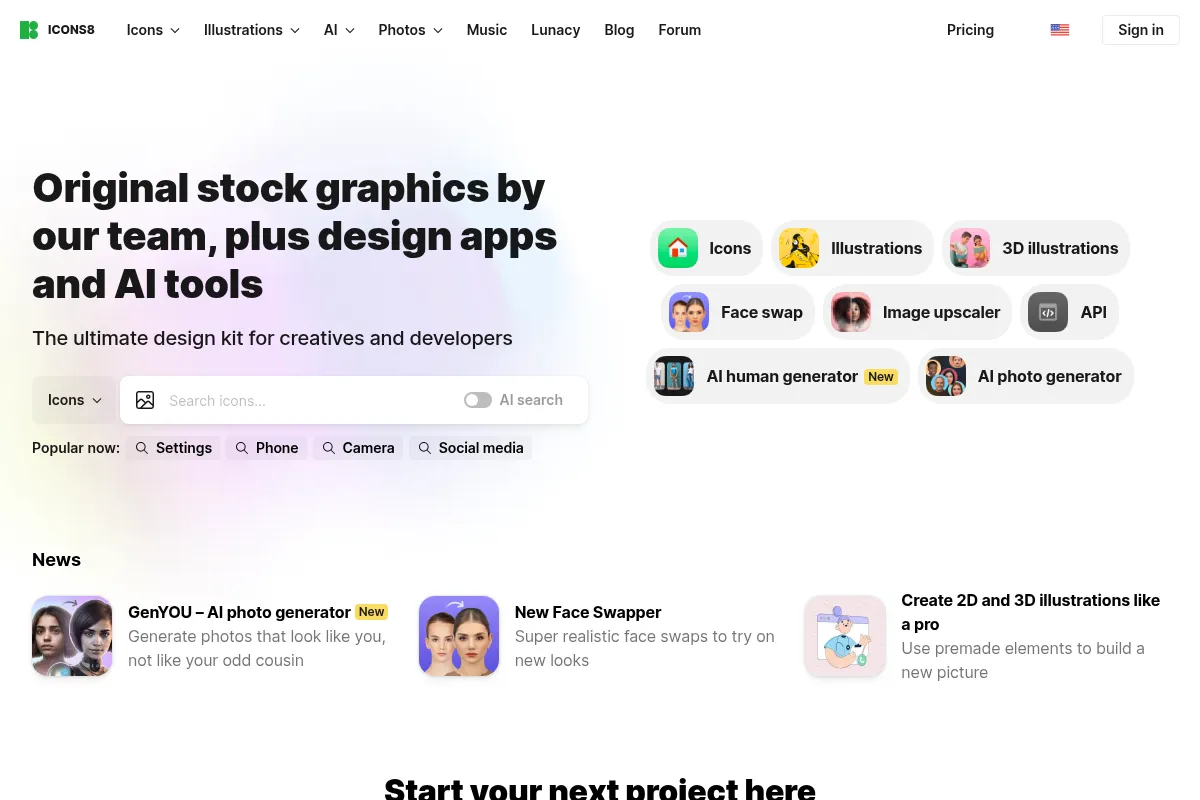
Icons8 AI offers a vast library of design assets combined with AI-powered tools for image generation and editing, aiming to streamline creative workflows.
Best for teams needing a broad range of consistent design assets and AI editing tools, weaker for highly specialized AI art generation.
Analysis based on product data, pricing structure, traffic signals, and public user sentiment.
Who Should Use Icons8 AI?
Typical users
Designers, marketers, content creators, and developers who require a large volume of high-quality, stylistically consistent visual assets. This includes small to medium-sized businesses and agencies looking to accelerate their creative output.
Maturity fit
beginner to scaling
Choose this if…
- You need a wide variety of icons, illustrations, and photos in consistent styles.
- Your workflow involves frequent image editing tasks like background removal or upscaling.
- You want to integrate design assets directly into your applications via API.
- You need to maintain brand consistency across multiple projects and platforms.
Skip this if…
- You require highly specialized or avant-garde AI art generation.
- Your primary need is for a standalone AI image generator without a large asset library.
- You have a very limited budget and only need a few specific assets.
- You need advanced animation or 3D modeling tools beyond basic illustration.
About Icons8 AI
Icons8 is a comprehensive design platform providing over a million icons, illustrations, and photos, augmented by AI tools for image generation and editing. It aims to simplify creative workflows by offering consistent, high-quality assets and efficient tools for designers and developers.
What it actually does
Icons8 provides access to a vast library of design assets and offers AI-powered tools for image editing (background removal, upscaling, face swapping) and generation. It allows users to find, edit, and integrate visuals into their projects through web interfaces, desktop apps, and an API.
What makes it different
Icons8 differentiates itself by combining a massive, stylistically consistent library of human-designed assets with integrated AI tools. This approach aims to provide a more cohesive and efficient workflow than using separate tools for asset sourcing and AI editing, with a strong emphasis on design system consistency.
Ratings across the web


Ratings aggregated from independent review platforms.
Key Features
Vast, Stylistically Consistent Asset Library
Offers over a million icons, illustrations, and photos, all designed to maintain visual coherence across different styles, reducing the need for extensive searching and manual adjustments.
Integrated AI Editing Tools
Features like Smart Upscaler, Background Remover, and Face Swapper are built directly into the platform, allowing for quick image enhancements without leaving the Icons8 ecosystem.
AI Illustration Generator
Enables the creation of custom illustrations based on text prompts or existing images, trained on Icons8's proprietary art styles for consistent output.
Developer-Friendly API
Provides programmatic access to icons, photos, illustrations, and music, allowing for seamless integration into applications and workflows.
Desktop Apps and Plugins
Offers native applications for Mac and Windows, as well as plugins for popular design software like Figma, Photoshop, and Illustrator, enabling offline access and in-app asset integration.
Multiple File Formats
Assets are available in various formats (PNG, SVG, PDF, EPS, PSD, AI), catering to diverse project needs from web design to print materials.
Free Tier with Attribution
Allows commercial use of many assets with a required backlink, making it accessible for individuals and small projects with budget constraints.
Pricing
Icons
- SVG and large PNG for static icons
- JSON, After Effects project and GIF for animations
- Pichon and plugins, MCP
- 100 downloads per month
Illustrations
- SVG and large PNG for vectors
- PSD and large PNG for 3D and rasters
- JSON, After Effects project and GIF for animations
- Pichon and plugins
AI Light
- AI generators: icons, illustrations, people photos
- AI editing tools: face swapper, smart upscaler, background remover
- 1,000 priority generations
- 25 watermark-free downloads per month
AI and graphics
- Everything in Icons
- AI generators: illustrations, icons, people photos
- AI editing tools: face swapper, smart upscaler, background remover
- 25 illustrations
- 50 photos
Ultimate
- Everything in AI and graphics
- All graphics unlimited
- 1M AI credits
Pricing checked 6 months ago
Pricing guidance
- When you need watermark-free downloads for commercial use.
- When you exceed the download limits of the free tier.
- When you require access to AI generation and editing tools beyond the limited free usage.
- When you need to maintain brand consistency with a wider range of assets.
- Free tier downloads are often lower resolution and may have watermarks.
- AI credit usage can become a bottleneck for extensive generation or editing.
- While API access is available, specific usage tiers and costs may apply.
- Some advanced AI features or unlimited asset downloads are reserved for higher-tier plans.
Icons8 offers a tiered pricing structure, with a generous free tier for basic use and progressively more comprehensive plans for individuals and teams needing full access to assets and AI tools.
Pros & Cons
Strengths
-
Comprehensive Asset Library
Icons8 boasts over a million icons, illustrations, and photos, all designed with stylistic consistency. This vast collection saves significant time by reducing the need to search across multiple platforms for cohesive visuals.
-
Integrated AI Tools
The inclusion of AI-powered editing tools like background removal and upscaling directly within the platform streamlines workflows, eliminating the need for separate software and speeding up repetitive tasks.
-
Developer API and Integrations
The robust REST API and plugins for popular design tools (Figma, Photoshop, Illustrator) make it easy for developers and designers to integrate assets directly into their projects and applications, enhancing productivity.
-
Visual Consistency
Icons8 emphasizes systematic design consistency across its assets, offering multiple style families. This is crucial for building strong brand identities and user experiences where visual coherence is paramount.
-
Free Tier for Basic Use
The free plan allows commercial use with attribution, providing access to a substantial portion of the library and basic AI tool usage, making it a viable option for individuals and small projects with budget constraints.
Weaknesses
-
AI Generation Limitations
While Icons8 offers AI illustration generation, it may fall short for highly conceptual or nuanced artistic needs, sometimes producing literal interpretations or compositional awkwardness compared to human artists.
Affects: Users requiring highly specialized or abstract AI art generation.
-
Free Tier Restrictions
The free tier has limitations on downloads, resolution, and watermark-free usage, which can quickly lead users to paid plans for professional or extensive use.
Affects: Users who need high-resolution assets or watermark-free downloads for commercial projects.
-
Illustration Quantity Gaps
While icon libraries are extensive, the quantity of illustrations in certain styles may lag behind the icon offerings, potentially requiring users to seek additional resources for extensive illustration needs.
Affects: Designers requiring a vast and diverse range of illustrations in specific styles.
-
Pricing for Unlimited AI
Unlimited access to AI generation tools, especially for high-volume use, can become expensive, with AI credit costs adding up for extensive generation and editing tasks.
Affects: Heavy users of AI generation and editing tools who require unlimited access.
Real User Sentiment
Users generally praise Icons8 for its vast, consistent asset library and the convenience of its integrated AI tools, though some find the free tier restrictive and pricing for unlimited AI usage to be a concern.
Users tend to like
- Vast and stylistically consistent icon and illustration library.
- Convenient integration of AI editing tools (upscaler, background remover).
- Useful plugins for Figma, Photoshop, and Illustrator.
- Developer-friendly API for asset integration.
- Good value for money with the 'AI and graphics' plan.
Users commonly complain about
- Free tier limitations (watermarks, download limits).
- AI generation can be hit-or-miss for complex concepts.
- Pricing can become expensive for unlimited AI credit usage.
- Illustration library quantity sometimes lags behind icons.
Recurring tradeoffs
- Balancing the breadth of the asset library with the depth of AI generation capabilities.
- Choosing between a comprehensive bundle and individual product plans.
- The cost of unlimited AI usage versus relying on human designers for complex tasks.
Happiest users
Designers, developers, and marketers who value visual consistency and need a wide range of assets integrated with practical AI editing tools.
Often frustrated
Users who expect highly specialized or unique AI art generation and find the current AI capabilities too generic or limited, or those who hit paywalls quickly on the free tier.
Use Cases
Creating UI kits and design systems with consistent iconography and illustrations.
Quickly editing product photos by removing backgrounds or upscaling images for e-commerce listings.
Generating custom illustrations for blog posts, social media, or marketing materials.
Integrating design assets directly into web applications or software via the Icons8 API.
Accelerating design workflows for agencies and teams by providing a centralized asset library and AI tools.
Students and educators using the free tier for learning and project work with attribution.
Developers building apps that require dynamic asset integration or AI-powered image manipulation.
Frequently Asked Questions
What is Icons8 AI?
Icons8 AI refers to the suite of artificial intelligence-powered tools offered by Icons8, complementing their extensive library of design assets. These tools include AI image generation (illustrations, icons, photos), AI image editing (like background removal, upscaling, and face swapping), and other AI-driven features designed to streamline creative workflows. They aim to help users create and refine visuals quickly and efficiently, often with a focus on maintaining stylistic consistency with Icons8's existing asset collections.
How does the Icons8 free plan work?
Icons8 offers a free plan that allows users to download a significant portion of their asset library, including icons, illustrations, and photos, for personal or commercial use, provided they include a link attribution to Icons8. The free tier also provides limited access to AI tools, such as a certain number of watermarked AI generations or edits per day/month. While useful for testing and small projects, users often find they need to upgrade to paid plans for watermark-free downloads, higher resolutions, and more extensive use of AI features.
What are the main differences between Icons8 and Freepik?
Icons8 excels in providing stylistically consistent, human-designed icons and illustrations, with a strong emphasis on design system integration and a growing suite of AI tools. Freepik, on the other hand, offers a larger volume of diverse assets, including a vast collection of stock photos and vectors contributed by various artists, and also features an AI image generator. Icons8 is often preferred by UI/UX designers and developers who prioritize visual coherence and integrated AI editing, while Freepik might appeal more to those needing a broader range of general design assets and a large AI image generation library.
What are the limitations of Icons8 AI illustration generation?
While Icons8's AI Illustration Generator can produce custom graphics, it has limitations. Users may encounter conceptual misinterpretations, compositional awkwardness, uncanny repetition, or detail collapse, especially with complex prompts. The AI applies patterns without fully grasping communicative intent or emotional undercurrents, which can result in technically correct but emotionally disconnected visuals. For brand-defining visuals or complex narrative illustrations, human creativity often remains a more adequate substitute. The platform is evolving, with plans to increase contextual intelligence and customization.
Can I use Icons8 assets for commercial purposes?
Yes, you can use Icons8 assets for commercial purposes. The free plan allows commercial use with attribution (a backlink to Icons8). For commercial use without attribution, or for higher resolution downloads and full access to all assets and AI tools, you will need to subscribe to one of their paid plans. The specific terms and conditions for commercial use are detailed in their licensing agreements, which are important to review.
What file formats does Icons8 offer?
Icons8 provides its design assets in a variety of file formats to cater to different project needs. These include PNG (for raster images), SVG (for scalable vector graphics, ideal for web and UI design), PDF (for print and general use), EPS (for vector graphics), PSD (for Adobe Photoshop), and AI (for Adobe Illustrator). This wide range of formats ensures compatibility with most design software and project requirements.
How does Icons8 pricing work for AI tools?
Icons8 offers AI tools through various plans. The 'AI Light' plan ($19/mo) focuses solely on AI tools with limited generations and downloads. The 'AI and graphics' plan ($24/mo) bundles AI tools with graphic assets. For extensive AI usage, users can purchase AI credits separately or opt for the 'Ultimate' plan ($199/mo) which includes a large number of AI credits and unlimited graphics. Each AI generation or edit consumes a certain number of AI credits, with costs varying by tool (e.g., icon generation costs more credits than background removal).
Does Icons8 have an API?
Yes, Icons8 offers a REST API that allows developers to integrate their vast library of design assets (icons, photos, illustrations, music) and AI tools directly into their applications, websites, or projects. This API is designed to be developer-friendly, with documentation and usage tracking available through a developer portal. It enables dynamic asset retrieval and integration, streamlining workflows for applications that require programmatic access to design resources.
Why trust this page?
This evaluation combines product positioning, pricing analysis, traffic and market signals, and public user sentiment into a single decision-support page. Content is generated editorially — not copied from the vendor's website.
Funding & Company
Founded
2012
Stage
Bootstrapped
Total Raised
Bootstrapped
Latest Round
—
Icons8 is a bootstrapped and profitable company that has not taken any outside investment since its founding. Its stability comes from a long-standing, profitable business model based on freemium subscriptions for its large library of design assets.
Market Signals & Traffic
Estimated visits, global rank, geography, traffic sources, monthly visit trends, and organic search keywords (Similarweb)—on a dedicated page built for depth and search.
- Estimated visits
- 2,313,301
- Global rank
- #23,513
- Snapshot
- Apr 2026
- Traffic trend
- Steady
Estimated monthly visits
Alternatives to Icons8 AI
View all alternativesCanva AI
Content Creation

Online design tool for creating graphics, presentations, videos, and websites.
Adobe Firefly
Content Creation, Video Creation
Generative AI tools for creating and editing images, video, and more.
Leonardo AI
Content Creation

AI platform for creating and editing visual assets like images and video.
Similar Tools
Visme
Content Creation, Design, Productivity

All-in-one platform for creating presentations, infographics, and visual content.
Let's Enhance
Content Creation, Design, Productivity

AI-powered tool to upscale, sharpen, and enhance image quality.
Aragon AI
Content Creation, Design, Productivity

Professional headshot generator for LinkedIn and corporate profiles.
Napkin
Content Creation, Design, Productivity

AI tool that transforms text into visual diagrams, infographics, and flowcharts.
Kimi Slides
Content Creation, Design, Productivity
Create professional presentation slides from text prompts, documents, or images.
Recraft
Content Creation, Design, Productivity

AI-powered design tool for creating consistent brand visuals, illustrations, and vector graphics.