

A behavior-based marketing automation platform built specifically for SaaS teams that need to trigger emails based on product usage and payment events without the enterprise cost of Customer.io.
Excellent for SaaS companies needing deep Stripe and CRM integrations, weaker for content-heavy publishers or simple newsletter needs.
Analysis based on product data, pricing structure, traffic signals, and public user sentiment.
Who Should Use Encharge?
Typical users
SaaS founders, product marketers, and growth leads at small to mid-sized software companies.
Maturity fit
scaling
Choose this if…
- You need to trigger emails based on specific user actions inside your web app
- Your marketing stack relies heavily on Stripe, Segment, or HubSpot
- You want a visual flow builder for complex lifecycle journeys
- You find Intercom or Customer.io too expensive for your current scale
Skip this if…
- You only need to send a weekly manual newsletter
- You require a full-service CRM with built-in sales calling and pipeline management
- You are a non-technical user who finds logic-based branching confusing
About Encharge
Encharge is a marketing automation tool designed to bridge the gap between product data and email communication. It allows software companies to map out the entire user lifecycle, from trial sign-up to churn prevention, using real-time behavioral triggers.
What it actually does
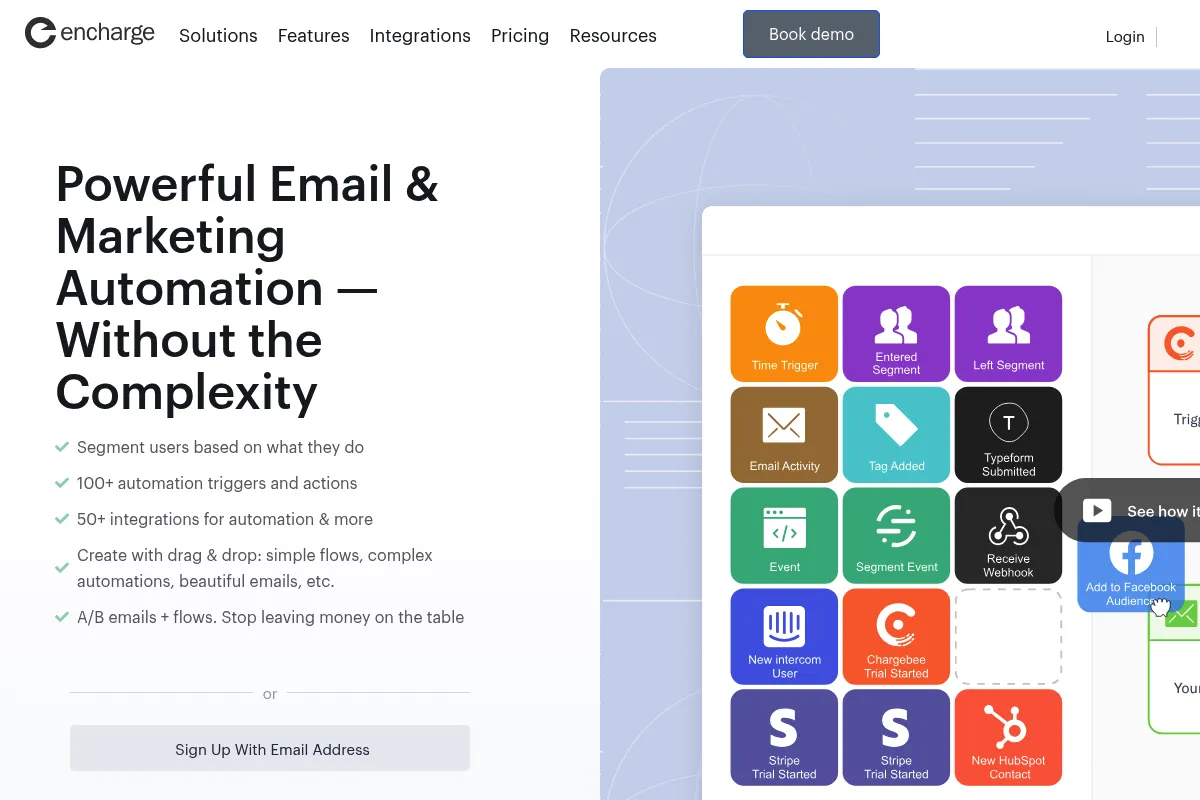
It ingests data from your application, payment processors, and CRMs to automate personalized email sequences. Users can build visual workflows that react to events like 'Trial Started,' 'Feature Used,' or 'Payment Failed.'
What makes it different
Unlike generic email tools, Encharge features deep, two-way native integrations with SaaS-specific tools like Stripe and Segment. It doesn't just send emails; it can update fields in your CRM or change a user's status in your database based on their email interactions.
Ratings across the web



Ratings aggregated from independent review platforms.
Key Features
Visual Flow Builder
Create complex branching logic for user journeys using a drag-and-drop interface.
Stripe Integration
Trigger billing-related emails like failed payment alerts or trial expiration reminders automatically.
Two-Way CRM Sync
Keep data consistent across HubSpot, Salesforce, or Pipedrive without manual exports.
Behavioral Triggers
Send emails based on what users actually do (or don't do) inside your software.
Segment Integration
Pull in product usage data directly from Segment to power advanced automation.
Lead Scoring
Assign points to users based on activity to help sales teams prioritize high-value trials.
Transactional Emails
Send password resets and notifications through the same platform as your marketing flows.
Pricing
Growth
- Up to 2,000 contacts
- Visual flow builder
- Behavioral tracking
- Native integrations (Stripe, Slack, etc.)
- Broadcast emails
Premium
- Up to 2,000 contacts
- Salesforce & HubSpot sync
- Transactional emails
- Revenue tracking
- Priority support
Pricing checked 6 months ago
Pricing guidance
- Exceeding the contact limit of your current tier
- Requiring two-way sync with enterprise CRMs like Salesforce
- Needing to send transactional emails via API
- Pricing scales significantly as your contact list grows
- Transactional emails may have separate volume limits depending on the setup
Mid-market pricing that offers high value for SaaS-specific needs compared to enterprise alternatives.
Pros & Cons
Strengths
-
SaaS-centric integrations
The native ties to Stripe and Segment are deeper than most competitors, allowing for sophisticated billing and usage-based triggers.
-
Visual logic clarity
The flow builder makes it easy to visualize how a user moves through a trial or onboarding sequence, reducing errors in complex setups.
-
Competitive pricing for features
It provides advanced behavioral automation features that are typically locked behind much higher price points in enterprise tools.
Weaknesses
-
Email design limitations
The drag-and-drop email editor is functional but lacks the advanced design flexibility and polish of dedicated design tools.
Affects: Design-heavy brands
-
Steep initial setup
To get the most out of it, you need to correctly map events from your app, which requires technical effort and planning.
Affects: Non-technical founders
-
Reporting depth
While it covers the basics, the analytics lack the deep multi-touch attribution and custom reporting found in HubSpot.
Affects: Data-driven marketing teams
Real User Sentiment
Users generally view Encharge as a powerful, more affordable alternative to Customer.io with a focus on ease of use for SaaS workflows.
Users tend to like
- The Stripe integration is a huge time-saver
- Clean and intuitive UI for building flows
- Responsive and helpful customer support
- Reliable data syncing with CRMs
Users commonly complain about
- The email template library is a bit dated
- Occasional lag when handling very large segments
- Lack of a mobile app for monitoring campaigns
Recurring tradeoffs
- You trade high-end design flexibility for superior automation logic and integration depth.
Happiest users
SaaS marketers who need to automate complex onboarding and billing sequences without writing code.
Often frustrated
E-commerce owners or bloggers who find the behavioral logic overkill for simple promotional blasts.
Use Cases
Trial Onboarding
Send a series of educational emails based on which features a user has or hasn't tried.
Churn Prevention
Trigger a personal reach-out or discount offer when a user hasn't logged in for 14 days.
Billing Recovery
Automate reminders for failed credit card payments using real-time Stripe data.
Lead Nurturing
Score leads based on website visits and sync high-scoring prospects directly to Pipedrive.
Feature Announcements
Send targeted updates only to users who have used related features in the past.
Frequently Asked Questions
Does Encharge have a free plan?
No, Encharge does not offer a free-forever plan. They provide a 14-day full-featured free trial, after which you must subscribe to a paid plan starting at $99/month for the Growth tier.
How does Encharge compare to Intercom?
Encharge is focused on email automation and lifecycle marketing, whereas Intercom is a full customer communication suite including live chat and help desks. Encharge is significantly cheaper for email automation but lacks the integrated chat features.
Can I send transactional emails like password resets?
Yes, but this feature is reserved for the Premium plan. It allows you to consolidate your marketing and transactional emails into one platform for better deliverability tracking.
What are the main limitations of the Growth plan?
The Growth plan lacks two-way syncing with Salesforce and HubSpot, transactional email capabilities, and advanced revenue reporting. It is best suited for startups using simpler CRMs or no CRM at all.
Do I need a developer to set up Encharge?
While you can use Segment or Zapier to send data to Encharge without code, most SaaS teams will want a developer to install the Encharge tracking pixel and map custom events for the most effective automation.
Does it integrate with Stripe?
Yes, Encharge has one of the strongest native Stripe integrations on the market. It can trigger flows based on trial starts, subscription changes, payment successes, and payment failures without needing third-party tools like Zapier.
Why trust this page?
This evaluation combines product positioning, pricing analysis, traffic and market signals, and public user sentiment into a single decision-support page. Content is generated editorially — not copied from the vendor's website.
Funding & Company
Founded
2018
Stage
Acquired
Total Raised
Bootstrapped
Latest Round
—
Encharge was bootstrapped from its inception in 2018, growing to profitability without any outside venture capital. [6, 9] In 2024 or 2025, the profitable company was acquired by the owner of the r/SaaS Reddit community, confirming its sustainable business model. [6]
Market Signals & Traffic
Estimated visits, global rank, geography, traffic sources, monthly visit trends, and organic search keywords (Similarweb)—on a dedicated page built for depth and search.
- Estimated visits
- 0
- Global rank
- —
- Snapshot
- May 2026
- Traffic trend
- Surging
Estimated monthly visits
Alternatives to Encharge
View all alternativesActiveCampaign
Email Marketing, Marketing Automation, Automation

Marketing automation and CRM platform for personalized customer experiences.
HubSpot
Marketing Automation, Automation & Agents, Website Builder

Customer platform for marketing, sales, and service automation.
Klaviyo
Email Marketing, Marketing Automation, Automation

Marketing automation platform for e-commerce email and SMS campaigns
Similar Tools
Ortto
Marketing Automation, Email Marketing, Automation

Unified platform for customer data, marketing automation, and analytics.
Copy.ai
Content Creation, AI Assistant

AI-powered copywriting and content generation platform.
Brevo
Email Marketing, Marketing Automation, Communication

CRM suite for managing customer relationships across multiple marketing channels.
TextQL
AI Assistant, Automation, Developer Tools

Query data warehouses and documentation using natural language.
Lovable
Developer Tools, Website Builder, Productivity

AI platform to build full-stack web apps and websites from natural language prompts.
Amplemarket
Marketing Automation, Automation, Communication

Sales platform for lead generation and multi-channel outreach automation.