

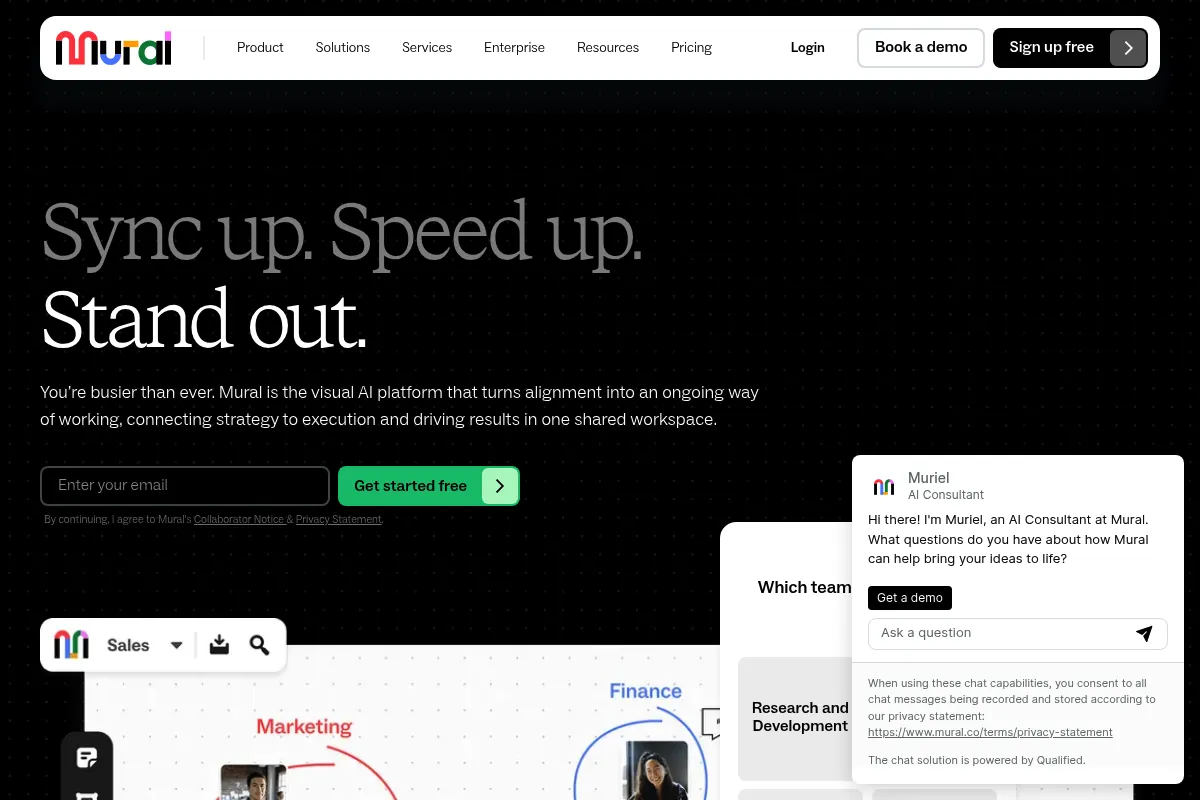
A structured digital whiteboarding platform built for workshop facilitators and enterprise teams who need more control than a blank canvas provides.
Excellent for guided workshops and strategic planning, weaker for high-fidelity design workflows compared to FigJam.
Analysis based on product data, pricing structure, traffic signals, and public user sentiment.
Who Should Use Mural?
Typical users
Design thinkers, agile coaches, and strategy consultants working within mid-to-large organizations.
Maturity fit
scaling to advanced
Choose this if…
- You need strict control over participant permissions during live sessions
- Your priority is structured design thinking frameworks over freeform sketching
- You operate in a highly regulated industry requiring Enterprise-grade security and compliance
Skip this if…
- You are a small design team already using Figma for your primary workflow
- You need a lightweight, ultra-fast tool for quick personal notes
- Your workflow requires advanced technical diagramming features found in Lucidchart
About Mural
Mural is a collaborative intelligence platform designed for visual problem-solving. It provides a digital canvas where distributed teams map out processes, run workshops, and manage projects using a library of frameworks and templates.
Official profiles
What it actually does
It allows teams to create shared visual workspaces using sticky notes, shapes, and connectors. It includes specific tools for meeting leaders, such as timers and private voting, to keep sessions productive and focused.
What makes it different
Unlike general-purpose whiteboards, Mural prioritizes the facilitator role. Its Facilitation Superpowers allow a moderator to lock elements, summon participants to specific areas, and manage what others see, making it more of a structured workshop tool than a freeform drawing app.
Ratings across the web


Ratings aggregated from independent review platforms.
Key Features
Facilitation Superpowers
Gives moderators control over the participant experience to prevent distractions during live sessions.
Mural AI
Summarizes sticky notes and generates mind maps to speed up the synthesis of brainstorming data.
Private Mode
Allows participants to add ideas anonymously and hidden from others to prevent groupthink.
Custom Templates
Enables teams to standardize their own methodologies and repeat successful workshop formats.
Content Library
Provides a repository of reusable icons, shapes, and frameworks for consistent documentation.
Infinite Canvas
Offers unlimited space for complex, multi-phase project mapping without hitting edge limits.
Pricing
Free
- 3 active murals
- Unlimited members
- Standard library and templates
- One-click visitor sharing
Team+
- Unlimited murals in one workspace
- Privacy control for murals
- Facilitation Superpowers
- Standard support
Business
- Unlimited guests
- Single Sign-On (SSO)
- Priority support
- Full facilitation feature set
Enterprise
- SCIM provisioning
- Advanced security and administration
- Multiple workspaces
- Dedicated success manager
Pricing checked 6 months ago
Pricing guidance
- When you need more than 3 active boards
- When you need to invite external clients as guests without paying for full seats
- When your IT department requires SSO for security compliance
- The Free plan does not allow for private murals; all content is visible to everyone in the workspace.
- Guest access is restricted on the Team+ plan, often forcing users to pay for full seats for occasional collaborators.
Premium positioning justified by deep facilitation features and enterprise-grade security.
Pros & Cons
Strengths
-
Superior workshop control
The ability to summon users to a specific view and lock elements makes running large-scale remote sessions significantly smoother than in less structured tools.
-
Strong enterprise compliance
Offers more granular security and administrative controls than many smaller competitors, making it easier for IT departments to approve.
-
Methodology-driven templates
The library is built on proven design thinking and agile methodologies, providing immediate structure for teams new to visual collaboration.
Weaknesses
-
Steep learning curve for guests
Occasional users often find the navigation and toolbars overwhelming, which can eat into workshop time as people learn the interface.
Affects: External clients and occasional collaborators
-
Performance lag on large boards
Boards with hundreds of objects or high participant counts can become sluggish, especially on older hardware.
Affects: Large teams running complex, long-term projects
-
Cluttered UI
The interface prioritizes feature depth over minimalism, which can distract from the creative process compared to cleaner alternatives like FigJam.
Affects: Users who prefer a distraction-free environment
Real User Sentiment
Users generally respect Mural for its professional-grade workshop tools but often find the user experience less fluid than its competitors.
Users tend to like
- Facilitator tools like the timer and laser pointer
- High-quality, methodology-based templates
- Granular control over what participants can edit
Users commonly complain about
- Clunky navigation and zoom mechanics
- High cost per seat for small teams
- Difficulty for first-time guests to get started quickly
Recurring tradeoffs
- You trade a simple, intuitive UI for advanced session management and control.
Happiest users
Professional facilitators and enterprise project managers who need to lead structured group sessions.
Often frustrated
Individual creators or small startups who find the tool over-engineered and the pricing model restrictive.
Use Cases
Agile Retrospectives
Teams use sticky notes and voting to identify sprint improvements in a structured format.
Client Discovery Workshops
Consultants lead sessions using Facilitation Superpowers to keep clients focused and on track.
Strategic Roadmapping
Product managers map out multi-quarter plans using connectors and pre-built frameworks.
User Journey Mapping
Designers visualize customer touchpoints across a complex ecosystem with collaborative input.
Brainstorming
Distributed teams generate ideas in Private Mode to ensure diverse input and avoid groupthink.
Frequently Asked Questions
How does Mural compare to Miro?
Mural is generally better for structured facilitation and workshops due to its 'Superpowers' that give moderators more control. Miro offers a smoother user interface, a larger integration ecosystem, and better features for technical diagramming. Choose Mural for guided sessions and Miro for ongoing, freeform project work.
Is Mural free to use?
Mural offers a Free plan that includes unlimited members but limits you to 3 active murals. To get unlimited murals, private boards, or advanced facilitation features, you must upgrade to a paid plan starting at $9.99 per user/month.
Can I invite external clients to a Mural board for free?
Only on the Business and Enterprise plans. The Team+ plan requires you to pay for a seat for most collaborators, whereas the Business plan allows for unlimited 'Guests' who can collaborate on specific boards without an additional fee.
Does Mural integrate with Microsoft Teams?
Yes, Mural has a deep integration with Microsoft Teams, allowing users to add a mural as a tab in a channel or open a whiteboard directly during a live Teams meeting for real-time collaboration.
What are Facilitation Superpowers?
These are a set of tools designed for meeting leaders. They include a timer to keep sessions on track, a 'Summon' feature to bring everyone to the same part of the board, a voting tool for decision-making, and a 'Private Mode' to hide contributions until the facilitator reveals them.
Is Mural secure enough for enterprise use?
Yes, Mural is built for enterprise needs, offering SOC2 Type 2 certification, SSO (on Business and Enterprise plans), and SCIM provisioning. It is often preferred by IT departments in regulated industries like finance and healthcare.
Why trust this page?
This evaluation combines product positioning, pricing analysis, traffic and market signals, and public user sentiment into a single decision-support page. Content is generated editorially — not copied from the vendor's website.
Funding & Company
Founded
2011
Stage
Series c
Total Raised
$195.63M
Latest Round
Series C (Jul 2021)
Notable Investors
Mural has raised a total of approximately $195.6 million, culminating in a $50 million Series C in mid-2021 that valued the company at $2 billion. This significant funding from top-tier investors like Insight Partners and Tiger Global indicates strong market confidence and provides a substantial runway for product development and market expansion, suggesting good stability for potential customers.
Market Signals & Traffic
Estimated visits, global rank, geography, traffic sources, monthly visit trends, and organic search keywords (Similarweb)—on a dedicated page built for depth and search.
- Estimated visits
- 2,147,952
- Global rank
- #23,388
- Snapshot
- Apr 2026
- Traffic trend
- Steady
Estimated monthly visits
Alternatives to Mural
View all alternativesFigma AI
Developer Tools, Content Creation
Collaborative interface design and prototyping tool for digital products.
Conceptboard
Communication, Design, Productivity

Collaborative online whiteboard for visual teamwork and brainstorming
Canva AI
Content Creation

Online design tool for creating graphics, presentations, videos, and websites.
Similar Tools
Conceptboard
Communication, Design, Productivity
Collaborative online whiteboard for visual teamwork and brainstorming
Smartcat
Automation, Communication, Productivity
Comprehensive translation and localization platform for global content management.
forms.app
Productivity, Research, Automation

Online form builder for creating surveys, quizzes, and forms.
Animoto
Video Creation, Content Creation, Design

Easy-to-use online video creation platform for professional-quality videos.
Fashable
Design, E-commerce, Content Creation

Generative design platform for the fashion and retail industry
Weights & Biases (W&B)
Developer Tools, Research

Developer platform for tracking, visualizing, and managing machine learning experiments.