

AIColors
A prompt-based color generator that visualizes palettes on functional UI components, best for rapid prototyping and early-stage design exploration.
Excellent for developers and founders needing quick, cohesive UI skins; weaker for designers requiring deep manual control over color theory variables.
Analysis based on product data, pricing structure, traffic signals, and public user sentiment.
Who Should Use AIColors?
Typical users
Solo developers, early-stage founders, and UI/UX designers looking to break through creative blocks.
Maturity fit
beginner to scaling
Choose this if…
- You want to see how colors look on a dashboard or landing page before committing to a palette
- Your priority is speed and prompt-based ideation over manual hex-code tweaking
- You need ready-to-use Tailwind or CSS variables for a side project
Skip this if…
- You need to adhere to strict, pre-defined corporate brand guidelines
- Your workflow requires advanced accessibility auditing beyond basic contrast checks
- You prefer traditional color wheels and harmony rules over AI-generated suggestions
About AIColors
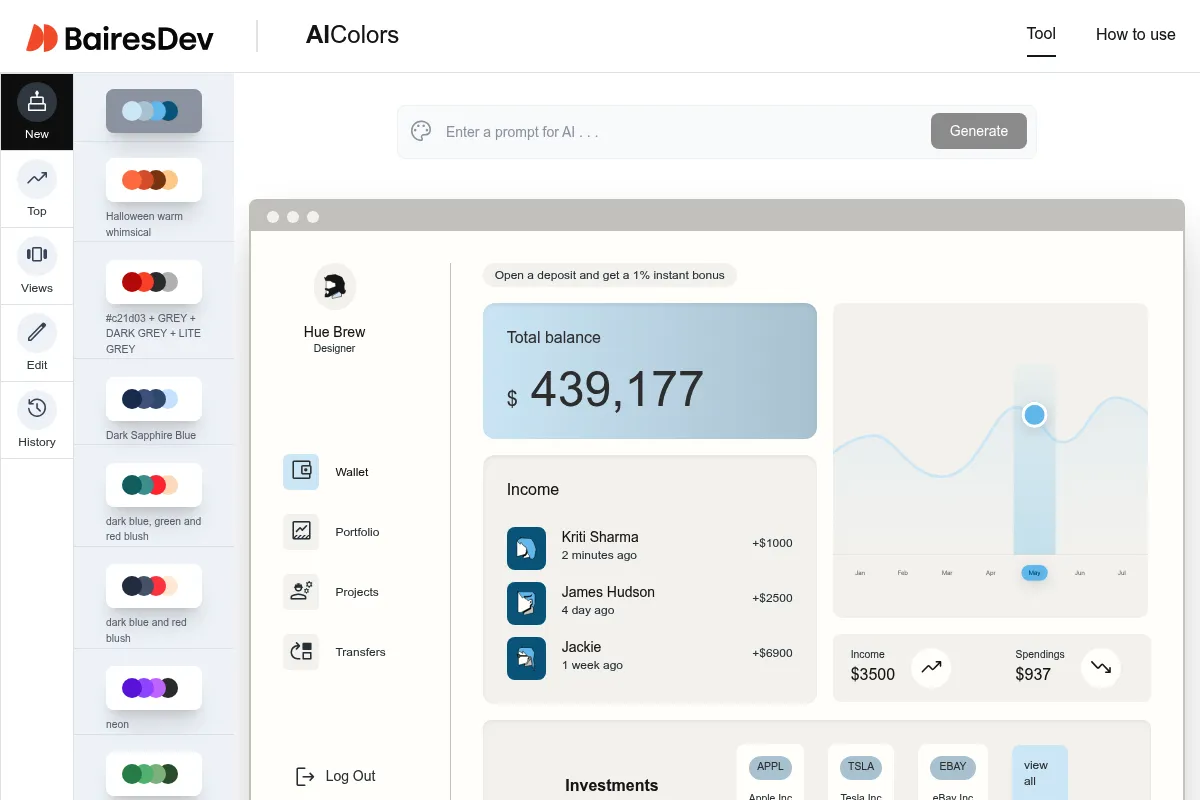
AIColors is a specialized design utility that uses natural language processing to generate color schemes. It addresses the gap between abstract color palettes and actual UI implementation by providing real-time previews on mock application interfaces.
What it actually does
Users enter a descriptive prompt to generate a primary, secondary, and accent color set. The tool then maps these colors onto various UI templates—like dashboards, landing pages, and mobile screens—allowing users to verify legibility and aesthetic balance before exporting code.
What makes it different
Unlike traditional generators like Coolors that show isolated color blocks, AIColors focuses on context. Its primary differentiator is the 'Live Preview' feature which applies the palette to realistic components, reducing the guesswork of how a 'vibrant blue' actually functions as a primary button color.
Key Features
Prompt-to-Palette
Generates cohesive schemes from descriptive text like 'modern fintech' or 'earthy organic.'
UI Component Previews
Maps colors to buttons, cards, navbars, and charts to test real-world application.
Tailwind Export
Provides direct configuration code to speed up frontend development.
Figma Plugin
Syncs generated palettes directly into design files to maintain workflow continuity.
Contrast Checker
Flags accessibility issues between background and text colors automatically.
Palette Editor
Allows fine-tuning of specific shades if the AI output is slightly off-target.
Dark/Light Mode Toggle
Instantly previews how a palette adapts to different system themes.
Pricing
Free
- Limited daily AI generations
- Basic UI previews
- Public palette library access
- Standard CSS exports
Pro
- Unlimited AI generations
- Figma plugin access
- Save unlimited palettes
- Advanced export formats (SVG, PNG, Tailwind)
- Priority support
Pricing checked 5 months ago
Pricing guidance
- When you need to sync palettes directly to Figma
- When you hit the daily generation limit on the free tier
- When you need clean Tailwind config exports
- Free users are limited to a few generations per day
- Figma integration is strictly locked behind the paid tier
Affordable utility pricing aimed at individual creators rather than enterprise teams.
Pros & Cons
Strengths
-
Contextual visualization
Seeing colors on a mock dashboard prevents the common mistake of choosing colors that look good in a row but fail in a complex UI.
-
Developer-friendly exports
The inclusion of Tailwind and CSS variable exports saves significant time during the handoff from design to code.
-
Low barrier to entry
The prompt-based interface allows non-designers to generate professional-looking schemes without understanding color theory.
Weaknesses
-
Limited UI templates
You are restricted to the built-in mockups; you cannot upload your own wireframes to test the colors.
Affects: Product designers with custom layouts
-
AI randomness
Prompts can sometimes yield unpredictable or muddy results that require manual correction to be usable.
Affects: Users seeking specific brand vibes
-
Basic accessibility tools
While it checks contrast, it lacks advanced color-blindness simulations found in dedicated design software.
Affects: Enterprise teams with strict ADA compliance needs
Real User Sentiment
Users generally appreciate the tool for its speed and the 'aha' moment of seeing colors applied to a real UI.
Users tend to like
- The prompt-based generation is fun and surprisingly effective
- The UI preview saves time in Figma
- Tailwind export is a major plus for developers
Users commonly complain about
- The AI can be repetitive with its suggestions
- Lack of more diverse UI templates (e.g., e-commerce or mobile apps)
- Occasional bugs in the Figma plugin sync
Recurring tradeoffs
- You trade granular control for speed and inspiration
Happiest users
Developers building side projects who want a 'designed' look without hiring a designer.
Often frustrated
Professional brand designers who find the AI suggestions too generic for high-end client work.
Use Cases
Rapid Prototyping
Quickly skinning a wireframe to show a client different 'vibes'.
Developer Side Projects
Generating a professional color scheme for a SaaS MVP without design skills.
Creative Block
Using prompts to find unexpected color combinations for a new brand.
Design System Kickoff
Establishing base Tailwind colors for a new web application.
Marketing Landing Pages
Testing high-contrast palettes for conversion-focused designs.
Frequently Asked Questions
Is there a free version of AIColors?
Yes, AIColors offers a free tier that allows for a limited number of AI generations per day and access to the public library. However, to use the Figma plugin or get unlimited generations, you must upgrade to the Pro plan for $9/month.
How does AIColors compare to Coolors?
Coolors is a more mature, manual tool for creating palettes with deep color theory features. AIColors is better for visualization, as it shows your colors on actual UI components, whereas Coolors primarily shows color bars.
Can I export my palette to Tailwind CSS?
Yes, one of the strongest features of the Pro plan is the ability to export your palette directly as a Tailwind configuration object, which you can paste into your project's config file.
Does the tool check for accessibility?
AIColors includes a basic contrast checker that evaluates the legibility of text against background colors based on WCAG standards, helping you ensure your UI is readable.
Can I use AIColors for mobile app design?
Yes, the tool includes UI templates specifically for mobile interfaces, allowing you to see how your palette looks on small-screen components like bottom navs and mobile cards.
What are the limitations of the AI generation?
The AI relies on the quality of your prompts. Vague prompts like 'nice colors' will produce generic results. It also lacks the ability to 'lock' specific brand colors and have the AI generate only the remaining complementary shades in the free version.
Why trust this page?
This evaluation combines product positioning, pricing analysis, traffic and market signals, and public user sentiment into a single decision-support page. Content is generated editorially — not copied from the vendor's website.
Funding & Company
Founded
—
Stage
Bootstrapped
Total Raised
Bootstrapped
Latest Round
—
AIColors is a free, bootstrapped tool with no external funding. Its stability is not backed by venture capital, meaning its longevity depends on the creator's continued, unsupported effort.
Market Signals & Traffic
Estimated visits, global rank, geography, traffic sources, monthly visit trends, and organic search keywords (Similarweb)—on a dedicated page built for depth and search.
- Estimated visits
- 0
- Global rank
- #12,032,882
- Snapshot
- Apr 2026
- Traffic trend
- Falling
Estimated monthly visits
Alternatives to AIColors
View all alternatives
Similar Tools
Back4App
Developer Tools, Automation & Agents, Workflow

Backend-as-a-Service platform for building and scaling applications.
Decart
Gaming, Video Creation
Real-time generative world models for interactive video game environments
Ideogram
Content Creation, Design

AI image generator that excels at rendering text within images.
Enter Pro
Developer Tools, Website Builder, Automation & Agents

Build full-stack apps, websites, and agents through conversational chat.
Flair
Design, Content Creation, Marketing Automation

Professional product photography and branded content design tool.
Playcode
Website Builder, Developer Tools, Design

Create professional websites and web applications using natural language.