

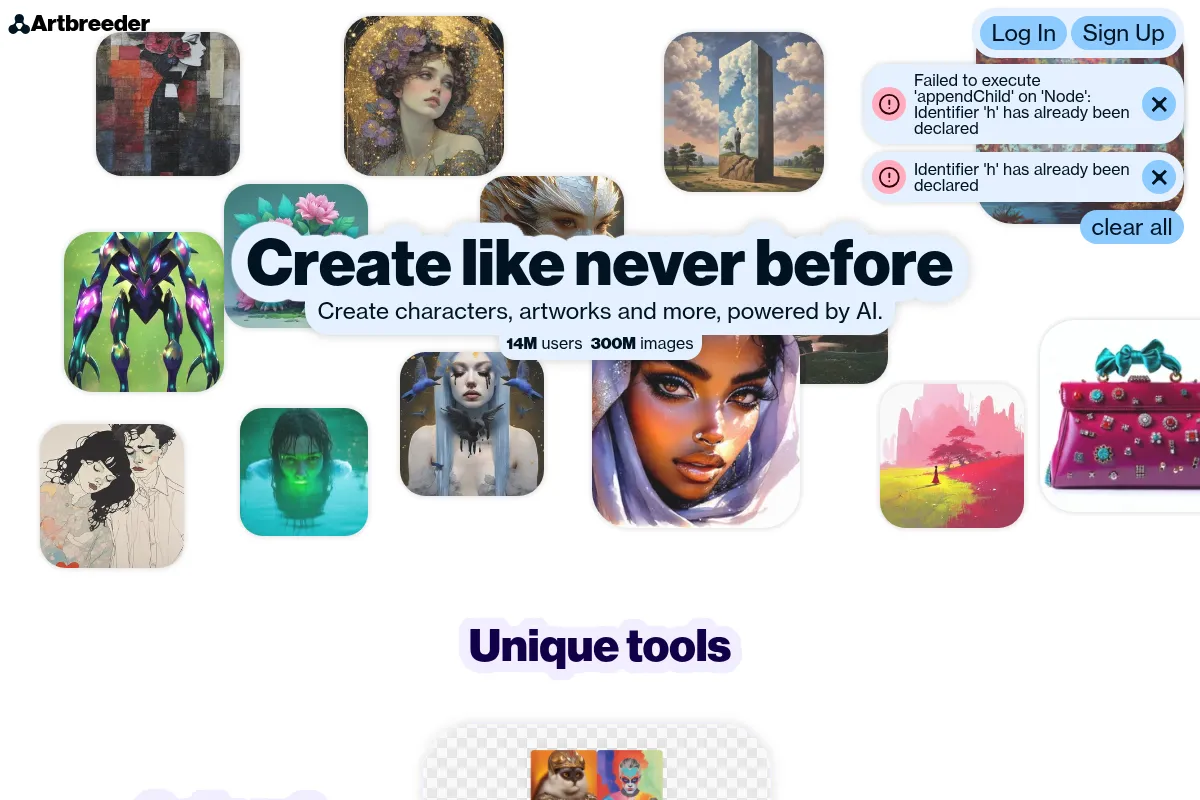
Artbreeder is an AI image generation platform focused on blending and evolving existing images through intuitive controls, best suited for rapid visual ideation and creative exploration.
Best for creative exploration and rapid visual prototyping, weaker for precise image editing or pure text-to-image generation.
Analysis based on product data, pricing structure, traffic signals, and public user sentiment.
Who Should Use Artbreeder?
Typical users
Artists, game developers, writers, and graphic designers looking for visual inspiration, concept development, or character ideation. It's also useful for educators and hobbyists exploring AI art.
Maturity fit
beginner to scaling
Choose this if…
- You want to quickly generate and experiment with AI-generated portraits, landscapes, or abstract images.
- Your priority is visual exploration and iterative design over precise manual control.
- You want to blend and remix existing images to create unique visuals.
- You need a fun and accessible way to visualize characters or concepts.
Skip this if…
- You need pixel-perfect editing control with layers and advanced manipulation tools.
- Your primary need is generating images solely from text prompts.
- You require absolute consistency and predictability for professional commercial campaigns.
- You prefer working offline or need deep integration with traditional design software.
About Artbreeder
Artbreeder is a web-based AI platform that allows users to generate and modify images by blending and evolving existing ones. It uses machine learning models like StyleGAN and BigGAN to enable creative experimentation, making it popular for concept art, character design, and visual inspiration.
Official profiles
What it actually does
Artbreeder enables users to create new images by mixing existing ones, adjusting features using sliders ('genes'), and exploring variations. It supports generating portraits, landscapes, anime, and abstract art, with capabilities for text-to-image generation and image animation.
What makes it different
Its core differentiator is the 'breeding' or blending mechanism, allowing users to intuitively combine and evolve images using gene-based sliders. This approach emphasizes iterative creativity and collaborative exploration over direct prompt engineering.
Ratings across the web

Ratings aggregated from independent review platforms.
Key Features
Image Blending ('Breeding')
Allows users to combine multiple images and evolve them using gene sliders, creating unique outputs that are difficult to replicate manually.
Gene Sliders
Intuitive controls that let users tweak specific attributes of an image (e.g., age, gender, expression, style) for precise, yet experimental, modifications.
Prompter (Text-to-Image)
Generates images based on textual descriptions, leveraging models like Stable Diffusion (SD-XL) for diverse visual outputs.
Community Gallery and Remixing
Provides access to millions of user-generated images that can be remixed and built upon, fostering collaboration and inspiration.
Animator
Transforms static images into short videos by combining them with text prompts, adding dynamic motion and effects.
Private Mode (Premium)
Allows users to keep their creations private until they are ready to share, which is beneficial for ongoing projects.
High-Resolution Downloads (Premium)
Unlocks higher quality exports suitable for professional and commercial use.
Pricing
Free
- Basic image generation and editing
- Limited saves
- Standard resolution downloads
- 10 credits per month
Starter
- Higher resolution downloads
- Unlimited uploads
- Private mode
- 100 credits per month
Advanced
- All Starter features
- 275 credits per month
Champion
- All Advanced features
- 700 credits per month
Pricing checked 6 months ago
Pricing guidance
- When you need higher resolution downloads for professional use.
- When you want to keep your creations private.
- When you hit the credit limit for generating or editing images.
- When you need to upload your own images for editing (currently limited to portrait tool).
- Free plan users have limited saves and standard resolution downloads.
- All creations are public by default on the free plan.
- Credit system for generation/editing can be a soft limit even on paid plans if usage is very high.
- Commercial use is permitted with paid plans, but exclusive copyright cannot be claimed.
Affordable freemium model with tiered subscriptions offering increased credits, download quality, and privacy features, making it accessible for hobbyists and professionals.
Pros & Cons
Strengths
-
Intuitive and Fun Interface
The slider-based editing makes AI art creation feel like a game, making it accessible and engaging for users of all skill levels.
-
Unique Image Blending
The 'breeding' feature, which allows for the seamless merging and evolution of images, is a standout capability not found in many other AI art tools.
-
Strong Free Tier
The free version offers access to core AI tools and a generous number of credits, making it an excellent entry point for exploration and casual use.
-
Collaborative Community
The platform fosters a vibrant community where users can remix, share, and build upon each other's creations, providing endless inspiration and learning opportunities.
-
Versatile Art Styles
Artbreeder supports a wide range of styles, from realistic portraits and fantasy landscapes to anime and abstract art, offering flexibility for diverse projects.
Weaknesses
-
Limited Precision Control
Achieving exact specifications or performing fine-grained manual edits is difficult due to the AI-driven, blend-focused nature of the tool.
Affects: Users needing precise control for professional graphic design or photo editing.
-
Unpredictable Results
While often creative, AI generation can sometimes produce bizarre or disproportionate outputs, requiring patience and iteration.
Affects: Users on tight deadlines or those who need highly consistent, predictable results.
-
Resolution Limitations (Free Tier)
The free version offers standard resolution downloads, which may not be suitable for professional print or high-detail applications.
Affects: Professionals and commercial users requiring high-quality outputs.
-
Dependence on Source Material
The quality and variation of generated images are influenced by the existing models and user-uploaded content, potentially limiting originality.
Affects: Users seeking entirely novel creations without any resemblance to existing imagery.
Real User Sentiment
Users generally find Artbreeder fun, intuitive, and a great tool for creative exploration and rapid ideation, though some note limitations in precision and output quality compared to more specialized tools.
Users tend to like
- The ease of use and intuitive slider-based interface.
- The unique 'breeding' or image blending functionality.
- The active and collaborative community.
- The generous free tier for exploration.
- The versatility in generating diverse art styles.
Users commonly complain about
- Lack of precise control for detailed editing.
- Occasional unpredictable or bizarre AI outputs.
- Resolution limitations on the free plan.
- Server slowdowns can sometimes affect performance.
- Concerns about the ethics of modifying others' work.
Recurring tradeoffs
- Fun, iterative exploration vs. precise, professional control.
- Accessibility and ease of use vs. advanced feature depth.
- Collaborative community-driven creation vs. individual, controlled output.
Happiest users
Artists, writers, and game developers who prioritize creative exploration, rapid concept generation, and enjoy the collaborative aspect of AI art creation.
Often frustrated
Users who require fine-grained control, pixel-perfect editing, or highly consistent, predictable results for professional commercial work.
Use Cases
Character Design
Quickly generate and iterate on consistent character portraits for games, novels, or concept art.
Visual Inspiration
Explore a vast gallery of AI-generated images to spark ideas for art projects, stories, or designs.
Concept Art Generation
Rapidly prototype visual concepts for environments, characters, or scenes in film, games, or advertising.
Artistic Experimentation
Play with AI-driven image manipulation and blending to discover unique visual styles and aesthetics.
Educational Tool
Introduce students to AI art generation, machine learning, and digital creativity in an accessible way.
Content Creation
Generate unique visuals for social media, blog posts, or marketing materials.
World-Building Assets
Blend landscapes, architectural styles, and color palettes to create a cohesive visual language for fictional worlds.
Frequently Asked Questions
Is Artbreeder free to use?
Artbreeder offers a free tier that provides access to basic image generation and editing tools, along with a limited number of credits per month. While sufficient for casual exploration and personal use, users requiring higher resolution downloads, private mode, or more extensive generation capabilities will need to upgrade to a paid subscription plan, which starts at $7.49 per month for the Starter plan.
How does Artbreeder compare to Midjourney?
Artbreeder and Midjourney represent different approaches to AI art generation. Midjourney excels at creating high-quality, polished images from detailed text prompts and is often preferred for professional, final artwork. Artbreeder, on the other hand, focuses on blending and evolving existing images using intuitive sliders, making it ideal for iterative design, character consistency, and creative exploration. Artbreeder also offers a free tier, whereas Midjourney is a paid-only service.
What are the limitations of Artbreeder?
Artbreeder's primary limitations include a lack of precise manual editing control, making it less suitable for professional graphic design or photo manipulation. The AI-generated results can sometimes be unpredictable, and the free tier has resolution limitations. While commercial use is allowed with paid plans, users cannot claim exclusive copyright on generated images. Additionally, the platform requires an internet connection and its effectiveness can depend on the quality of source material and community contributions.
Does Artbreeder integrate with other tools?
Currently, Artbreeder is primarily a standalone web-based platform and does not offer direct integrations with other design software or platforms like Adobe Creative Suite, Figma, or Zapier. Users typically download images from Artbreeder and then import them into other tools for further editing or use.
Can I use Artbreeder images for commercial purposes?
Yes, Artbreeder allows commercial use of generated images, particularly with its paid subscription plans. However, it's important to note that you cannot claim exclusive copyright on the AI-generated artwork. The images are considered public domain or licensed under CC0, meaning others can also use them. Paid plans offer higher resolution downloads, which are more suitable for commercial applications.
What is the 'breeding' feature in Artbreeder?
The 'breeding' feature is Artbreeder's core mechanism for creating new images. It involves blending two or more existing images together, or evolving a single image by adjusting its 'genes' (parameters controlled by sliders). This process allows users to create unique variations and hybrids of the source images, fostering a highly experimental and iterative creative workflow.
How does the credit system work in Artbreeder?
Artbreeder uses a credit system to manage image generation and editing actions. The free plan provides a limited number of credits per month, while paid plans offer a higher allowance. Actions like generating new images, editing existing ones, or using advanced features consume credits. This system encourages users to be mindful of their usage and incentivizes upgrades for more intensive creative work.
What is the difference between Artbreeder's 'Prompter' and other text-to-image tools?
Artbreeder's 'Prompter' feature allows users to generate images from text descriptions, similar to tools like DALL-E or Stable Diffusion. However, Artbreeder's strength lies in its ability to then take these generated images and further blend, evolve, or modify them using its signature gene sliders and breeding features. This offers a hybrid approach where text-to-image generation can be combined with its unique image manipulation capabilities.
Why trust this page?
This evaluation combines product positioning, pricing analysis, traffic and market signals, and public user sentiment into a single decision-support page. Content is generated editorially — not copied from the vendor's website.
Funding & Company
Founded
2018
Stage
Bootstrapped
Total Raised
Bootstrapped
Latest Round
—
Artbreeder is a bootstrapped company, meaning it has not taken any external venture capital funding and has grown organically through its own revenue. This indicates a sustainable business model reliant on its user base rather than investor capital for operations and growth.
Market Signals & Traffic
Estimated visits, global rank, geography, traffic sources, monthly visit trends, and organic search keywords (Similarweb)—on a dedicated page built for depth and search.
- Estimated visits
- 555,819
- Global rank
- #54,352
- Snapshot
- Apr 2026
- Traffic trend
- Surging
Estimated monthly visits
Alternatives to Artbreeder
View all alternativesMidjourney
Content Creation
AI tool that generates images from natural language text prompts.
Leonardo AI
Content Creation

AI platform for creating and editing visual assets like images and video.
Stable Diffusion
Content Creation, Developer Tools, AI Assistant

Open-source generative AI models for image, video, audio, and code.
Similar Tools
FaceApp
Content Creation, Design

AI-powered mobile app for realistic photo and video editing.
AirBrush
Content Creation, Design

Generate professional stock photos and illustrations from text prompts
Brandmark
Content Creation, Design

AI-powered logo and brand identity generator.
BeFunky
Content Creation, Design

All-in-one platform for photo editing, collage making, and graphic design.
Magnific AI
Content Creation, Design

AI-powered tool to upscale and enhance images with incredible detail.
123RF
Content Creation, Design
Stock media library with integrated creative image generation tools