

DagsHub
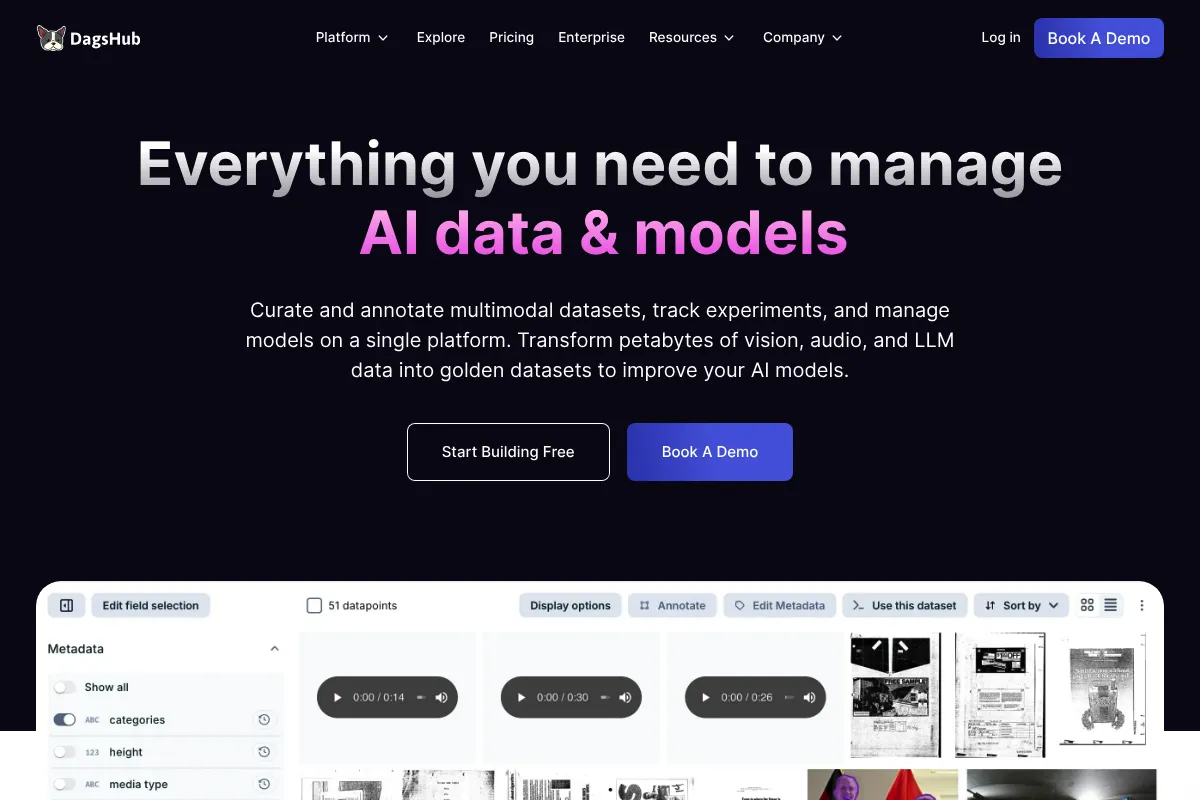
A unified repository for machine learning that layers DVC and MLflow onto a GitHub-like interface, making it the best choice for teams prioritizing open-source standards over proprietary silos.
Excellent for teams already committed to DVC and MLflow, weaker for those seeking a zero-configuration, 'no-code' experiment tracker.
Analysis based on product data, pricing structure, traffic signals, and public user sentiment.
Who Should Use DagsHub?
Typical users
Data scientists and ML engineers in research-heavy teams or open-source projects who need to version large datasets alongside code.
Maturity fit
scaling
Choose this if…
- You want to avoid vendor lock-in by using open-source standards like DVC and MLflow
- Your priority is seeing data, code, and experiments in a single unified UI
- You need integrated data labeling without jumping between separate tools
Skip this if…
- You find DVC's command-line complexity a barrier to your workflow
- You require a fully managed, proprietary 'black box' solution with zero setup
- Your organization forbids hosting data on third-party cloud platforms
About DagsHub
DagsHub is a collaboration platform designed specifically for the machine learning lifecycle. It acts as a specialized version of GitHub that handles not just code, but also massive datasets, model weights, and experiment logs by integrating open-source tools into a single interface.
Official profiles
What it actually does
It provides hosted versions of DVC for data versioning, MLflow for experiment tracking, and Label Studio for data annotation. Users push code via Git and data via DVC to a central repository where the entire team can visualize changes, compare experiments, and review data labels.
What makes it different
Unlike Weights & Biases or Comet, which use proprietary formats, DagsHub is built entirely on open-source protocols. It doesn't try to replace Git or DVC; it provides the infrastructure to host them, ensuring you can migrate your entire project elsewhere if needed.
Ratings across the web

Ratings aggregated from independent review platforms.
Key Features
DVC Integration
Allows versioning of multi-terabyte datasets without bloating Git repositories.
Zero-Config MLflow
Provides a hosted MLflow tracking URI out of the box for every repository.
Data Engine
Enables querying, visualizing, and labeling data directly from the storage bucket.
Git-based Pull Requests for Data
Facilitates code-style reviews for dataset changes and model improvements.
Direct S3/GCS Mounting
Connects existing cloud storage buckets to the DagsHub UI without moving data.
DagsHub Actions
Triggers specialized ML workflows like model testing or data validation on every commit.
Integrated Label Studio
Lets teams annotate images, audio, and text within the project repository.
Pricing
Free
- Unlimited public repositories
- 3 private repositories
- 10GB DagsHub storage
- Integrated MLflow & Label Studio
Pro
- Unlimited private repositories
- 100GB DagsHub storage
- Priority support
- Advanced data engine features
Team
- SAML SSO
- Role-based access control (RBAC)
- Custom storage connectors
- Dedicated support engineer
Enterprise
- On-premises or VPC deployment
- Unlimited storage options
- Custom security compliance
- White-glove onboarding
Pricing checked 5 months ago
Pricing guidance
- When you exceed the 3 private repository limit
- When your dataset grows beyond 10GB
- When you need team-wide access controls and SAML
- Storage limits apply to DagsHub-hosted storage; external S3/GCS mounting may incur separate cloud costs
- Free tier compute for DagsHub Actions is limited
Competitive with GitHub and Weights & Biases, though the per-user pricing for teams can become expensive for large organizations.
Pros & Cons
Strengths
-
No vendor lock-in
Because it uses Git, DVC, and MLflow, you own your data and metadata in standard formats, making it easy to leave the platform if requirements change.
-
Unified project view
Eliminates the 'context switching' tax by showing code, data versions, and experiment results in one tab rather than three different tools.
-
Generous free tier for open source
Provides significant value to the research community by offering unlimited public repositories with integrated tracking tools.
-
Streamlined data labeling
The Label Studio integration allows for a tight feedback loop between model error analysis and data re-labeling.
Weaknesses
-
DVC learning curve
DagsHub relies heavily on DVC; if your team isn't comfortable with DVC's CLI and concepts, the platform will feel difficult to use.
Affects: Beginner data science teams
-
UI performance with massive repos
Users report occasional lag when navigating repositories with extremely large file counts or complex directory structures.
Affects: Enterprise teams with legacy data structures
-
Fragmented documentation
While the core features are well-documented, troubleshooting the interaction between Git, DVC, and DagsHub can sometimes lead to 'dependency hell'.
Affects: DevOps and MLOps engineers
Real User Sentiment
Generally positive, with users praising the 'all-in-one' feel and the commitment to open-source standards, though some find the setup overhead of DVC annoying.
Users tend to like
- The GitHub-like familiarity of the interface
- Not having to set up an MLflow server manually
- The ability to diff datasets and see what changed visually
- Responsive community support on Discord
Users commonly complain about
- DVC can be finicky and hard to teach to new team members
- Occasional bugs in the Label Studio integration
- The UI can feel cluttered compared to specialized experiment trackers
Recurring tradeoffs
- You trade the 'instant setup' of W&B for the long-term flexibility of open-source DVC/MLflow.
Happiest users
Teams who already use DVC and want a centralized place to collaborate and visualize their work.
Often frustrated
Users who want a 'magic' solution for data versioning without learning the underlying command-line tools.
Use Cases
Collaborative Research
Multiple researchers sharing a single MLflow dashboard and DVC remote.
Open Source ML
Hosting public datasets and models with a community-driven contribution model.
Data Labeling Workflows
Moving from raw data to labeled datasets and trained models in one platform.
Model Auditing
Using the Git-style history to track exactly which data version produced a specific model weight.
Education
Teaching students the principles of MLOps using industry-standard open-source tools.
Frequently Asked Questions
Is DagsHub just a wrapper for DVC?
No, while it provides a remote for DVC, it also includes a hosted MLflow server, an integrated Label Studio instance, and a custom UI for diffing datasets and visualizing pipelines. It acts as the orchestration and visualization layer for these tools.
How does DagsHub compare to Weights & Biases (W&B)?
W&B is a proprietary, highly polished experiment tracker that is easier to set up but harder to leave. DagsHub is built on open standards (MLflow/DVC), offering more flexibility and data versioning capabilities at the cost of a slightly steeper learning curve.
Can I use DagsHub with my existing S3 bucket?
Yes, DagsHub allows you to connect your own S3, GCS, or Azure Blob Storage. This lets you use DagsHub's UI to explore and version data without actually moving your files from your existing cloud infrastructure.
Does the free plan include MLflow?
Yes, every DagsHub repository—including those on the free tier—comes with a fully managed MLflow remote tracking URI that you can use to log parameters, metrics, and artifacts.
What are the storage limits for data?
The Free plan includes 10GB of DagsHub-hosted storage. The Pro plan increases this to 100GB. If you connect your own external cloud storage (S3/GCS), those limits do not apply to DagsHub, though you will pay your cloud provider for that storage.
Can I host DagsHub on my own servers?
Yes, DagsHub offers an Enterprise version that can be deployed on-premises or within your own Virtual Private Cloud (VPC) for organizations with strict data privacy requirements.
Why trust this page?
This evaluation combines product positioning, pricing analysis, traffic and market signals, and public user sentiment into a single decision-support page. Content is generated editorially — not copied from the vendor's website.
Funding & Company
Founded
2019
Stage
Seed
Total Raised
$3.61M
Latest Round
Accelerator/Incubator (Jan 2025)
Notable Investors
DagsHub has raised a total of $3.61M, primarily through Seed and accelerator rounds, with its most recent funding occurring in early 2025. This modest funding level suggests a focus on capital efficiency and product-led growth rather than aggressive, venture-backed scaling.
Market Signals & Traffic
Estimated visits, global rank, geography, traffic sources, monthly visit trends, and organic search keywords (Similarweb)—on a dedicated page built for depth and search.
- Estimated visits
- 0
- Global rank
- —
- Snapshot
- May 2026
- Traffic trend
- Surging
Estimated monthly visits
Alternatives to DagsHub
View all alternatives
Similar Tools
Kolena
Developer Tools, Workflow, Research

Testing and validation platform for machine learning models.
Evidently AI
Developer Tools, Workflow, Research

Open-source framework for evaluating, testing, and monitoring machine learning models.
Encord
Developer Tools, Workflow, Research

Data development platform for labeling, managing, and evaluating multimodal datasets.
Radiant
Developer Tools, Automation, Workflow

Integrated AI infrastructure and cloud platform for scaling model deployment.
SmartDraw
Design, Productivity, Documentation

Professional diagramming software for creating flowcharts, floor plans, and visuals.
Terray Therapeutics
Research, Health & Wellness
Generative platform for large-scale small molecule drug discovery.