

Gamma is an AI-powered content creation tool that quickly generates presentations, documents, and websites from prompts, but its export fidelity and AI image quality can be inconsistent.
Best for rapid first drafts and internal content, weaker for polished, client-facing exports.
Analysis based on product data, pricing structure, traffic signals, and public user sentiment.
Who Should Use Gamma?
Typical users
Professionals, educators, and content creators who need to generate initial drafts of presentations, documents, or websites quickly. It's suitable for individuals or small teams looking to streamline their workflow and overcome the blank page.
Maturity fit
beginner to scaling
Choose this if…
- You need to create a presentation draft in minutes.
- You prioritize speed and ease of use over granular design control.
- You want to embed interactive content like videos and GIFs.
- You need to generate multiple content formats (presentations, documents, websites) from one platform.
Skip this if…
- You require perfect PowerPoint or Google Slides export fidelity without manual cleanup.
- Your primary need is highly accurate AI-generated images.
- You need advanced automation or complex conditional logic.
- Your workflow is strictly offline.
About Gamma
Gamma is an AI-native platform designed to transform ideas into polished presentations, documents, and websites rapidly. It aims to act as an agentic design partner, reducing the need for formatting or design expertise. The tool is built for professionals, educators, and content creators seeking efficiency in producing visual content.
What it actually does
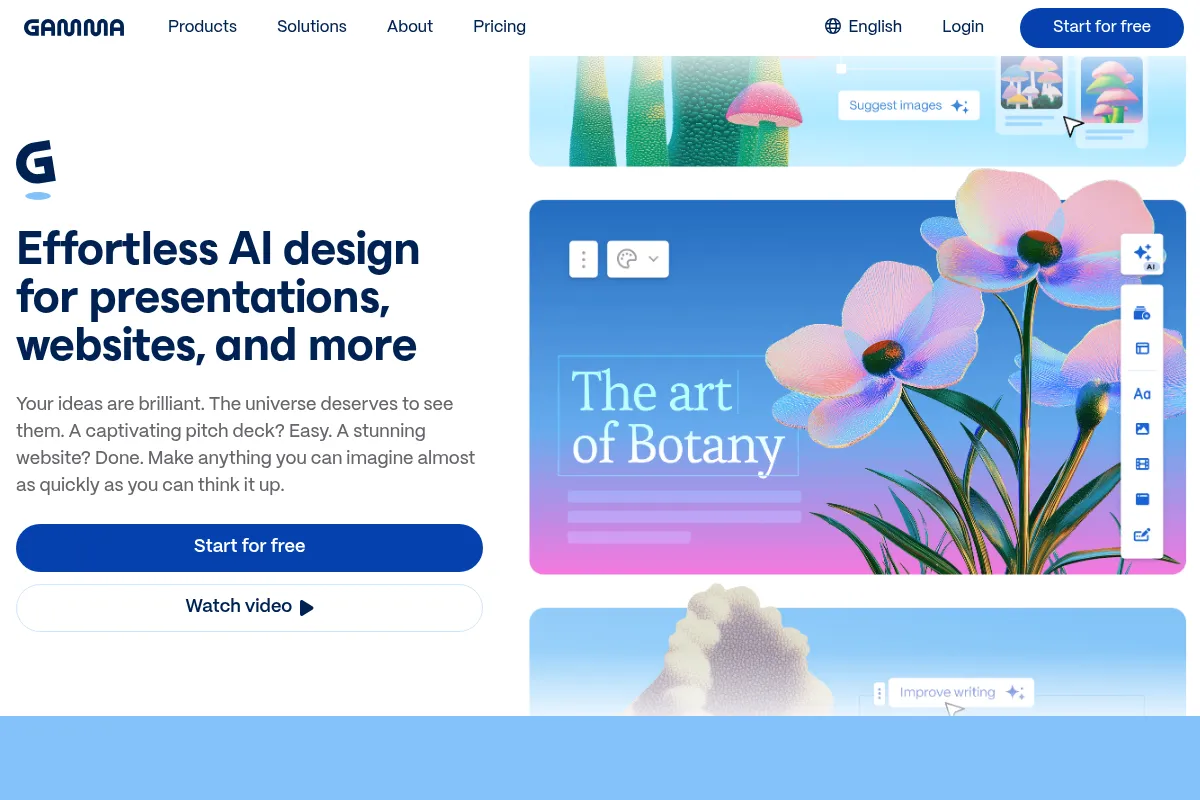
Gamma uses AI to generate entire drafts of presentations, documents, and websites from text prompts, uploaded files, or pasted content. It offers a card-based, scrollable format and allows for embedding interactive media, with options to export to PDF and PPTX.
What makes it different
Gamma differentiates itself with its AI-native approach to content generation, transforming prompts into structured visual content in seconds. Its card-based layout and focus on rapid prototyping offer a different workflow compared to traditional slide-based software.
Ratings across the web



Ratings aggregated from independent review platforms.
Key Features
AI Content Generation
Quickly turns prompts into structured outlines and content for presentations, documents, or websites.
Card-Based Layout
Uses a flexible, scrollable card format that differs from traditional slides, suitable for web-based sharing.
Interactive Embeds
Allows embedding of videos, GIFs, Figma designs, and other live content directly into presentations.
One-Click Themes
Instantly applies a consistent visual theme (colors, fonts, backgrounds) across the entire presentation.
Export Options
Supports exporting content to PDF, PPTX, and Google Slides, though fidelity can vary.
Real-Time Collaboration
Enables multiple users to edit and comment on presentations simultaneously (on paid plans).
Analytics Dashboard
Provides insights into viewer engagement, such as views and scroll depth.
Pricing
Free
- Up to 10 cards per prompt
- 400 credits at signup
- Simple presentations, docs, websites, social, and images
- Import from PDF & PPTX
- Export to PDF, PPTX, PNG & Google Slides
Plus
- Up to 20 cards per prompt
- 1,000 monthly credits
- Remove Gamma branding
- Advanced AI image models
Pro
- Up to 60 cards per prompt
- 4,000 monthly credits
- Premium AI image models
- Custom branding & fonts
- Detailed analytics & advanced sharing
- Publish up to 10 custom domains
- API access
Ultra
- Up to 75 cards per prompt
- 20,000 monthly credits
- Access to the most advanced AI models (text, image, video)
- Publish up to 100 custom domains
- Early access to new features
- SOC 2 compliant
Pricing checked 6 months ago
Pricing guidance
- You consistently run out of AI credits on the free plan.
- You need to remove the 'Made with Gamma' branding for professional presentations.
- You require access to advanced AI image models.
- You need custom branding and fonts for consistent company visuals.
- AI credit system can be restrictive and push users to upgrade.
- Exported PPTX files often require significant manual cleanup due to formatting issues.
- Free plan exports include a watermark.
- While collaboration is available, it's primarily on paid plans.
Gamma offers a freemium model with tiered paid plans that scale in features and AI usage, making it accessible for individuals but potentially costly for large teams needing extensive AI generation.
Pros & Cons
Strengths
-
Speed of initial draft creation
Gamma can generate a full presentation draft from a prompt in minutes, significantly reducing the time spent on initial content structuring and design. This is ideal for overcoming the 'blank page' problem.
-
Ease of use for non-designers
The platform's AI-driven approach and intuitive interface allow users without design expertise to create polished-looking content quickly. This lowers the barrier to entry for professional-looking presentations.
-
Interactive content embedding
The ability to embed live content like videos, GIFs, and interactive elements directly into presentations makes them more engaging and dynamic than static slides.
-
Versatile content formats
Gamma can generate presentations, documents, and websites within a single platform, offering flexibility for different content needs without switching tools.
Weaknesses
-
Inconsistent export fidelity
Exporting to formats like PPTX can result in formatting issues, broken layouts, and font problems, often requiring significant manual cleanup. This makes it less ideal for final client-facing deliverables.
Affects: Users needing polished, ready-to-present files in traditional formats.
-
AI image generation quality
The AI-generated images can sometimes be inaccurate, 'hallucinate,' or appear 'creepy,' making them unreliable for professional or academic use where image accuracy is critical.
Affects: Users relying on AI for visual assets.
-
Repetitive template designs
While visually appealing initially, the templates can start to feel repetitive after frequent use, limiting unique design customization for users seeking distinct branding.
Affects: Users who require highly unique or branded visual styles.
-
Credit-based AI usage
The free plan's credit system runs out quickly, pushing users towards paid plans for substantial use. Even paid plans have credit limits for certain AI features, which can be a hidden cost.
Affects: Heavy users of AI features, especially on the free tier.
Real User Sentiment
User sentiment is mixed, with praise for speed and ease of use, but significant complaints regarding export quality, AI image accuracy, and customer support.
Users tend to like
- Speed of generating initial drafts.
- Ease of use for non-designers.
- Ability to embed interactive content.
- Modern and clean interface.
- Quick content generation from prompts.
Users commonly complain about
- Poor export fidelity to PPTX/Google Slides, requiring manual cleanup.
- Inaccurate or hallucinated AI-generated images.
- Repetitive template designs.
- Limited AI credits on free and lower-tier paid plans.
- Unhelpful customer support.
Recurring tradeoffs
- Speed vs. export quality.
- Ease of use vs. advanced customization.
- AI-generated content vs. need for heavy editing.
Happiest users
Individuals and small teams who prioritize rapid content generation for internal use or as a starting point, and who don't require perfect export fidelity.
Often frustrated
Users who need reliable, high-fidelity exports for client-facing presentations, those who rely heavily on accurate AI-generated images, or those who encounter issues with customer support.
Use Cases
Generating first drafts of sales pitches quickly.
Creating internal training materials or company updates.
Brainstorming and outlining presentation content.
Developing simple website landing pages.
Producing social media content in various formats.
Educators creating lesson plans and visual aids.
Content creators for blog post visuals or simple document drafts.
Frequently Asked Questions
What is Gamma AI and what does it do?
Gamma AI is an AI-powered platform that helps users create presentations, documents, and websites rapidly from text prompts, uploaded files, or pasted content. It aims to streamline the content creation process by generating drafts with AI, reducing the need for manual design and formatting. It uses a card-based layout and allows for interactive embeds, with options to export to PDF and PPTX. Gamma is designed for professionals, educators, and content creators looking for efficiency in producing visual content.
How does Gamma's pricing work?
Gamma offers a freemium model with several paid tiers: Free, Plus, Pro, and Ultra. The Free plan includes limited features and AI credits. Paid plans offer more AI credits, advanced features, custom branding, and higher generation limits. Pricing is often per seat per month, with annual billing offering a discount. AI usage is primarily managed through a credit system, where certain AI actions consume credits.
What are the limitations of Gamma's AI image generation?
While Gamma offers AI image generation, users report that the quality can be inconsistent. Images may sometimes 'hallucinate,' be inaccurate, or appear unusual, making them less reliable for professional or academic use where precision is key. The 'Plus' plan offers advanced AI image models, and the 'Pro' and 'Ultra' plans offer premium models, which may improve quality over the basic models available on the free tier.
Can Gamma presentations be exported to PowerPoint (PPTX) without issues?
Gamma allows exporting presentations to PPTX, but users frequently report that the fidelity is not perfect. Exports can sometimes result in formatting issues, broken layouts, text overflow, and font problems. Significant manual cleanup in PowerPoint is often required after exporting, which can negate some of the time saved during the initial creation process. For native PowerPoint creation, alternatives like Plus AI might be more suitable.
Does Gamma offer integrations with other tools?
Yes, Gamma offers integrations with various tools to enhance workflow. It integrates with Google Workspace (Docs, Slides) and Microsoft 365 (Word, PowerPoint) for content import and export. It also supports embedding content from platforms like YouTube, Loom, TikTok, Giphy, Unsplash, Figma, Miro, Instagram, and Calendly. A Zapier integration is also available, connecting Gamma to over 8,000 other apps for automation.
Is Gamma suitable for creating client-facing presentations?
Gamma is excellent for rapidly generating first drafts and internal content. However, for client-facing presentations, the inconsistent export fidelity to formats like PPTX can be a significant drawback. The need for manual cleanup after export may not be practical for urgent client deliverables. While the designs are modern, the potential for repetitive templates and the need for heavy editing of AI-generated text might also be a concern for high-stakes client interactions.
How does Gamma's free plan compare to its paid plans?
The Free plan offers basic features, up to 10 cards per prompt, and 400 AI credits upon signup. It's suitable for testing and light use. Paid plans like 'Plus' ($9/seat/month billed annually) and 'Pro' ($18/seat/month billed annually) offer significantly more AI credits (1,000 and 4,000 respectively), remove Gamma branding, provide advanced AI image models, and unlock features like custom branding, detailed analytics, and API access. The credit system on the free plan is restrictive, pushing users towards paid plans for regular use.
What is the main difference between Gamma and Tome?
Gamma and Tome are both AI presentation tools, but they differ in focus. Gamma emphasizes rapid content generation with flexible layouts and strong export options (though with potential fidelity issues), catering more to professionals with business-ready themes and analytics. Tome, on the other hand, focuses on streamlined storytelling and narrative flow, with a more minimalist aesthetic, aiming to help users tell compelling stories. Tome also offers self-narration features, which Gamma lacks.
Why trust this page?
This evaluation combines product positioning, pricing analysis, traffic and market signals, and public user sentiment into a single decision-support page. Content is generated editorially — not copied from the vendor's website.
Funding & Company
Founded
2020
Stage
Series b
Total Raised
$87M
Latest Round
Series B (Nov 2025)
Notable Investors
Gamma has raised a total of $87 million across three rounds, culminating in a $68 million Series B in late 2025 that valued the company at $2.1 billion. This significant funding from top-tier investors like Andreessen Horowitz and Accel provides substantial runway for product development and team expansion.
Market Signals & Traffic
Estimated visits, global rank, geography, traffic sources, monthly visit trends, and organic search keywords (Similarweb)—on a dedicated page built for depth and search.
- Estimated visits
- 0
- Global rank
- —
- Snapshot
- May 2026
- Traffic trend
- Cooling
Estimated monthly visits
Alternatives to Gamma
View all alternativesCanva AI
Content Creation

Online design tool for creating graphics, presentations, videos, and websites.
Beautiful.ai
Design, Productivity, Content Creation

AI-powered presentation software that automates design.
Tome
Content Creation, Productivity, Design

AI-powered storytelling and presentation tool.
Similar Tools
Pitch
Content Creation, Productivity, Design

AI-powered presentation software for collaborative teams.
Decktopus
Content Creation, Productivity, Design

AI-powered presentation maker for creating stunning slides in seconds.
Tome
Content Creation, Productivity, Design
AI-powered storytelling and presentation tool.
Presentations.ai
Content Creation, Productivity, Design

AI-powered platform for creating professional presentations quickly and easily.
Hyperbolic
Developer Tools

Decentralized cloud platform for GPU resources and AI model inference.
WorkBeaver
Automation & Agents, Productivity

Automate repetitive computer tasks by demonstrating workflows or using text instructions.