

A specialized suite of AI micro-tools that decompose overwhelming tasks and decode social nuances to assist users with executive dysfunction.
Excellent for neurodivergent individuals needing task breakdown and tone adjustment, weaker for structured project management or team workflows.
Analysis based on product data, pricing structure, traffic signals, and public user sentiment.
Who Should Use Goblin Tools?
Typical users
Individuals with ADHD, Autism, or general executive dysfunction who struggle to start complex tasks or interpret written communication.
Maturity fit
beginner
Choose this if…
- You feel paralyzed by large, vague tasks and need them broken into tiny steps
- You struggle to strike the right professional or social tone in emails
- You need a low-friction tool without subscriptions or complex onboarding
- Your priority is immediate relief from mental load over long-term data tracking
Skip this if…
- You need a full-featured project management system with deadlines and dependencies
- You require team collaboration features like assignments and comments
- You need to integrate your task list with calendars or third-party apps like Jira or Notion
About Goblin Tools
Goblin Tools is a collection of single-task AI assistants designed specifically for neurodivergent users. It focuses on lowering the barrier to entry for daily tasks and social interactions by handling the cognitive heavy lifting of planning and interpretation.
What it actually does
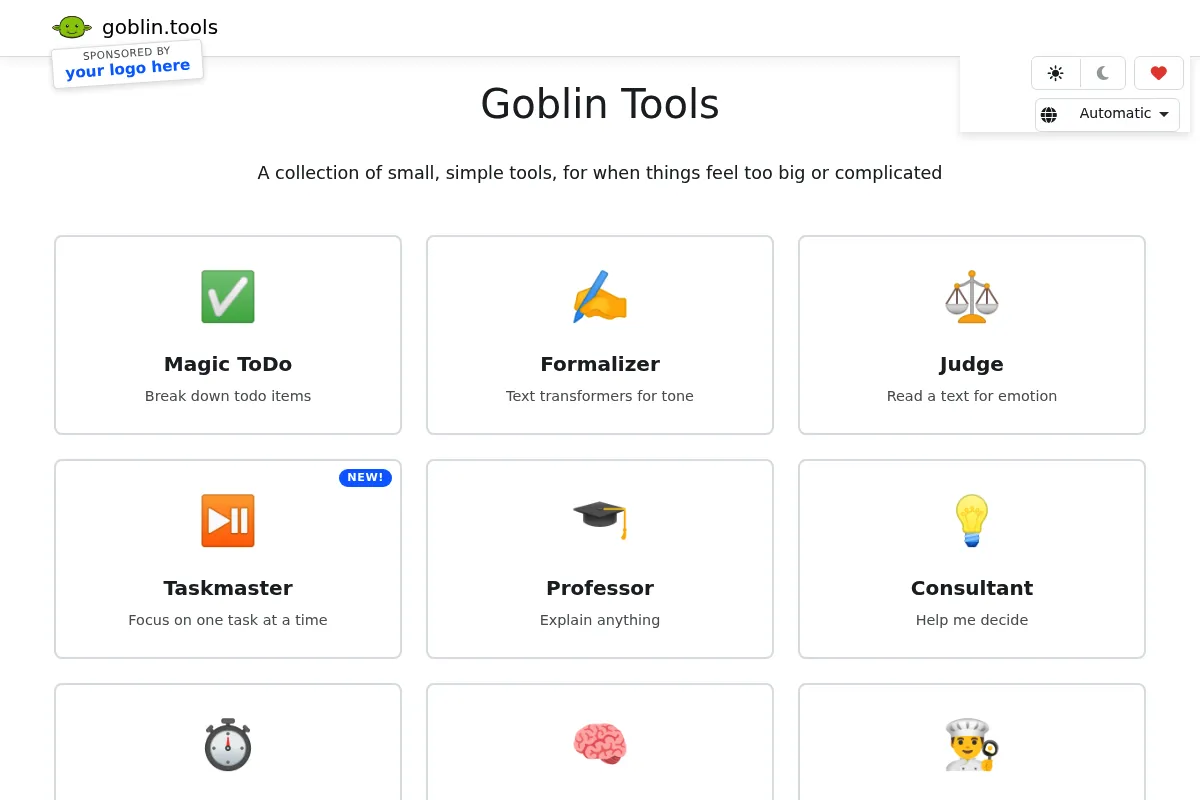
The platform provides six distinct tools: a task decomposer, a tone formalizer, a time estimator, a social tone interpreter, a brain-dump-to-list compiler, and a simplified explainer. It uses LLMs to turn vague prompts into granular, actionable checklists or adjusted text.
What makes it different
Unlike general-purpose AI like ChatGPT, Goblin Tools is architected for a single use case: executive function support. It features a 'spiciness' slider to control the depth of task breakdown, a UI designed for zero-distraction utility, and a pricing model that avoids the predatory subscription patterns common in productivity software.
Ratings across the web

Ratings aggregated from independent review platforms.
Key Features
Magic ToDo
Breaks one big task into a nested list of tiny, manageable steps.
The Formalizer
Rewrites text to be more professional, polite, or concise without changing the meaning.
The Judge
Analyzes a piece of text to tell you the likely emotional tone of the sender.
The Estimator
Provides a range of how long a task will likely take to complete.
The Compiler
Takes a 'brain dump' of thoughts and automatically turns them into a checklist.
The Professor
Explains a concept or task with a focus on clarity and step-by-step logic.
Spiciness Level
A slider that determines how many sub-tasks the AI generates for a single prompt.
Pricing
Web Version
- Access to all 6 tools
- No ads
- Optional account for syncing
- Full AI functionality
Mobile App (iOS/Android)
- Native mobile experience
- Syncs with web account
- Supports ongoing development
- Offline access to basic UI
Pricing checked 4 months ago
Pricing guidance
- When you need to use the tools while away from a computer
- When you want to support the developer's server costs
- When you want a more stable mobile experience than a browser tab
- No API access for developers
- No bulk export features
- Account syncing can occasionally be laggy
Extremely pro-consumer; avoids the 'subscription tax' typical of AI tools.
Pros & Cons
Strengths
-
Zero-friction interface
The lack of complex menus or 'productivity' fluff makes it accessible during moments of high overwhelm or burnout.
-
Highly granular task breakdown
The 'spiciness' slider allows users to break tasks down into steps so small they feel impossible to fail, which is critical for ADHD support.
-
Affordable and ethical pricing
The web version is free and the apps are a low, one-time cost, making it accessible to students and those on fixed incomes.
-
Social anxiety reduction
The Judge and Formalizer tools act as a 'social bridge,' helping users navigate workplace communication without second-guessing their tone.
Weaknesses
-
Limited task management depth
It lacks recurring tasks, reminders, and calendar views. It is a task 'breaker,' not a task 'manager.'
Affects: Users looking for a primary productivity system.
-
No third-party integrations
You cannot sync tasks to Google Calendar, Todoist, or Outlook. Everything stays within the Goblin Tools ecosystem.
Affects: Power users with established workflows.
-
AI hallucinations in estimation
The Estimator can sometimes provide unrealistic timeframes for niche or highly technical tasks as it relies on general LLM patterns.
Affects: Professionals in specialized fields.
Real User Sentiment
Users are overwhelmingly positive, often describing the tool as 'life-changing' for managing daily paralysis.
Users tend to like
- The 'spiciness' slider for task breakdown
- The lack of ads and subscriptions
- The non-judgmental, utility-first design
- The accuracy of the Formalizer for work emails
Users commonly complain about
- Lack of a 'save' feature for individual lists without an account
- Occasional generic AI advice for very specific tasks
- No dark mode on some older browser versions
Recurring tradeoffs
- Users trade advanced features (reminders, tags) for extreme simplicity and ease of use.
Happiest users
Neurodivergent individuals who feel overwhelmed by standard 'to-do' lists and need help starting.
Often frustrated
Project managers or 'power users' who expect the tool to replace a professional suite like ClickUp or Notion.
Use Cases
Cleaning a messy room
Use Magic ToDo to turn 'clean room' into 'pick up 5 socks' and 'clear the nightstand.'
Writing a resignation letter
Use The Formalizer to turn 'I quit because this place is stressful' into a professional notice.
Interpreting a vague text from a boss
Use The Judge to determine if 'We need to talk' is urgent or routine.
Cooking a new recipe
Use The Professor to explain cooking terms or steps that seem confusing.
Planning a move
Use The Estimator to get a realistic idea of how many hours packing will actually take.
Frequently Asked Questions
Is Goblin Tools really free?
Yes, the web version at goblin.tools is completely free to use and does not have ads. The developer charges a small, one-time fee (usually around $2 USD) for the iOS and Android apps to cover server costs and ongoing development.
How does Goblin Tools compare to ChatGPT?
While both use similar AI technology, Goblin Tools is purpose-built with a UI that removes the 'prompt engineering' hurdle. You don't have to explain to Goblin Tools that you have ADHD or need small steps; the interface is already optimized for those specific outcomes.
Does it integrate with other apps like Notion or Todoist?
Currently, there are no direct integrations. You have to manually copy and paste your broken-down tasks into your primary task manager. It is designed as a 'helper' tool rather than a central hub.
Is my data private?
Goblin Tools does not sell your data. If you create an optional account to sync tasks, your data is stored on their servers, but the tool is designed with a privacy-first mindset. However, like all LLM-based tools, you should avoid inputting highly sensitive or confidential information.
Can I use it for work?
Absolutely. The Formalizer and The Judge are particularly popular for neurodivergent professionals who want to ensure their written communication is perceived as intended in a corporate environment.
What is the 'spiciness' slider?
The spiciness slider is a unique feature in the Magic ToDo tool. A low setting gives you 3-4 broad steps, while a high setting (more 'spicy') breaks the task down into dozens of tiny, granular actions.
Why trust this page?
This evaluation combines product positioning, pricing analysis, traffic and market signals, and public user sentiment into a single decision-support page. Content is generated editorially — not copied from the vendor's website.
Funding & Company
Founded
2023
Stage
Bootstrapped
Total Raised
Bootstrapped
Latest Round
—
Goblin Tools is a bootstrapped project created by an individual developer, Bram De Buyser. It has not received any venture capital or external funding. The project sustains itself through low-priced mobile app sales and an optional Patreon, ensuring the web-based tools remain free and accessible.
Market Signals & Traffic
Estimated visits, global rank, geography, traffic sources, monthly visit trends, and organic search keywords (Similarweb)—on a dedicated page built for depth and search.
- Estimated visits
- 848,801
- Global rank
- #72,800
- Snapshot
- Apr 2026
- Traffic trend
- Cooling
Estimated monthly visits
Alternatives to Goblin Tools
View all alternativesMotion
Productivity, Automation

AI-powered productivity platform for scheduling, task, and project management.
Otter.ai
AI Assistant, Productivity, Documentation

AI-powered transcription and meeting assistant for accurate notes and summaries.
Similar Tools
Multi
Communication, Developer Tools, Productivity

Collaborative screen sharing and multiplayer desktop for remote teams.
AiZolo
Productivity, Search, Workflow

Comprehensive directory for discovering and comparing specialized software solutions.
tl;dv
Productivity, Training & Onboarding, Video Creation

AI meeting recorder, transcriber, and summarizer for enhanced productivity.
Jace
AI Assistant, Automation & Agents, Workflow

Autonomous agent for automating complex digital tasks and workflows.
Bookmark AI
AI Assistant, Content Creation, Productivity

AI-powered website builder for non-technical users.
Doodle
Productivity, Communication, Automation

Online scheduling tool for coordinating meetings and group events