

Krisp is an AI-powered audio tool that excels at real-time noise cancellation and offers meeting transcription and summarization, but its AI meeting assistant features are less developed than its core audio processing.
Best for real-time noise cancellation, weaker for advanced AI meeting intelligence.
Analysis based on product data, pricing structure, traffic signals, and public user sentiment.
Who Should Use Krisp?
Typical users
Professionals, remote workers, and teams who frequently participate in online calls and need to eliminate background noise and improve audio clarity. This includes customer support agents, sales teams, and educators.
Maturity fit
beginner to scaling
Choose this if…
- You need to eliminate distracting background noise during calls.
- You want to improve the clarity of your voice for professional communication.
- You need basic transcription and meeting summaries.
- Your primary concern is audio quality over advanced AI meeting insights.
Skip this if…
- You require sophisticated AI meeting analysis, such as sentiment analysis or in-depth conversational insights.
- You need advanced automation or complex workflow integrations beyond basic CRM sync.
- You are looking for a free, unlimited solution for all features.
- Your workflow relies heavily on mobile-only functionality for noise cancellation.
About Krisp
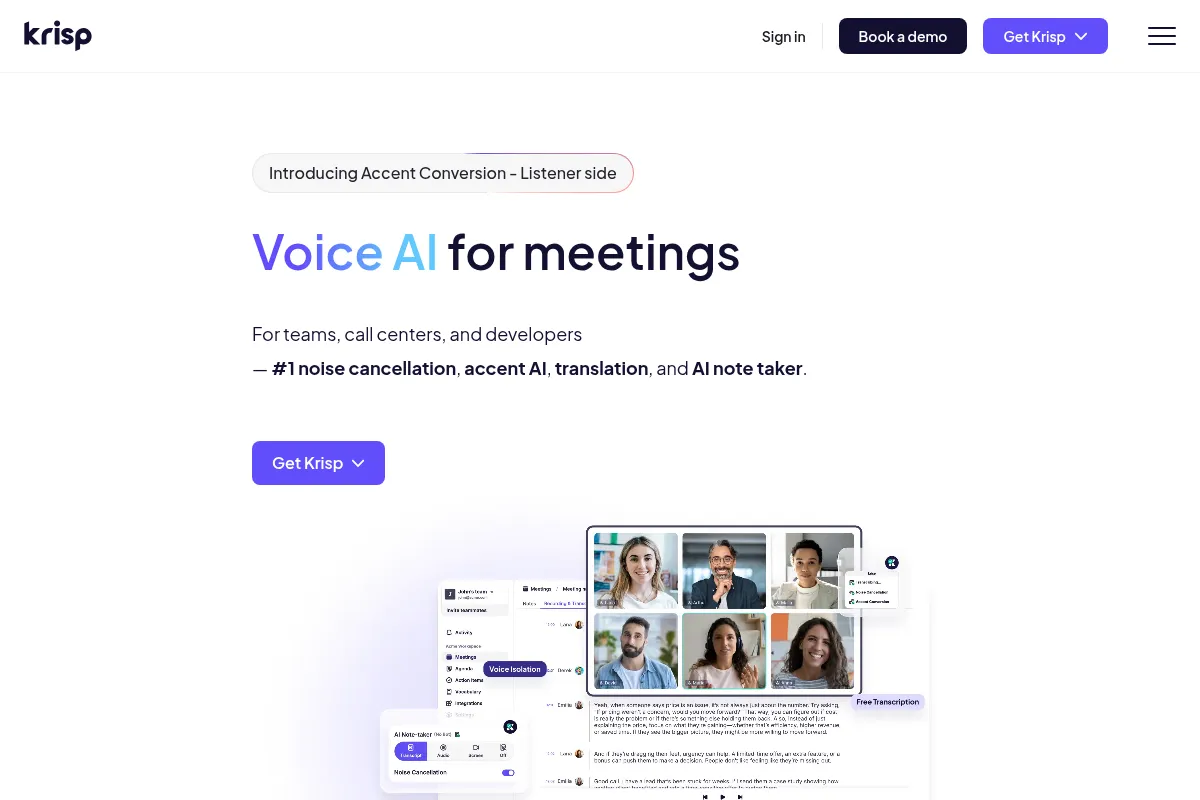
Krisp is an AI-driven platform focused on enhancing digital communication by removing background noise, echoes, and other voices in real-time. It also provides AI-powered transcription and meeting summaries. Krisp prioritizes privacy by processing audio locally on the user's device.
Official profiles
What it actually does
Krisp functions as a virtual audio device that filters out background noise and echoes from your microphone and incoming audio. It offers real-time transcription of meetings and generates summaries with action items. It also includes an accent conversion feature to improve understanding across different accents.
What makes it different
Krisp's core differentiator is its highly effective, bi-directional noise cancellation that processes audio locally for enhanced privacy. While it offers AI meeting assistant features, its strength lies in its audio processing capabilities, setting it apart from tools that focus more heavily on AI-driven meeting intelligence.
Ratings across the web



Ratings aggregated from independent review platforms.
Key Features
AI Noise Cancellation
Eliminates background noise and echoes, ensuring clear audio for both outgoing and incoming calls.
Bot-Free Recording
Captures meeting content without joining as a participant, maintaining a natural conversation flow and privacy.
Real-Time Transcription
Automatically transcribes meetings, providing searchable text for easy reference and documentation.
Meeting Summaries and Action Items
Generates concise summaries and extracts key action items to streamline follow-up and boost productivity.
Accent Localization
Modifies accents in real-time to improve understanding for global audiences without altering voice identity.
On-Device Processing
Processes audio locally for enhanced privacy and security, as audio streams are not sent to external servers.
Broad Compatibility
Works as a virtual microphone/speaker with over 800 communication apps, including Zoom, Microsoft Teams, and Google Meet.
Pricing
Free
- 60 minutes noise cancellation daily
- Unlimited transcription
- 2 AI summaries daily
- Bot-free recording
- Custom vocabulary (750 words)
- 10+ languages support
Core
- Unlimited noise cancellation
- Unlimited transcription
- Unlimited AI summaries
- Bot-free recording
- 5GB storage
- 17+ languages support
- Basic CRM integrations (HubSpot, Slack, Zapier)
Business
- Unlimited noise cancellation
- Unlimited transcription
- Unlimited AI summaries
- Bot-free recording
- 30GB storage
- 4hr/day Accent Conversion (speaker side)
- SSO/SCIM
- Advanced integrations (Salesforce, ConnectWise)
Enterprise
- Unlimited noise cancellation
- Unlimited transcription
- Unlimited AI summaries
- Bot-free recording
- Unlimited storage
- On-device transcription
- SSO/SCIM
- HIPAA compliance (optional)
- Dedicated account manager
Pricing checked 6 months ago
Pricing guidance
- When you exceed the 60 minutes of daily noise cancellation.
- When you need more than 2 AI meeting summaries per day.
- When you require unlimited transcription and recording storage.
- When you need advanced features like SSO/SCIM or deeper CRM integrations.
- The free plan has daily time limits for noise cancellation and AI summaries.
- Storage limits on paid plans can be reached quickly with video recordings.
- Accent conversion is limited on the Business plan (4hr/day speaker side).
- Advanced CRM integrations are not available on the Core plan.
Krisp offers competitive pricing for its core noise cancellation features, with a tiered structure that scales from a limited free plan to enterprise solutions. The Core plan is particularly well-priced for individuals and small teams.
Pros & Cons
Strengths
-
Superior Noise Cancellation
Krisp's AI-powered noise cancellation is consistently praised for its effectiveness in removing background distractions, making calls clearer and more professional.
-
Privacy-Focused Design
All audio processing occurs locally on the user's device, ensuring that conversations are not uploaded to the cloud, which is a significant benefit for privacy-conscious users.
-
Broad Compatibility
Krisp integrates with a vast number of communication apps and platforms, functioning as a virtual audio device that works across most software.
-
Bot-Free Recording
The ability to record meetings without a visible bot joining the call enhances privacy and maintains a more natural meeting dynamic.
Weaknesses
-
Limited AI Meeting Assistant Features
While Krisp offers transcription and summaries, users report that these AI features are basic and lack the depth of more specialized AI meeting intelligence tools.
Affects: Users needing advanced AI insights.
-
Free Plan Limitations
The free plan has daily caps on noise cancellation minutes and AI summaries, which can be restrictive for frequent users.
Affects: Frequent users and teams on a budget.
-
Potential Voice Distortion
Some users report occasional voice distortion or choppiness, particularly with certain accent combinations or when noise cancellation is heavily applied.
Affects: Users sensitive to voice quality nuances.
-
Desktop App Requirement for Noise Cancellation
While mobile apps exist for transcription, the core noise cancellation feature is primarily limited to the desktop application.
Affects: Users who rely on mobile-first workflows for calls.
Real User Sentiment
Users generally praise Krisp for its core noise cancellation capabilities, ease of use, and privacy features. However, sentiment around its AI meeting assistant features is more mixed, with some finding them basic.
Users tend to like
- Effective noise cancellation
- Ease of use and setup
- Bot-free recording
- Privacy due to on-device processing
- Broad compatibility with apps
Users commonly complain about
- AI meeting assistant features are basic/undercooked
- Occasional voice distortion or choppiness
- Free plan limitations can be restrictive
- Inconsistent transcription accuracy reported by some
- Customer support and refund issues cited by a few
Recurring tradeoffs
- Excellent noise cancellation vs. basic AI meeting intelligence
- Local processing for privacy vs. potential for higher CPU usage
- Affordable core features vs. cost for advanced AI capabilities
Happiest users
Remote workers and professionals in noisy environments who prioritize clear audio and simple meeting notes.
Often frustrated
Users seeking advanced AI meeting analysis, complex automation, or unlimited features on a free plan.
Use Cases
Remote worker needing to eliminate background noise during calls.
Sales professional wanting to ensure clear audio during client pitches.
Customer support agent working in a noisy environment.
Educator needing to maintain audio clarity during online lectures.
Team member needing basic meeting transcriptions and summaries.
Freelancer requiring professional audio quality for client consultations.
Hybrid worker needing consistent audio performance across different locations.
Frequently Asked Questions
What is Krisp's free plan and what are its limitations?
Krisp offers a free plan that includes 60 minutes of daily noise cancellation, unlimited transcriptions, and two AI-generated meeting notes per day. It also supports custom vocabulary and over 10 languages. The main limitations are the daily time caps on noise cancellation and AI summaries, which can be restrictive for frequent users. The free plan also has limited storage and may not include all advanced features found in paid tiers.
How does Krisp compare to built-in noise cancellation in Zoom or Microsoft Teams?
Krisp's noise cancellation is generally considered more robust and effective than the built-in options in platforms like Zoom and Microsoft Teams. Krisp uses AI to process audio locally on your device, offering bi-directional noise cancellation (cleaning both your outgoing and incoming audio) and often achieving higher levels of noise reduction. While built-in features are convenient, Krisp provides a more specialized and often superior audio enhancement experience, especially in very noisy environments. However, built-in features are free and require no additional software.
What are the main limitations of Krisp's AI meeting assistant features?
While Krisp offers transcription and AI-generated summaries, users often find these features to be basic compared to dedicated AI meeting intelligence tools. The summaries may lack depth, and the transcription accuracy can sometimes be inconsistent, especially with multiple languages or complex jargon. If your primary need is advanced AI analysis, sentiment tracking, or in-depth conversational insights, Krisp's AI assistant may not be sufficient.
Does Krisp work on mobile devices?
Krisp offers mobile apps for iOS and Android, primarily for transcription and note-taking. However, the core AI noise cancellation feature is mainly available on the desktop application for Windows and macOS. The mobile apps are useful for capturing meeting details on the go, but they do not provide the same level of audio enhancement as the desktop version.
What integrations does Krisp offer?
Krisp integrates with a wide range of communication apps and platforms, including Zoom, Microsoft Teams, Google Meet, Slack, and Discord, functioning as a virtual audio device. For workflow automation, it offers Zapier integration. Higher-tier plans, like the Business and Enterprise plans, offer more advanced CRM integrations such as HubSpot, Salesforce, and ConnectWise. However, some users note that the integration ecosystem is still developing, with some desired integrations listed as 'coming soon'.
Is Krisp's local processing truly private?
Yes, Krisp emphasizes privacy by processing audio locally on your device. This means that your audio streams are not sent to Krisp's servers for filtering or analysis, which significantly enhances data security and privacy. This on-device processing is a key differentiator for users concerned about sensitive information being transmitted online.
What is the best Krisp plan for a small team?
For small teams that require unlimited noise cancellation, transcription, and AI summaries, the Core plan at $8/month (billed annually) is likely the best value. It removes the daily limits of the free plan and provides essential features for consistent use. If advanced integrations or more extensive accent conversion are needed, the Business plan would be the next step up.
Why trust this page?
This evaluation combines product positioning, pricing analysis, traffic and market signals, and public user sentiment into a single decision-support page. Content is generated editorially — not copied from the vendor's website.
Funding & Company
Founded
2017
Stage
Series a
Total Raised
$15.5M
Latest Round
Series A (Feb 2021)
Notable Investors
Krisp has raised a total of $15.5 million over three rounds, concluding with a $9 million Series A in early 2021. This funding, from investors like RTP Global and Storm Ventures, was secured to expand its AI-powered noise cancellation and voice productivity features. The capital provides a solid foundation for product development and enterprise market expansion.
Market Signals & Traffic
Estimated visits, global rank, geography, traffic sources, monthly visit trends, and organic search keywords (Similarweb)—on a dedicated page built for depth and search.
- Estimated visits
- 681,891
- Global rank
- #64,284
- Snapshot
- Apr 2026
- Traffic trend
- Cooling
Estimated monthly visits
Alternatives to Krisp
View all alternativesOtter.ai
AI Assistant, Productivity, Documentation
AI-powered transcription and meeting assistant for accurate notes and summaries.
Fathom
Productivity, Video Creation, AI Assistant

AI notetaker that records, transcribes, and summarizes meetings.
Fireflies.ai
AI Assistant, Productivity, Documentation
AI meeting assistant that records, transcribes, and summarizes calls.
Similar Tools
Hugo
AI Assistant, Productivity, Communication

Centralized workspace for agencies to manage email, tasks, and calendars.
Noty
AI Assistant, Productivity, Communication

Meeting assistant for automated transcription, summaries, and action items.
Omi (Based Hardware)
AI Assistant, Productivity, Communication

Wearable necklace that transcribes and summarizes real-world conversations
Aymo AI
AI Assistant, Productivity, Communication

Personal assistant for managing tasks and information via WhatsApp.
Adam.ai
AI Assistant, Productivity, Communication

Comprehensive platform for managing meeting agendas, notes, and action items.
Harvey
AI Assistant, Automation, Documentation

Professional services platform for legal research and document analysis