

A meeting assistant focused on the post-call workflow that bridges the gap between transcription and CRM data entry, particularly for Google Meet users.
Excellent for sales teams using Google Meet and HubSpot, weaker for users requiring high-fidelity video editing or advanced clip sharing.
Analysis based on product data, pricing structure, traffic signals, and public user sentiment.
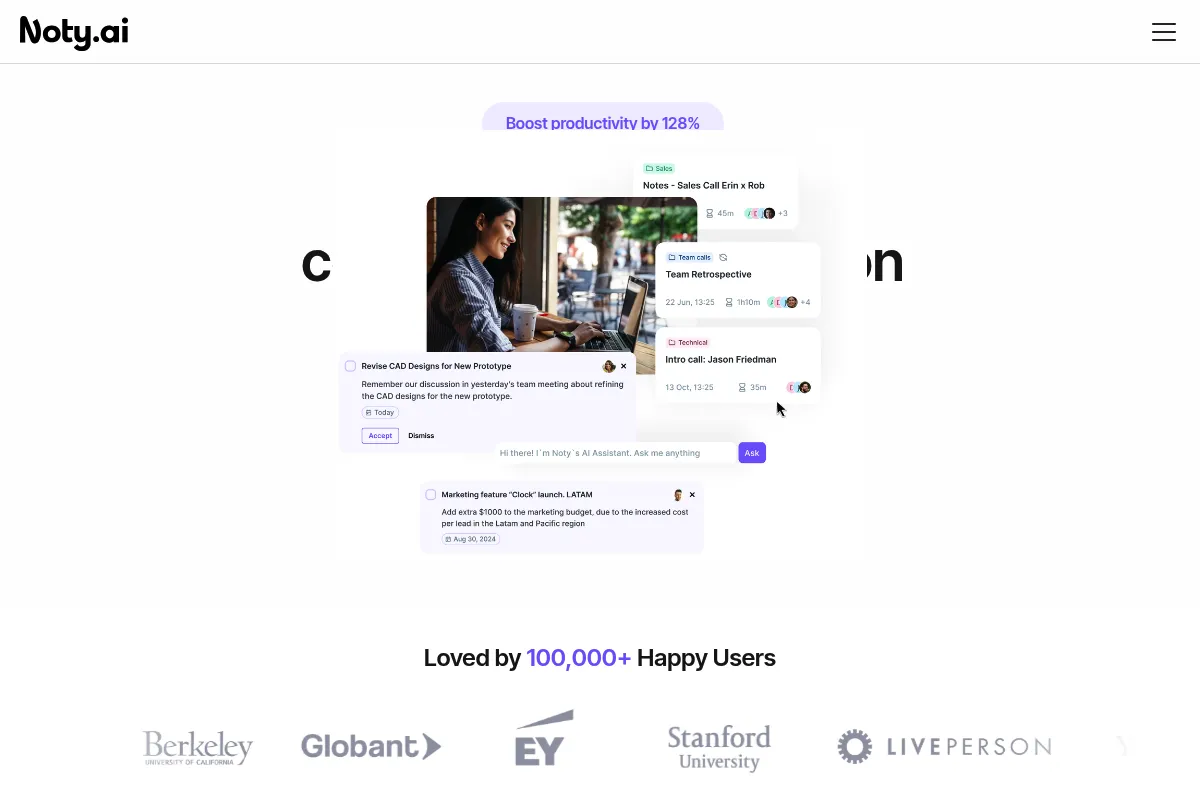
Who Should Use Noty?
Typical users
Sales representatives, account managers, and project leads in small to mid-sized agencies.
Maturity fit
beginner to scaling
Choose this if…
- Your team primarily uses Google Meet and wants a native-feeling Chrome extension experience
- Your priority is automating follow-up emails and CRM updates over just recording video
- You want a meeting assistant that doesn't always require a visible bot to join the call
Skip this if…
- You need to edit and share video 'reels' or clips frequently for product feedback
- You require 99% transcription accuracy for highly technical or medical terminology
- Your workflow is centered entirely around Zoom or Microsoft Teams where the experience is less optimized than Google Meet
About Noty
Noty is an AI meeting productivity tool that automates the transition from conversation to documentation. It focuses on capturing transcripts and converting them into structured summaries, tasks, and follow-up drafts for distributed teams.
Official profiles
What it actually does
The tool records, transcribes, and summarizes meetings across Google Meet, Zoom, and Teams. It automatically extracts action items and allows users to sync these insights directly into CRMs like HubSpot or Salesforce and communication tools like Slack.
What makes it different
Noty prioritizes the Google Meet ecosystem through a Chrome extension that captures transcripts without always needing an external bot participant. Its 'Follow-up' engine is more aggressive than competitors, specifically designed to draft ready-to-send emails immediately after a call ends.
Ratings across the web

Ratings aggregated from independent review platforms.
Key Features
Chrome Extension for Google Meet
Captures transcripts natively within the browser, avoiding the 'bot-in-the-room' friction.
AI Follow-up Drafts
Generates formatted email summaries based on call context to reduce post-meeting admin time.
One-Click CRM Sync
Pushes meeting notes and identified action items directly to specific contact or deal records.
Action Item Identification
Uses NLP to flag commitments made during the call and organizes them into a checklist.
Meeting Highlights
Allows users to mark important moments during the live call for easier review later.
Cross-Platform Search
Enables keyword searching across all past transcriptions to find specific decisions or mentions.
Team Workspaces
Centralizes meeting recordings for specific departments or projects to improve knowledge sharing.
Pricing
Free
- 10 meetings per month
- 100 transcriptions total
- Basic AI summaries
- Google Meet & Zoom support
Pro
- Unlimited meetings
- Advanced AI summaries
- Full CRM integrations
- Follow-up email drafts
Business
- Team workspace management
- Centralized billing
- Priority support
- Advanced collaboration tools
Pricing checked 4 months ago
Pricing guidance
- When you exceed 10 meetings in a single month
- When you need to sync notes directly to HubSpot or Salesforce
- When you want to use the automated follow-up email generator
- Transcription minutes are capped on the free tier
- Advanced AI features are locked behind the Pro paywall
- Team sharing features require the Business tier
Competitive pricing that sits slightly below Otter.ai and Fireflies.ai, positioning it as a value-driven alternative.
Pros & Cons
Strengths
-
Low-friction Google Meet integration
The Chrome extension allows for a more integrated experience compared to competitors that rely solely on joining as a guest participant.
-
Strong follow-up automation
The tool effectively bridges the gap between 'having a meeting' and 'taking action' by drafting the next-step emails automatically.
-
CRM-centric workflow
The deep integration with HubSpot and Salesforce makes it a practical choice for sales teams who struggle with manual data entry.
Weaknesses
-
Transcription accuracy varies
While competent for standard English, it can struggle with heavy accents or niche industry jargon compared to premium engines like Otter.
Affects: International teams or technical engineering groups
-
Cluttered web interface
The dashboard can feel overwhelming with too many competing buttons and sections, making it harder to find specific recordings quickly.
Affects: Users who prefer minimalist, high-speed interfaces
-
Secondary platform experience
The experience on Zoom and Microsoft Teams feels less polished and more like a standard 'bot' implementation than the Google Meet version.
Affects: Teams running multi-platform meeting environments
Real User Sentiment
Generally positive for its utility in sales, though users frequently compare its transcription quality to more established players.
Users tend to like
- The Google Meet Chrome extension
- Speed of generating follow-up emails
- Ease of syncing to HubSpot
- The ability to highlight moments live
Users commonly complain about
- Occasional transcription errors with non-native speakers
- The UI feels a bit dated compared to Fathom
- Bot occasionally fails to join Zoom calls
Recurring tradeoffs
- You trade some transcription precision for better CRM and follow-up automation features.
Happiest users
Sales reps who hate manual CRM entry and live in Google Meet.
Often frustrated
Power users who need to do heavy video editing or those on the free plan who hit limits quickly.
Use Cases
Sales Discovery
Capturing pain points and automatically syncing them to a HubSpot deal record.
Project Kickoffs
Extracting action items and pushing them directly to Jira for the dev team.
Recruitment Interviews
Summarizing candidate responses to share with hiring managers who couldn't attend.
Client Success Calls
Drafting a summary email to the client immediately after the call to confirm next steps.
Internal Standups
Keeping a searchable record of decisions made during quick syncs.
Frequently Asked Questions
Does Noty.ai work with the free version of Google Meet?
Yes, Noty works with free Google Meet accounts via its Chrome extension, though the recording features may depend on your browser's ability to capture audio/video streams.
How does Noty compare to Otter.ai?
Otter.ai generally has superior transcription accuracy and better mobile apps, but Noty offers tighter CRM integrations and a more specialized 'follow-up' workflow for sales teams at a slightly lower price point.
Is there a limit on how many meetings I can record?
The Free plan limits you to 10 meetings per month. The Pro and Business plans offer unlimited meeting recording and transcription.
Can I use Noty without a bot joining my meeting?
On Google Meet, you can use the Chrome extension to capture the transcript without a visible bot. For Zoom and Microsoft Teams, an assistant bot must join the call to record and transcribe.
What CRMs does Noty integrate with?
Noty currently supports direct integrations with HubSpot and Salesforce, allowing you to sync transcripts and tasks to specific records.
Does Noty support languages other than English?
Yes, Noty supports over 18 languages, including Spanish, French, German, and Portuguese, though transcription accuracy is highest for English.
Why trust this page?
This evaluation combines product positioning, pricing analysis, traffic and market signals, and public user sentiment into a single decision-support page. Content is generated editorially — not copied from the vendor's website.
Market Signals & Traffic
Estimated visits, global rank, geography, traffic sources, monthly visit trends, and organic search keywords (Similarweb)—on a dedicated page built for depth and search.
- Estimated visits
- 55,704
- Global rank
- #560,046
- Snapshot
- May 2026
- Traffic trend
- Surging
Estimated monthly visits
Alternatives to Noty
View all alternativesOtter.ai
AI Assistant, Productivity, Documentation
AI-powered transcription and meeting assistant for accurate notes and summaries.
Fireflies.ai
AI Assistant, Productivity, Documentation
AI meeting assistant that records, transcribes, and summarizes calls.
Fathom
Productivity, Video Creation, AI Assistant

AI notetaker that records, transcribes, and summarizes meetings.
Similar Tools
Hugo
AI Assistant, Productivity, Communication

Centralized workspace for agencies to manage email, tasks, and calendars.
Omi (Based Hardware)
AI Assistant, Productivity, Communication

Wearable necklace that transcribes and summarizes real-world conversations
Krisp
AI Assistant, Productivity, Communication

AI-powered noise cancellation and meeting assistant for clear communication.
Aymo AI
AI Assistant, Productivity, Communication

Personal assistant for managing tasks and information via WhatsApp.
Adam.ai
AI Assistant, Productivity, Communication
Comprehensive platform for managing meeting agendas, notes, and action items.
Alteryx
Automation, Productivity, Research

Automated data analytics platform for end-to-end business insights