

Recall
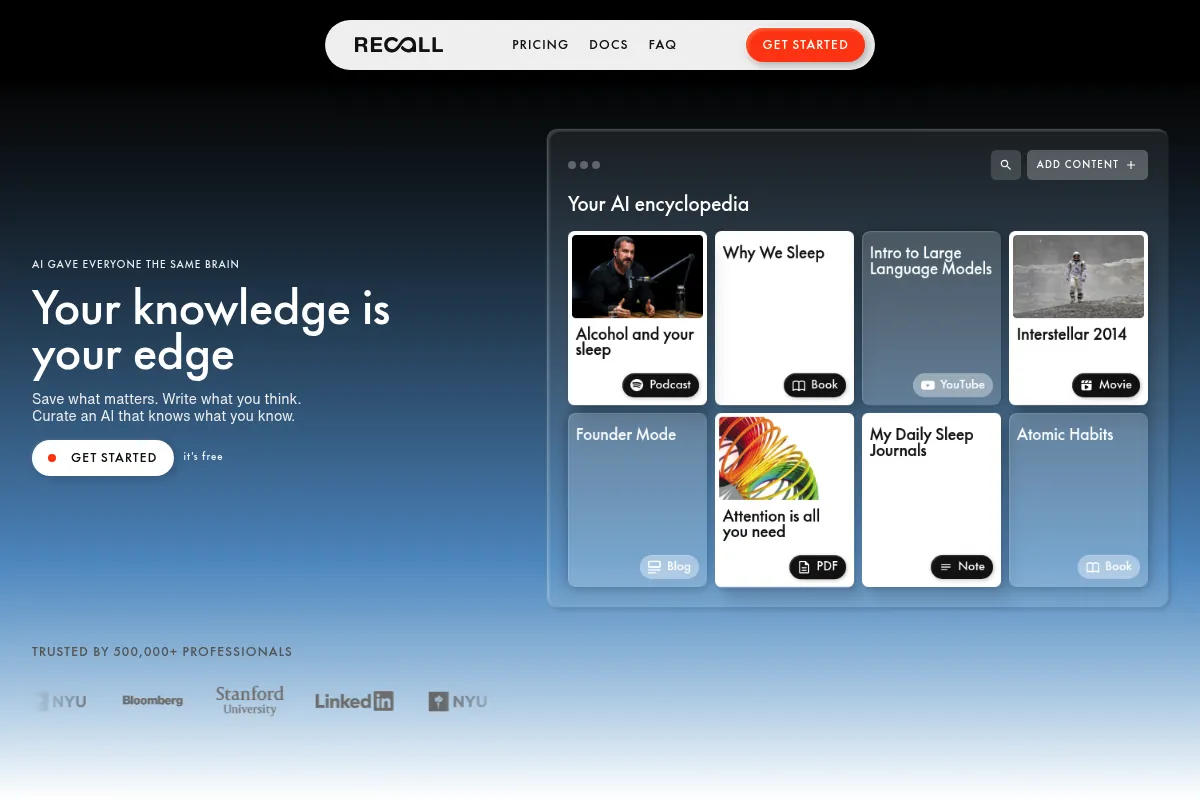
A summarization tool that prioritizes long-term retention over quick reading by connecting disparate web content into a structured knowledge graph.
Excellent for researchers who consume high volumes of YouTube and long-form articles, weaker for users needing deep analysis of local PDF files.
Analysis based on product data, pricing structure, traffic signals, and public user sentiment.
Who Should Use Recall?
Typical users
Lifelong learners, content curators, and researchers who need to synthesize information from multiple media formats.
Maturity fit
beginner to scaling
Choose this if…
- Your primary information sources are YouTube videos and web articles.
- You want your summaries automatically categorized and linked to related topics.
- You struggle to remember what you read and need built-in spaced repetition.
- You prefer a browser-first workflow rather than switching to a separate note-taking app.
Skip this if…
- Your workflow relies heavily on local PDF documents or offline files.
- You need a full-featured writing environment or markdown editor.
- You only need occasional summaries and don't care about building a long-term library.
About Recall
Recall is a knowledge management tool designed to capture, summarize, and organize digital content. It focuses on the 'collector's fallacy' by forcing users to categorize and revisit information through a personal knowledge graph and spaced repetition system.
Official profiles
What it actually does
It extracts key insights from YouTube videos, articles, and podcasts via a browser extension. These summaries are then stored in a networked database where the tool automatically identifies connections between new and existing entries.
What makes it different
Unlike standard AI summarizers that provide one-off text blocks, Recall treats every summary as a node in a graph. It automatically links mentions of people, companies, or concepts across different sources, mimicking the bidirectional linking found in tools like Obsidian but with automated metadata generation.
Key Features
Knowledge Graph
Automatically links related summaries based on shared entities and topics.
YouTube Summarizer
Provides structured breakdowns of videos including key takeaways and time-stamped sections.
Spaced Repetition
Resurfaces saved information at intervals to improve long-term memory retention.
Automatic Categorization
Tags and files content into folders without manual user input.
Browser Extension
Allows one-click saving and summarizing without leaving the current tab.
Entity Extraction
Identifies specific people, places, and organizations within content to build a personal wiki.
Review Queue
A dedicated feed for revisiting past summaries to ensure they aren't forgotten.
Pricing
Free
- 5 summaries per month
- Basic knowledge graph
- Browser extension access
- Limited spaced repetition
Recall Pro (Annual)
- Unlimited summaries
- Full knowledge graph access
- Advanced spaced repetition
- Priority support
- Early access to new features
Recall Pro (Monthly)
- Unlimited summaries
- Full knowledge graph access
- Advanced spaced repetition
- No long-term commitment
Pricing checked 4 months ago
Pricing guidance
- When you exceed 5 summaries in a single month
- When you want to build a large, interconnected knowledge graph
- When you need to use the spaced repetition features for more than a few items
- The free tier limits the number of 'mentions' or links in the graph
- Some advanced export features may be gated behind the Pro tier
Competitive pricing that aligns with other niche AI research tools like Readwise or Glasp.
Pros & Cons
Strengths
-
Superior YouTube integration
It handles video content better than most general-purpose AI tools, providing clear timestamps that link directly back to the video source.
-
Automated organization
The tool reduces the 'organizing tax' by suggesting categories and linking related notes, which is ideal for users who hate manual filing.
-
Retention-focused design
By integrating spaced repetition, it moves beyond simple bookmarking into active learning and knowledge management.
-
Clean, focused UI
The interface avoids the clutter of traditional 'all-in-one' workspaces, making it easy to focus on the content itself.
Weaknesses
-
Limited PDF support
While it excels at web content, its ability to process and summarize local PDF files is currently behind competitors like NotebookLM.
Affects: Academic researchers and corporate users
-
Summary quality variance
Like all LLM-based tools, it can occasionally miss nuance in highly technical or abstract content, requiring manual correction.
Affects: Users in niche or highly technical fields
-
Mobile experience is secondary
The tool is most effective as a desktop browser extension; the mobile experience feels less integrated for quick capture.
Affects: Users who do most of their reading on phones or tablets
Real User Sentiment
Users generally appreciate the tool for its ability to turn passive consumption into a structured library, though some find the graph view more aesthetic than functional.
Users tend to like
- The speed and accuracy of YouTube summaries
- The automatic linking of related topics
- The ability to export clean summaries to Notion
- The browser extension's ease of use
Users commonly complain about
- The 5-summary free limit is too restrictive
- Occasional hallucinations in summaries
- Lack of a robust mobile application
Recurring tradeoffs
- Users trade deep manual control over their notes for the speed of automated AI summarization and linking.
Happiest users
Students and content creators who need to quickly digest and organize hours of video content.
Often frustrated
Power users who want total control over their knowledge graph's architecture or those who work primarily with offline documents.
Use Cases
Student Research
Summarizing a series of educational YouTube videos and linking them to a central exam topic.
Content Creation
Curating insights from various articles to build a background library for a newsletter or video script.
Professional Development
Tracking key takeaways from industry podcasts and webinars without taking manual notes.
Personal Interest
Building a 'second brain' of recipes, travel tips, or hobby-related information found across the web.
Competitive Intelligence
Monitoring and summarizing competitor blog posts and news to identify industry trends.
Frequently Asked Questions
How does Recall compare to Readwise Reader?
Readwise Reader is primarily a 'read-it-later' app with highlighting and basic AI features. Recall focuses more on the automated summarization and the visual connection of those summaries in a knowledge graph. Choose Recall if you want the AI to do more of the organizing for you; choose Readwise if you prefer manual highlighting and a superior reading experience.
Is there a free version of Recall?
Yes, Recall offers a free tier, but it is very limited. You only get 5 summaries per month. This is mostly intended to let you test the quality of the summaries and the interface before committing to a Pro subscription at $8-$10 per month.
Can Recall summarize YouTube videos?
Yes, this is one of its core strengths. It provides a full transcript-based summary with timestamps. You can click any part of the summary to jump to that specific moment in the video, which is highly effective for long-form educational content.
Does Recall work with PDFs?
Recall is primarily designed for web-based content (URLs). While it has some capability to handle online PDFs, it is not a dedicated PDF analysis tool. If your primary need is chatting with local PDF documents, tools like NotebookLM or ChatPDF are better suited.
Can I export my summaries to other apps?
Yes, Recall supports exports to popular note-taking apps including Notion and Obsidian. It also integrates with Readwise, allowing you to sync your summaries into your existing highlight workflow.
What is the 'Knowledge Graph' in Recall?
The Knowledge Graph is a visual representation of your saved content. When you save a summary, Recall identifies 'entities' (like 'Artificial Intelligence' or 'Elon Musk') and automatically links that summary to every other summary in your library that mentions the same entity.
Why trust this page?
This evaluation combines product positioning, pricing analysis, traffic and market signals, and public user sentiment into a single decision-support page. Content is generated editorially — not copied from the vendor's website.
Funding & Company
Founded
2022
Stage
Seed
Total Raised
$1.62M
Latest Round
Seed (Dec 2024)
Notable Investors
Recall has raised a total of $1.62 million over two seed-stage rounds in 2024, with LAUNCH Accelerator as a known investor. This early-stage funding suggests the company is in its initial phase of product development and market entry. The modest funding amount is typical for a seed-stage company and will likely be used to expand its small team and refine its product.
Market Signals & Traffic
Estimated visits, global rank, geography, traffic sources, monthly visit trends, and organic search keywords (Similarweb)—on a dedicated page built for depth and search.
- Estimated visits
- 352,306
- Global rank
- #128,893
- Snapshot
- Apr 2026
- Traffic trend
- Falling
Estimated monthly visits
Alternatives to Recall
View all alternatives
Similar Tools
RemNote
Productivity, Research, Documentation

Note-taking platform with integrated flashcards and PDF annotation tools.
Dumme
Content Creation, Social Media, Video Creation

Turn long-form videos into viral short-form clips automatically.
Epidemic Sound
Content Creation, Video Creation

Royalty-free music and sound effects library for content creators.
Pieces
Developer Tools, Productivity, AI Assistant

Workflow copilot for capturing and managing developer context and snippets.
Mendable
Documentation, Search, Developer Tools

Search and chat interface for technical documentation and knowledge bases.
Mem AI
Productivity, AI Assistant

AI-powered note-taking and knowledge management app.