

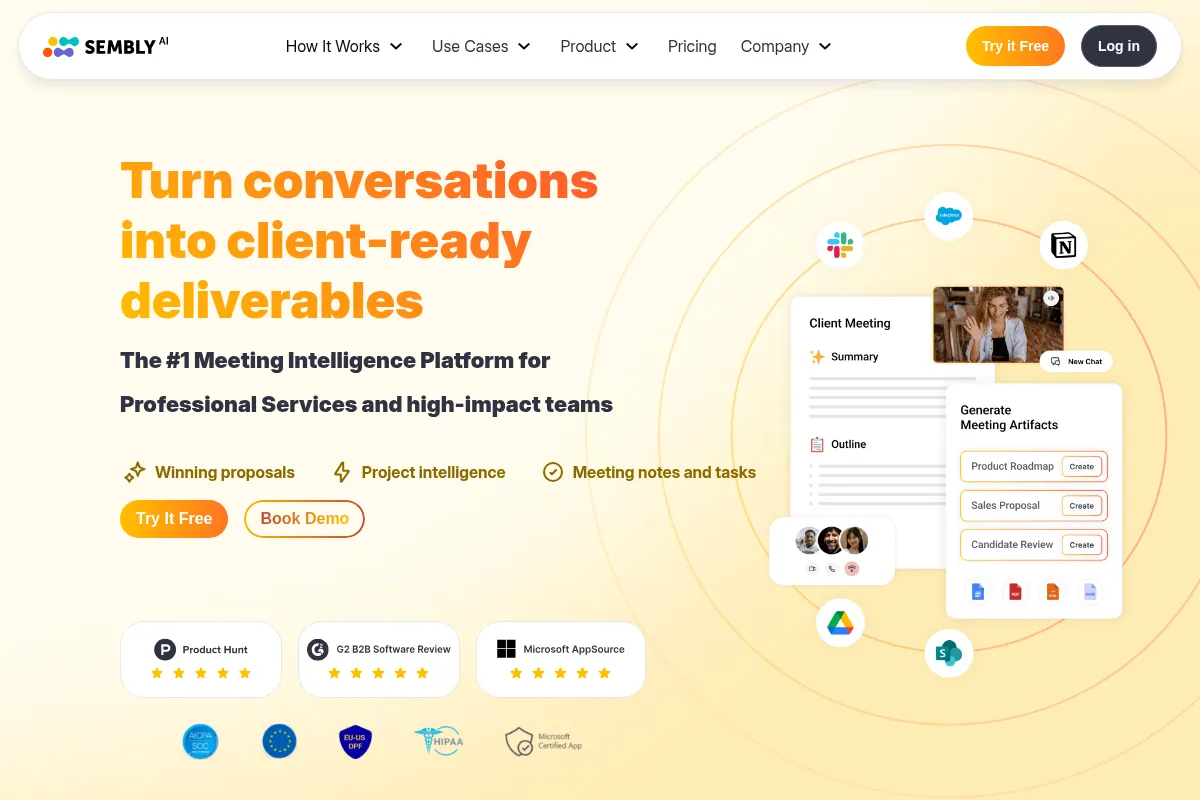
Sembly is an AI meeting assistant that automates transcription, summarization, and action item extraction, best for teams that need to quickly process meeting content into actionable outputs.
Excellent for teams needing automated meeting summaries and action items, weaker for complex transcription needs or deep voice analysis.
Analysis based on product data, pricing structure, traffic signals, and public user sentiment.
Who Should Use Sembly?
Typical users
Teams and professionals who regularly attend virtual meetings and need to efficiently capture, summarize, and act on meeting outcomes. This includes project managers, sales teams, customer success managers, and individual contributors seeking to reduce manual note-taking.
Maturity fit
beginner to scaling
Choose this if…
- You need to automate meeting note-taking and summarization.
- Your priority is extracting action items and decisions from meetings.
- You want to generate documents or reports directly from meeting content.
- You need to search across multiple meeting transcripts for specific information.
Skip this if…
- You require highly accurate, nuanced transcription for legal or highly technical purposes.
- Your primary need is raw speech-to-text API access for custom development.
- You need advanced sentiment analysis or detailed voice biometrics.
- You have a very small budget and only need basic transcription for occasional use.
About Sembly
Sembly AI is an AI-powered meeting assistant designed to record, transcribe, and analyze virtual meetings. It aims to transform spoken conversations into searchable knowledge, providing summaries, action items, and even document generation to improve team productivity and follow-through.
What it actually does
Sembly AI automatically joins virtual meetings, records the audio, transcribes it into text, and then generates summaries, identifies action items, decisions, and risks. It also offers features like multi-meeting chat for searching across conversations and AI-generated document creation from meeting content.
What makes it different
Sembly differentiates itself by focusing on generating tangible outputs from meetings, such as AI-generated documents (e.g., sales proposals, project plans) and providing multi-meeting intelligence through its AI chat feature. It aims to be more than just a transcription tool, acting as a proactive assistant that turns conversations into actionable deliverables.
Ratings across the web



Ratings aggregated from independent review platforms.
Key Features
AI Meeting Summaries
Provides concise, structured summaries of meetings, highlighting key discussion points, decisions, and action items, saving users time from reviewing full transcripts.
Action Item Detection
Automatically identifies and lists action items, owners, and due dates mentioned during meetings, ensuring accountability and follow-through.
Multi-Meeting AI Chat
Allows users to ask questions across their entire meeting history, enabling quick retrieval of context and insights from multiple conversations.
AI Artifacts (Document Generation)
Generates structured documents like sales proposals or project plans directly from meeting content, streamlining the creation of deliverables.
Speaker Identification
Differentiates between speakers in a meeting, making transcripts and summaries easier to follow and attribute.
Multilingual Support
Transcribes and supports meetings in over 48 languages, making it suitable for global teams.
Pricing
Personal
- 60 minutes recording/upload per month
- Basic AI meeting notes, tasks, automations
- 1 workspace member
- Limited meeting history (4 months)
Professional
- Unlimited recording
- 900 minutes upload capacity per month
- Video recording support
- Semblian 2.0 (advanced AI assistant)
- Workspace credits
- Unlimited meeting history
Team
- All Professional features
- Collaboration and shared AI meeting features
- Up to 500 user limit per workspace
- HD video recording
- Sharing Groups
MAX
- All Team features
- Advanced workspace controls (auto-sharing, custom SSO, SMTP)
- Deeper analytics
- HIPAA compliance
- Audit log
Enterprise
- Custom contracts
- Administrative handling
- Special support
- All MAX features
Pricing checked 6 months ago
Pricing guidance
- When you need more than 60 minutes of recording/upload per month.
- When you require collaboration features for multiple team members.
- When you need advanced controls like custom SSO or deeper analytics.
- When you need to generate AI-generated documents or use the advanced AI assistant.
- The free plan's meeting history is limited to 4 months.
- While transcription is supported in 48+ languages, AI-generated summaries currently default to English.
- The 'unlimited' recording applies to built-in recording; uploaded file limits still apply per plan.
- The free trial for Professional and Team plans is 30 days, after which users are moved to the Basic free trial mode if not upgraded.
Tiered pricing with a very limited free tier, becoming progressively more feature-rich and collaborative at higher price points, with custom options for enterprises.
Pros & Cons
Strengths
-
Efficient Meeting Processing
Sembly excels at quickly transcribing and summarizing meetings, identifying key takeaways like action items and decisions, which significantly reduces manual note-taking effort.
-
Actionable Deliverables
The ability to generate documents (AI Artifacts) directly from meeting content is a unique advantage, turning discussions into tangible outputs like proposals or project plans.
-
Cross-Meeting Intelligence
The Multi-Meeting AI Chat feature allows users to query their entire meeting history, providing deep insights and context that would be difficult to gather manually.
-
Broad Integrations
Sembly integrates with over 50 tools, including popular CRM and productivity platforms, allowing for seamless workflow automation and data syncing.
-
Multilingual Capabilities
Supports over 48 languages for transcription, making it a valuable tool for international teams and diverse communication needs.
Weaknesses
-
Speaker Recognition Inaccuracies
The AI can struggle to accurately identify speakers, especially in larger meetings or with similar voices, requiring manual correction.
Affects: Users in large or complex meetings
-
Limited Free Plan
The free plan's 60-minute monthly limit is insufficient for regular professional use, pushing users towards paid plans for meaningful functionality.
Affects: Individuals and small teams testing the product
-
Cost Escalation for Teams
The per-user pricing for team plans can become expensive quickly as team size increases.
Affects: Growing teams and larger organizations
-
Potential for AI Inaccuracy
Some users report AI inaccuracies, bugs, and limitations in summarizing long meetings effectively, requiring review and editing.
Affects: Users relying heavily on AI output without review
Real User Sentiment
Users generally find Sembly to be a valuable tool for automating meeting notes and summaries, appreciating its efficiency and integration capabilities, though some express frustration with AI accuracy and pricing for larger teams.
Users tend to like
- Efficient AI note-taking and summarization
- Ease of use and setup
- Action item and decision extraction
- Seamless integrations with other platforms
- AI chat for cross-meeting insights
Users commonly complain about
- AI inaccuracy and bugs
- Speaker recognition challenges
- High subscription cost for teams
- Limited functionality on the free plan
- Editing issues and occasional lost data
Recurring tradeoffs
- Accuracy of AI output vs. time saved on manual notes
- Cost for individual users vs. cost for growing teams
- Ease of use vs. need for manual review/correction
Happiest users
Individuals and small teams who value time savings and actionable meeting insights, and who are willing to pay for premium features.
Often frustrated
Users who encounter AI inaccuracies, struggle with speaker identification, or find the pricing prohibitive for larger team deployments.
Use Cases
Automating meeting minutes for project teams
Generating sales proposals from client calls
Extracting action items for task management
Summarizing lectures for students
Creating meeting follow-up reports for stakeholders
Searching historical meeting data for key decisions
Onboarding new team members with access to past discussions
Frequently Asked Questions
What is the difference between Sembly's free and paid plans?
The free Personal plan offers 60 minutes of recording/upload per month, basic AI notes, and limited meeting history (4 months). Paid plans like Professional ($10/month) offer unlimited recording, 900 minutes of upload, advanced AI features, and unlimited meeting history, making them essential for regular professional use. The Team and MAX plans add collaboration features and advanced controls for larger groups.
How does Sembly AI compare to AssemblyAI?
Sembly is an end-to-end AI meeting assistant focused on recording, transcribing, summarizing, and generating actionable outputs like documents from meetings. AssemblyAI, on the other hand, provides foundational AI models for speech-to-text, speaker diarization, and voice understanding via an API, primarily for developers to build their own applications. Sembly uses AI models (potentially including those from providers like AssemblyAI) to deliver a user-facing product, whereas AssemblyAI offers the underlying technology.
What are the limitations of Sembly AI?
Key limitations include potential inaccuracies in AI transcription and speaker identification, especially in noisy or multi-speaker environments, which may require manual correction. The free plan is very limited in usage. While it supports many languages for transcription, AI-generated summaries currently default to English. Some users find the cost for larger teams to be high.
What integrations does Sembly AI support?
Sembly integrates with over 50 tools, including major platforms like Zoom, Google Meet, Microsoft Teams, Slack, HubSpot, Salesforce, Notion, Asana, Trello, and Jira. These integrations facilitate seamless workflow automation, allowing meeting intelligence to sync directly with your existing productivity and CRM tools.
Can Sembly AI join meetings automatically?
Yes, Sembly AI can join meetings automatically. After connecting your calendar (Google Calendar, Outlook), Sembly can be invited to your calls as a virtual participant. It introduces itself and begins recording and transcribing without requiring manual intervention during the meeting.
How accurate is Sembly AI's transcription?
Sembly AI provides high-accuracy transcription, but like most AI transcription services, it is not always perfect. Accuracy can be affected by audio quality, background noise, accents, and the number of speakers. Users may need to review and edit transcripts for critical applications. The platform does offer features to improve accuracy, such as clear audio and proper speaker attribution.
What is the 'AI Artifacts' feature?
AI Artifacts is a feature that allows Sembly AI to generate structured documents directly from meeting content. This can include sales proposals, project plans, marketing briefs, and other deliverables. It leverages the transcribed and summarized meeting data to create these documents, saving users significant time on manual content creation.
Is there a free trial for Sembly AI's paid plans?
Yes, Sembly AI offers a 30-day free trial for its Professional and Team plans, allowing users to test the premium features before committing. The Personal plan is free but has significant limitations. After the trial, users are typically moved to a Basic free trial mode if they do not upgrade to a paid subscription.
Why trust this page?
This evaluation combines product positioning, pricing analysis, traffic and market signals, and public user sentiment into a single decision-support page. Content is generated editorially — not copied from the vendor's website.
Funding & Company
Founded
2019
Stage
Seed
Total Raised
$8M
Latest Round
Seed (Feb 2022)
Notable Investors
Sembly AI has raised over $8 million in funding, primarily from a strategic seed round led by MI-GSO | PCUBED. This funding supports its mission to automate workplace tasks and enhance team productivity through its AI-driven platform.
Market Signals & Traffic
Estimated visits, global rank, geography, traffic sources, monthly visit trends, and organic search keywords (Similarweb)—on a dedicated page built for depth and search.
- Estimated visits
- 83,950
- Global rank
- #398,042
- Snapshot
- Apr 2026
- Traffic trend
- Falling
Estimated monthly visits
Alternatives to Sembly
View all alternativesOtter.ai
AI Assistant, Productivity, Documentation
AI-powered transcription and meeting assistant for accurate notes and summaries.
Fireflies.ai
AI Assistant, Productivity, Documentation

AI meeting assistant that records, transcribes, and summarizes calls.
Fathom
Productivity, Video Creation, AI Assistant

AI notetaker that records, transcribes, and summarizes meetings.
Similar Tools
Plandex
Developer Tools, Automation & Agents

Terminal-based coding engine for complex multi-file development tasks
Appsmith
Developer Tools, Automation, Productivity

Low-code platform for building and deploying custom internal business applications.
Defog
Developer Tools, Search, Automation

Natural language interface for querying structured data and databases
Rain AI
Developer Tools, Research

Energy-efficient hardware for on-device AI and edge computing.
Plexigen AI
Video Creation, Content Creation, Marketing Automation

Transform text and images into videos with synchronized audio.
VoiceMy.ai
Content Creation, Music Generation

Generate custom voice clones for text-to-speech and vocal covers.