

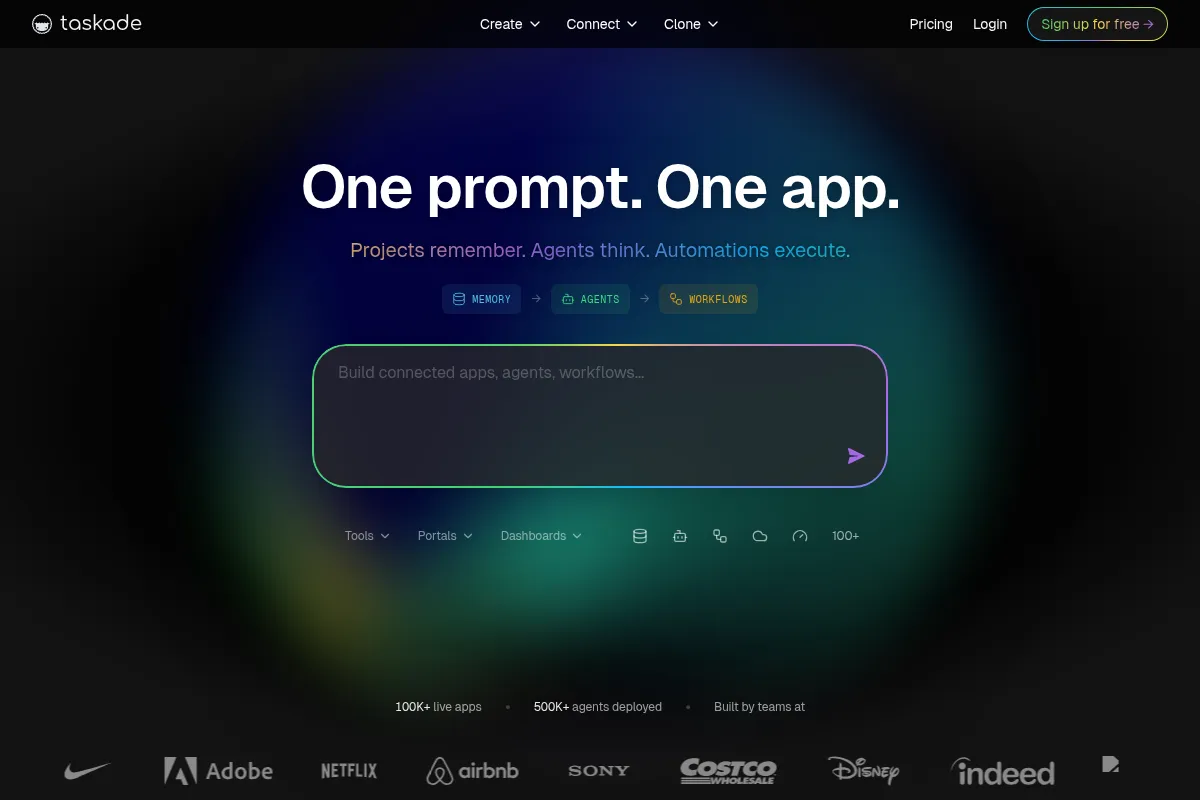
Taskade AI is an AI-native workspace that integrates project management, AI agents, and workflow automation, best suited for teams and individuals who want to streamline operations and build custom applications without coding.
Excellent for AI-powered project management and no-code app building, weaker for complex enterprise-level project management.
Analysis based on product data, pricing structure, traffic signals, and public user sentiment.
Who Should Use Taskade AI?
Typical users
Individuals, freelancers, and small to medium-sized teams looking for an integrated platform for project management, collaboration, and AI-driven automation.
Maturity fit
beginner to scaling
Choose this if…
- You need an all-in-one workspace for project management, notes, and team communication.
- You want to build custom applications or automate workflows without coding.
- You value real-time collaboration features like chat and video calls within your project management tool.
- You want to leverage AI agents for task assistance, content generation, and research.
Skip this if…
- You require advanced enterprise-level project management features like portfolio management or complex resource allocation.
- Your primary need is in-depth documentation and knowledge management, where Notion might be more suitable.
- You need extensive third-party integrations beyond standard communication and storage tools.
- You are a large enterprise with highly complex, established workflows that demand a more specialized solution.
About Taskade AI
Taskade AI is an AI-native workspace designed to unify project management, AI agents, and workflow automation. It enables users to create custom applications from prompts, deploy intelligent agents, and automate processes with real-time collaboration. It aims to boost productivity for individuals and teams by streamlining workflows and bringing ideas to life without requiring coding expertise.
Official profiles
What it actually does
Taskade AI provides a unified platform for project management, task organization, note-taking, and team collaboration. It integrates AI agents that can draft content, automate tasks, conduct research, and assist in project planning. Users can also build custom applications and workflows using natural language prompts.
What makes it different
Taskade differentiates itself by being an AI-native platform that focuses on actionable AI agents and no-code application building ('Genesis apps') directly within the workspace. Unlike tools that primarily store information or offer basic AI writing assistance, Taskade aims to execute tasks and build functional software from prompts, integrating intelligence, memory, and execution pillars.
Ratings across the web



Ratings aggregated from independent review platforms.
Key Features
AI Agents
Autonomous agents that can perform tasks like research, content generation, and answering complex questions, trained on user data.
Genesis App Builder
Allows users to create custom applications, dashboards, and websites from a single prompt without coding.
Real-time Collaboration
Integrated chat and video conferencing within projects for seamless team communication.
Multiple Project Views
Offers flexibility in visualizing tasks and projects through List, Board, Calendar, Mind Map, and Gantt views.
Workflow Automation
Automates repetitive tasks and processes across various integrations.
Knowledge Ingestion
AI agents can be trained on user-uploaded files (PDFs, docs, spreadsheets) and web content.
Template Library
A vast collection of user-generated and official templates for various project management and workflow needs.
Pricing
Free
- 1 workspace
- 1 AI Agent
- 5 AI Requests
- 250 MB storage
- 7-day version history
- Cross-platform access
- Task lists, mind maps, flowcharts, kanban boards, calendars
Starter
- 10 workspaces
- 1 AI Agent
- Unlimited AI usage
- 100 GB storage
- 1-year version history
- Advanced AI Automations
- Gantt Chart and Custom fields
- Calendar integration & syncing
Pro
- Unlimited workspaces
- Unlimited AI Agents
- Unlimited AI usage
- 1,000 GB storage
- Unlimited version history
- 5000+ automations and integrations
- External team collaboration
- Advanced team permissions
Business
- Unlimited workspaces
- Unlimited AI Agents
- Unlimited AI usage
- 1,000 GB storage
- Unlimited version history
- 5000+ automations and integrations
- External team collaboration
- Advanced team permissions
- Single sign on (SSO)
- Organization-wide deployment
- Premium support
Pricing checked 6 months ago
Pricing guidance
- When you need more than 5 AI requests per month.
- When you require more than 1 workspace.
- When you need to collaborate with more than 3 team members (Free plan limit).
- When you need advanced AI features like unlimited AI agents or custom app building.
- AI credit consumption can vary significantly based on the model used and task complexity, potentially leading to higher costs if not managed.
- While integrations are listed as 5000+, specific advanced integrations might be tiered or require higher plans.
- The 'Unlimited AI usage' in Pro and Business plans may still be subject to fair use policies or underlying credit consumption for very heavy usage.
Taskade offers a tiered pricing structure that starts with a very limited free plan and scales up to robust Pro and Business plans, positioning itself as an affordable yet powerful AI-native workspace solution.
Pros & Cons
Strengths
-
Integrated AI Agents and App Building
Taskade's core strength lies in its AI-native approach, allowing users to create custom AI agents and build functional applications directly from prompts, which is a significant differentiator for no-code development and automation.
-
All-in-One Workspace
It combines project management, task tracking, note-taking, and real-time communication tools (chat, video) into a single platform, reducing the need for multiple subscriptions and context switching.
-
User-Friendly Interface and Templates
Taskade is praised for its intuitive design and a rich library of customizable templates, making it easy for new users to get started quickly and adapt the platform to their specific needs.
-
Affordable AI Features
Compared to competitors, Taskade offers generous AI capabilities, including unlimited AI agents and usage in higher tiers, at a competitive price point, making advanced AI accessible.
-
Real-time Collaboration
Built-in chat and video conferencing within projects enhance team communication and synchronous collaboration, a feature often missing or requiring separate tools in competing platforms.
Weaknesses
-
Limited Advanced Project Management Features
While strong in task management and AI, Taskade lacks some advanced project management functionalities like detailed workload management, portfolio management, or complex resource allocation found in enterprise-grade tools.
Affects: Larger organizations or project managers requiring deep, enterprise-level planning and reporting.
-
Automation Depth
While it offers workflow automation, the depth and complexity of conditional branching or advanced triggers might be less sophisticated than dedicated automation platforms.
Affects: Teams with highly complex, multi-stage automated processes.
-
Integration Ecosystem
The integration library is sufficient for common tools but may not be as extensive as platforms with years of development in third-party connections.
Affects: Teams heavily reliant on a very specific or niche set of external tools.
-
AI Feature Pace
The platform is rapidly adding new AI features, which can sometimes feel overwhelming or lead to a sense of early-stage development for some functionalities.
Affects: Users who prefer a more stable, less rapidly evolving feature set.
Real User Sentiment
Users generally praise Taskade for its intuitive interface, strong AI capabilities, and real-time collaboration features, finding it efficient for task management and project organization. However, some find the rapid pace of new feature additions overwhelming, and billing can occasionally be confusing.
Users tend to like
- AI agents and custom AI capabilities
- Intuitive and user-friendly interface
- Real-time collaboration features (chat, video)
- Versatile project views (List, Board, Mind Map, etc.)
- Extensive template library
Users commonly complain about
- Billing process can be confusing, leading to unexpected charges.
- The rapid pace of new AI feature releases can be overwhelming.
- Advanced project management features are less robust than competitors.
- Integration ecosystem could be more extensive for niche tools.
Recurring tradeoffs
- Ease of use and AI features vs. depth of enterprise project management tools.
- All-in-one integration vs. specialized best-of-breed tools for specific functions.
- Affordability of AI features vs. potential for complex billing.
Happiest users
Individuals, freelancers, and small to medium-sized teams who prioritize AI-driven task automation, no-code app building, and seamless real-time collaboration.
Often frustrated
Users who require highly advanced, enterprise-grade project management features or a vast array of niche third-party integrations may find Taskade limiting.
Use Cases
Streamlining project management for remote teams
Taskade's integrated chat and video, combined with task management, centralizes team communication and project progress.
Building custom internal tools without code
Users can leverage Genesis apps to create dashboards, CRMs, or client portals from simple prompts.
Automating repetitive tasks with AI agents
AI agents can handle content drafting, research, and data analysis, freeing up user time.
Organizing personal and professional projects
Individuals can use Taskade for everything from daily to-do lists to complex project planning with AI assistance.
Content creation and management
AI can assist in drafting articles, social media posts, and managing editorial calendars.
Brainstorming and idea generation
AI agents can help users brainstorm ideas, structure thoughts, and develop project outlines.
Frequently Asked Questions
What is Taskade AI?
Taskade AI is an AI-native workspace that integrates project management, AI agents, and workflow automation. It allows users to build custom applications from prompts, deploy intelligent agents for tasks like content generation and research, and automate processes with real-time collaboration features. It aims to enhance productivity by streamlining workflows and enabling users to create functional software without coding.
How does Taskade AI compare to Notion AI?
Taskade is positioned as an AI-native platform focused on 'action' and 'execution,' enabling users to build apps and deploy AI agents that perform tasks. Notion, while strong in documentation and knowledge management, primarily offers AI for writing assistance and information synthesis. Taskade's AI agents can be trained on user data and execute workflows, whereas Notion's AI is more focused on content generation within its document-centric structure. Taskade also includes built-in video calls and a more integrated AI experience at a competitive price point.
What are the limitations of Taskade's AI features?
While Taskade offers robust AI capabilities, some users find the rapid pace of new feature development can be overwhelming. For very complex, enterprise-level project management, it may lack the depth of specialized tools. Additionally, while integrations are numerous, the ecosystem might not be as extensive as some long-standing platforms for highly niche third-party connections. The AI credit system, while generous, requires monitoring for heavy usage.
Does Taskade integrate with other tools?
Yes, Taskade offers integrations with over 5,000+ automations and integrations, including popular communication and storage tools like Slack, Google Drive, Dropbox, and Microsoft 365. These integrations allow for seamless workflow automation and data synchronization between Taskade and other essential business applications.
What is the pricing for Taskade AI?
Taskade offers a Free plan with limited AI usage. Paid plans include Starter ($8/month), Pro ($20/month), and Business ($50/month), billed annually. The Pro plan is highlighted as the best value, offering unlimited AI agents, unlimited AI usage, and extensive integrations for teams. Pricing is generally considered competitive, especially for the AI capabilities included.
Can I use Taskade for complex project management?
Taskade is excellent for task management, collaboration, and AI-driven workflows. However, for highly complex enterprise-level project management that requires advanced features like portfolio management, intricate resource allocation, or detailed workload capacity planning, tools like Asana or ClickUp might offer more specialized functionalities. Taskade is better suited for teams prioritizing AI execution and no-code app building within a unified workspace.
What is Taskade Genesis?
Taskade Genesis is the AI-native engine that powers Taskade's ability to build applications, deploy AI agents, and automate workflows from a single prompt. It's described as a 'living system' where projects (memory), AI agents (intelligence), and automations (execution) work together. Users can create custom apps, dashboards, CRMs, and websites using natural language prompts, making it a powerful no-code development platform within the workspace.
Why trust this page?
This evaluation combines product positioning, pricing analysis, traffic and market signals, and public user sentiment into a single decision-support page. Content is generated editorially — not copied from the vendor's website.
Funding & Company
Founded
2017
Stage
Seed
Total Raised
$5M
Latest Round
Seed (Oct 2019)
Notable Investors
Taskade has raised a single Seed round of $5 million in late 2019, led by Y Combinator and Grishin Robotics. This funding was secured after their participation in the Y Combinator S19 batch and was intended to scale the team and accelerate product development.
Market Signals & Traffic
Estimated visits, global rank, geography, traffic sources, monthly visit trends, and organic search keywords (Similarweb)—on a dedicated page built for depth and search.
- Estimated visits
- 709,438
- Global rank
- #67,557
- Snapshot
- Apr 2026
- Traffic trend
- Surging
Estimated monthly visits
Alternatives to Taskade AI
View all alternativesNotion AI
AI Assistant, Content Creation
AI assistant integrated into Notion for content creation and task automation.
Motion
Productivity, Automation

AI-powered productivity platform for scheduling, task, and project management.
Lindy
AI Assistant, Automation, Productivity
No-code AI agent builder for automating business workflows.
Similar Tools
Balance
AI Assistant, Productivity

Personalized meditation and sleep coach for stress reduction.
Mirrago
E-commerce, Sales, Design

Virtual fitting room for realistic clothing visualization and online shopping.
mixedbread ai
Developer Tools, Search

High-performance embedding and reranking models for semantic search.
Decart
Gaming, Video Creation

Real-time generative world models for interactive video game environments
Kits.ai
Music Generation, Content Creation, Productivity

Voice generation and music production toolkit for creators
Symbolic
Content Creation, Workflow, Automation & Agents

Streamline publishing workflows by capturing and reusing institutional editorial knowledge.