

A focused readability tool that forces brevity and clarity by highlighting stylistic friction — best for tightening prose, but not a replacement for a full grammar checker.
Excellent for simplifying complex sentences and improving readability, weaker for deep grammatical analysis or nuanced creative writing.
Analysis based on product data, pricing structure, traffic signals, and public user sentiment.
Who Should Use Hemingway Editor?
Typical users
Bloggers, copywriters, and business professionals who need to make their writing accessible to a general audience.
Maturity fit
beginner to scaling
Choose this if…
- Your priority is clarity over stylistic flair
- You want a distraction-free interface without complex menus
- You need to hit a specific grade-level readability target
Skip this if…
- You need advanced grammar, punctuation, or plagiarism checks
- You write technical academic papers where complexity is required
- Your workflow requires a browser extension that works inside other apps
About Hemingway Editor
Hemingway Editor is a minimalist writing aid designed to strip away stylistic clutter. It focuses on the mechanics of readability rather than the rules of grammar, helping writers reach a broader audience through simpler sentence structures.
What it actually does
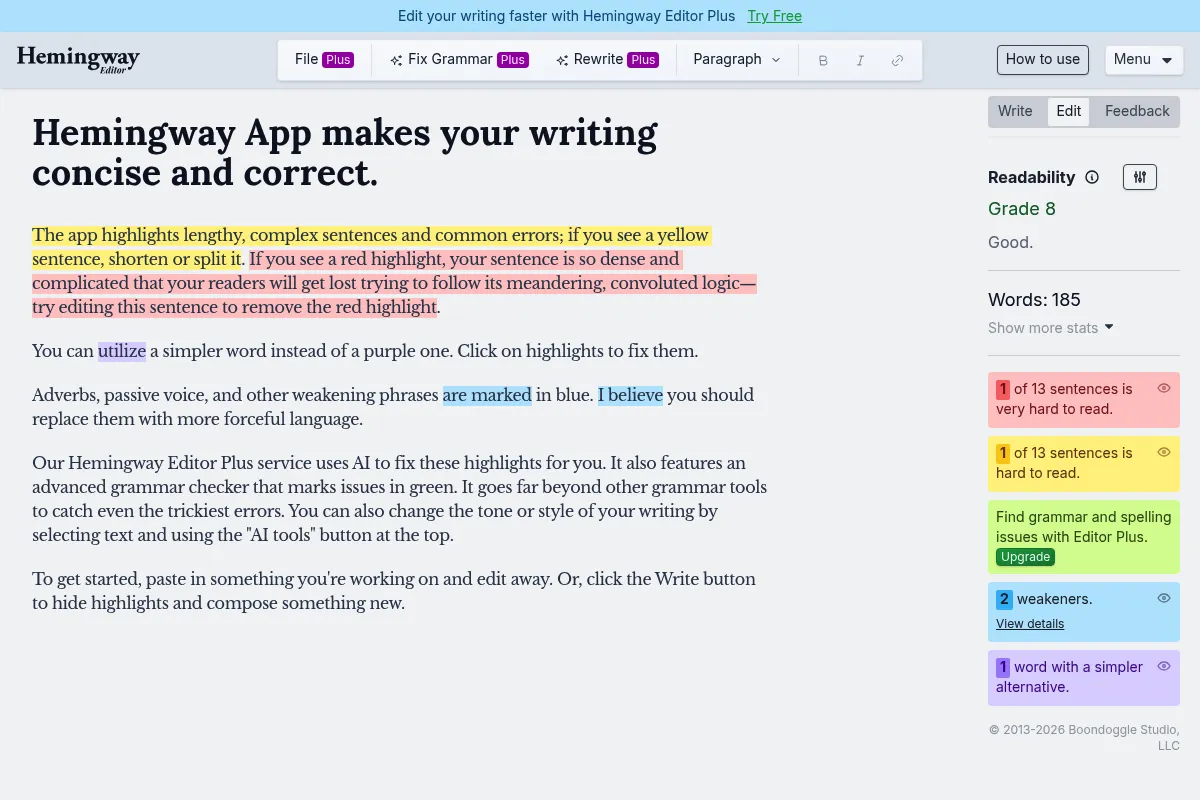
It analyzes text in real-time, color-coding sentences based on difficulty and highlighting specific issues like passive voice or excessive adverbs. The paid AI tier provides one-click suggestions to fix these highlighted issues automatically.
What makes it different
Unlike most assistants that focus on 'correctness,' Hemingway focuses on 'boldness.' It is intentionally opinionated, pushing users to shorten sentences and remove qualifiers, often resulting in a more direct, punchy tone.
Ratings across the web


Ratings aggregated from independent review platforms.
Key Features
Readability Grade Level
Instantly tells you if your writing is too complex for your target audience, aiming for Grade 9 or lower for general web content.
Color-Coded Highlights
Visualizes exactly where prose is 'clogged' so you can fix specific sentences without re-reading the whole piece.
AI Rewrites
Provides specific alternatives for 'hard to read' sentences, saving time on manual restructuring.
One-Time Purchase Desktop App
Offers a distraction-free, offline editing environment without a recurring subscription.
Direct CMS Integration
Allows you to push edited drafts directly to WordPress or Medium, maintaining formatting.
Passive Voice Counter
Helps writers identify and convert weak, passive phrasing into active, authoritative statements.
Word Count and Reading Time
Provides essential metadata for content planning and SEO requirements.
Pricing
Web Version
- Basic readability highlighting
- Grade level scoring
- Adverb and passive voice counts
- Web-only access
Desktop App
- Offline access
- Save and open files
- Export to PDF and Markdown
- Direct WordPress/Medium publishing
Plus Individual
- 5,000 AI sentences per month
- AI-powered rewrites
- Includes Desktop App access
- Priority support
Plus Team
- 10,000 AI sentences per month
- Team management dashboard
- Shared billing
- Includes Desktop App access
Pricing checked 5 months ago
Pricing guidance
- When you need to work offline
- When you want AI to automatically fix highlighted sentences
- When you need to export directly to WordPress or Medium
- AI credits do not roll over to the next month
- The one-time desktop purchase does not include AI 'Plus' features
- No mobile app version available
Extremely affordable entry point with a standard SaaS model for its newer AI features.
Pros & Cons
Strengths
-
Minimalist, distraction-free UI
The interface is exceptionally clean, keeping the focus entirely on the text and the highlights rather than sidebars and settings.
-
Immediate visual feedback
The color-coding system makes it easy to spot patterns of bad habits, like overusing adverbs, at a glance.
-
Low barrier to entry
The free web version is fully functional for basic editing, making it accessible for quick checks without an account.
-
Offline capability
The desktop app allows for work without an internet connection, which is a major plus for focused writing sessions.
Weaknesses
-
Lacks deep grammar checks
It won't catch complex punctuation errors or subtle spelling mistakes like a dedicated grammar tool.
Affects: Professional editors and non-native speakers
-
Can be overly prescriptive
It often suggests removing adverbs or simplifying sentences that require nuance, which can strip the 'voice' out of creative writing.
Affects: Fiction writers and essayists
-
No browser extension
Unlike competitors, it doesn't follow you into your email or social media; you have to paste text into their editor.
Affects: Social media managers and support teams
Real User Sentiment
Highly positive for its specific use case, though users often pair it with other tools for a complete editing stack.
Users tend to like
- The simplicity of the color-coded system
- The 'Grade Level' metric for audience targeting
- The one-time payment option for the desktop app
- Distraction-free writing environment
Users commonly complain about
- Aggressive stance against adverbs
- Lack of a Chrome or browser extension
- No plagiarism detection
- Limited AI credits on the base subscription
Recurring tradeoffs
- Speed and clarity vs. stylistic nuance and complex grammar
Happiest users
Bloggers and business writers who value brevity and punchy communication.
Often frustrated
Fiction writers or academics who feel the tool 'dumbs down' their work or strips away their unique voice.
Use Cases
Blog Post Polishing
Use the grade level score to ensure content is accessible to a general audience.
Email Conciseness
Paste long emails to identify and cut unnecessary adverbs and filler words.
Technical Writing
Simplify complex documentation to make it easier for non-technical users to follow.
SEO Copywriting
Ensure sentences are short and punchy to improve mobile reading experiences.
Non-native English Writing
Use the AI rewrites to find more natural-sounding sentence structures.
Frequently Asked Questions
Is Hemingway Editor free?
Yes, the web version is free for basic highlighting and readability scoring. However, the desktop app for offline use and the AI-powered rewriting features require a paid purchase or subscription.
How does Hemingway compare to Grammarly?
Hemingway focuses on style and readability (making writing bold and clear), while Grammarly focuses on mechanics and correctness (grammar, spelling, and punctuation). Most professional writers use both tools in tandem.
Does it have a browser extension?
No, Hemingway does not currently offer a browser extension. You must write or paste your text directly into the web editor or the desktop application.
Can I use it offline?
Only if you purchase the $19.99 Desktop version. The web-based editor and the AI 'Plus' features require an active internet connection.
What is a good readability score?
For most general web content, a Grade 9 or lower is recommended. This ensures that the majority of the public can easily understand your writing without effort.
Does the AI plan include the desktop app?
Yes, a Hemingway Editor Plus subscription includes access to the desktop version for both Mac and PC as part of the monthly or yearly fee.
Why trust this page?
This evaluation combines product positioning, pricing analysis, traffic and market signals, and public user sentiment into a single decision-support page. Content is generated editorially — not copied from the vendor's website.
Funding & Company
Founded
2013
Stage
Bootstrapped
Total Raised
Bootstrapped
Latest Round
—
Hemingway Editor, created by brothers Adam and Ben Long in 2013, is a bootstrapped and self-funded company. It has not taken any external investment, relying on revenue from its one-time purchase desktop app and premium subscriptions to operate and grow.
Market Signals & Traffic
Estimated visits, global rank, geography, traffic sources, monthly visit trends, and organic search keywords (Similarweb)—on a dedicated page built for depth and search.
- Estimated visits
- 0
- Global rank
- —
- Snapshot
- May 2026
- Traffic trend
- Steady
Estimated monthly visits
Alternatives to Hemingway Editor
View all alternativesGrammarly
AI Assistant, Content Creation

AI-powered writing assistant for clear, effective, and authentic communication.
QuillBot
Content Creation, AI Assistant

AI-powered writing assistant for paraphrasing, grammar checking, and summarizing.
Similar Tools
Storm
Content Creation, Productivity, AI Assistant

AI system that researches and writes Wikipedia-like articles.
SlidesAI
Content Creation, Productivity, AI Assistant

AI-powered tool that transforms any text into professional presentation slides.
Wattpad
Content Creation

Social storytelling platform for reading, writing, and sharing original stories.
Surfer SEO
Content Creation, Productivity

AI-powered tool for data-driven content optimization and SEO.
Lex
AI Assistant, Content Creation, Productivity

Modern word processor with integrated writing and editing assistance
Doubao
AI Assistant, Content Creation, Search

Versatile personal assistant for chat, content creation, and image generation.