

An algorithmic logo generator that prioritizes speed and brand cohesion over custom artistry, best for early-stage solopreneurs who need a functional identity without hiring a designer.
Excellent for non-designers needing a full brand kit in minutes, weaker for businesses requiring unique, trademarkable iconography.
Analysis based on product data, pricing structure, traffic signals, and public user sentiment.
Who Should Use Logo.com?
Typical users
Solopreneurs, side-hustlers, and small business owners with zero design budget or time.
Maturity fit
beginner
Choose this if…
- You need a logo and social media headers in under 10 minutes
- You want a tool that automatically handles font pairings and color theory
- Your priority is a professional-looking placeholder over a unique brand mark
Skip this if…
- You need a hand-drawn, one-of-a-kind icon that can be easily trademarked
- You require vector-level control over anchor points and custom shapes
- You want to avoid recurring subscriptions for access to your brand assets
About Logo.com
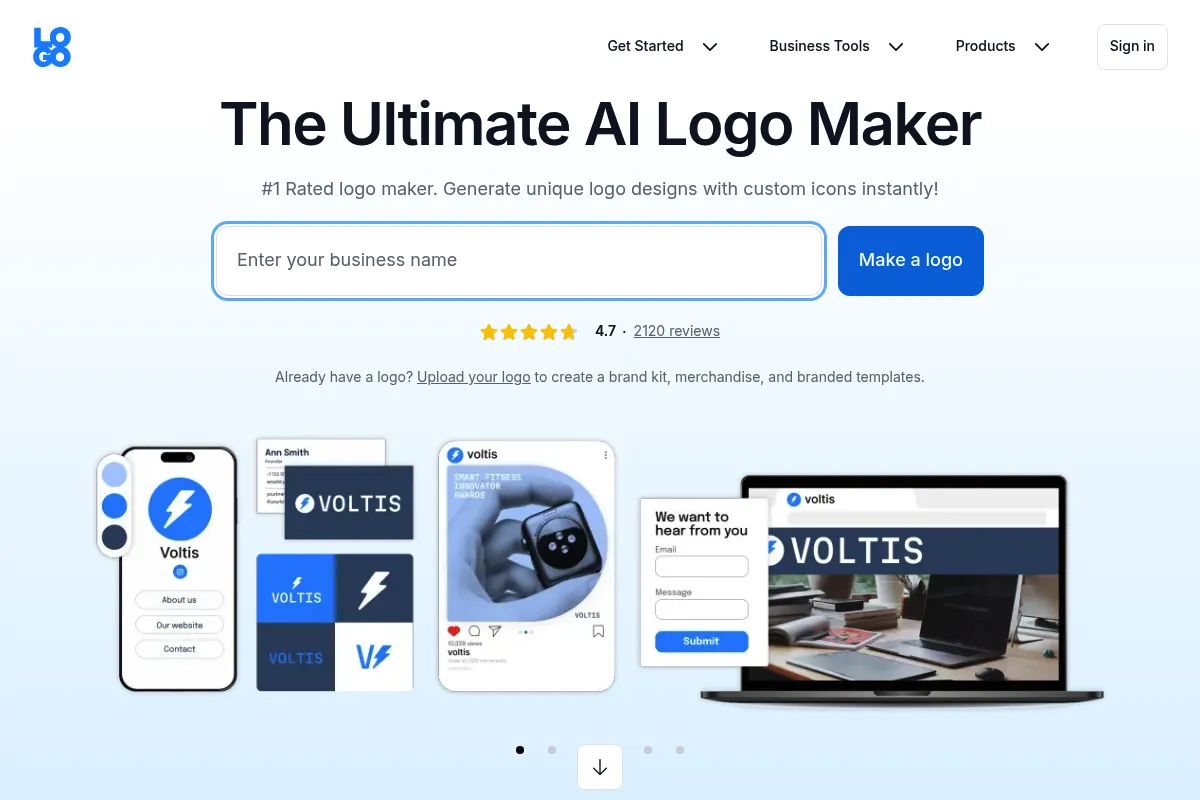
Logo.com is an automated design platform that generates thousands of logo variations based on business names and industry keywords. It replaces the traditional designer-client feedback loop with an instant, iterative generator that builds a cohesive brand identity around a chosen mark.
Official profiles
What it actually does
The platform uses a generative engine to produce logo options which users can then refine in a simplified editor. Beyond the logo, it automatically populates a 'Brand Board' containing social media assets, business card templates, and brand guidelines using the selected colors and typography.
What makes it different
Unlike Canva, which is a general-purpose design tool, Logo.com is strictly generative and focused on the 'Brand Kit' as a holistic product. It integrates domain registration and website setup directly into the design flow, attempting to be the first stop for a new business launch.
Ratings across the web

Ratings aggregated from independent review platforms.
Key Features
Logo Editor
Allows for granular adjustments to icons, spacing, and font weights after the initial generation.
Brand Plan
A centralized dashboard that stores all brand assets, ensuring consistency across different file types.
Stitch
A mockup tool that applies your logo to physical merchandise and digital screens to visualize the brand in context.
Icon Library
Access to a massive database of symbols categorized by industry and style.
Color Palette Explorer
Generates complementary color schemes based on the primary logo color.
Font Pairing Engine
Suggests typography combinations that maintain readability and style across headers and body text.
Pricing
Free
- Low-resolution logo files
- Unlimited revisions
- Standard font access
Brand Plan (Monthly)
- High-resolution logo files (PNG, JPG)
- Vector files (SVG, EPS)
- Social media kit
- Business card designs
- Brand guidelines
Brand Plan (Annual)
- All Monthly features
- Billed as $60/year
- Free domain for the first year
- Priority support
Pricing checked 6 months ago
Pricing guidance
- When you need to print your logo on physical merchandise
- When you need social media headers that match your logo
- When you want to secure a matching domain name
- The 'Free' logo is often limited to 200px width
- Domain renewals after the first year are at standard market rates
- Icon usage is non-exclusive
Affordable for solopreneurs, but uses a subscription model to monetize what was traditionally a one-time transaction.
Pros & Cons
Strengths
-
Instant brand cohesion
Once a logo is chosen, the system automatically applies those styles to social banners and business cards, eliminating the need for manual resizing or color matching.
-
Low barrier to entry
Requires zero design software knowledge; the interface is strictly point-and-click, making it accessible to anyone who can use a web browser.
-
High-quality file formats
The paid tiers provide vector files (SVG/EPS), which are essential for professional printing and scaling without pixelation.
Weaknesses
-
Generic iconography
Most icons are sourced from standard libraries, meaning other businesses may use the exact same symbol, making trademarking difficult.
Affects: Established businesses or those seeking unique brand protection
-
Subscription-heavy model
While it markets a 'free' logo, many essential features and high-res files are locked behind a recurring Brand Plan subscription.
Affects: Users looking for a one-time purchase
-
Limited layout flexibility
You cannot freely move elements or layer shapes like you can in Adobe Illustrator or Canva; you are restricted to the platform's preset templates.
Affects: Users with specific creative visions
Real User Sentiment
Users generally appreciate the speed and the 'Brand Board' concept, but there is recurring frustration regarding the transition from 'free' marketing to paid downloads.
Users tend to like
- The speed of the generation process
- The clean, modern UI of the editor
- The convenience of having social media assets pre-sized
- The ability to see the logo on mockups instantly
Users commonly complain about
- Icons can feel repetitive or 'clip-art' style
- Difficulty in canceling subscriptions
- The 'Free' version is too limited for professional use
Recurring tradeoffs
- You trade uniqueness for speed; the logo will look professional but likely won't be iconic.
Happiest users
First-time founders who need to look 'official' quickly to start selling or testing a concept.
Often frustrated
Designers or experienced marketers who find the lack of manual control and generic icons stifling.
Use Cases
Side Project Launch
Generating a quick identity for a weekend project without spending hours in design tools.
Social Media Branding
Creating matching profile pictures and banners for a new YouTube channel or LinkedIn page.
Pitch Deck Prep
Getting a professional-looking logo onto a slide deck for an early investor meeting.
Small Business Refresh
Updating an outdated logo with a cleaner, more modern font and color palette.
Merchandise Mockups
Visualizing how a logo would look on t-shirts or mugs before committing to a bulk order.
Frequently Asked Questions
Is Logo.com actually free?
It is free to design and preview as many logos as you want. However, to download high-resolution files, vector formats (SVG/EPS), and the full brand kit, you must subscribe to the Brand Plan, which costs approximately $10-$12 per month or $60 annually.
Can I trademark a logo from Logo.com?
While you own the rights to the specific arrangement of your logo, the icons are sourced from non-exclusive libraries. This means other people can use the same icon, making it very difficult to obtain an exclusive trademark for the symbol itself.
How does Logo.com compare to Looka?
Both tools use similar generative AI. Looka is often praised for a slightly more polished UI and better initial 'inspiration' steps, while Logo.com is frequently cited for its comprehensive 'Brand Board' and integrated domain services.
What files do I get with the paid plan?
The Brand Plan includes high-resolution PNG and JPG files, as well as vector files (SVG and EPS). Vector files are the industry standard because they can be scaled to any size without losing quality, which is required for printing signs or apparel.
Can I change my logo after I buy it?
Yes, if you have an active Brand Plan subscription, you can make unlimited changes to your logo and the updates will automatically reflect across all your brand assets in the dashboard.
Does Logo.com offer custom design services?
No, Logo.com is a self-service automated platform. If you need a custom, hand-drawn logo, you would be better served by a platform like 99designs or hiring a freelance designer on Upwork.
Why trust this page?
This evaluation combines product positioning, pricing analysis, traffic and market signals, and public user sentiment into a single decision-support page. Content is generated editorially — not copied from the vendor's website.
Funding & Company
Founded
—
Stage
Bootstrapped
Total Raised
Bootstrapped
Latest Round
—
Logo.com is a bootstrapped company that has not taken any external venture capital funding. It was founded by Richard Lau, a successful serial entrepreneur with a track record of building and selling companies like Resume.com and NamesCon. The company's stability and longevity are therefore dependent on its own revenue and the founder's extensive experience, rather than investor capital.
Market Signals & Traffic
Estimated visits, global rank, geography, traffic sources, monthly visit trends, and organic search keywords (Similarweb)—on a dedicated page built for depth and search.
- Estimated visits
- 957,867
- Global rank
- #35,531
- Snapshot
- Apr 2026
- Traffic trend
- Steady
Estimated monthly visits
Alternatives to Logo.com
View all alternativesCanva AI
Content Creation

Online design tool for creating graphics, presentations, videos, and websites.
Looka
Content Creation, Design
AI-powered platform for logo design, branding, and website creation.
Wix AI
Design, Content Creation, Productivity
All-in-one website builder with drag-and-drop functionality and AI tools.
Similar Tools
Color Hunt
Design, Content Creation

Curated collection of trendy color palettes for designers and artists.
Photopea
Design, Content Creation

Advanced web-based image editor for raster and vector graphics.
Evatype
Design, Content Creation

Generate custom, high-quality fonts and typography using text descriptions.
AirBrush
Design, Content Creation

Professional photo editing and retouching tool for portraits and selfies.
Stylar
Design, Content Creation

Controllable image editor for precise graphic design and composition.
Turbologo
Design, Content Creation

Create professional logos and brand kits for businesses and startups.