
The 10 Most Cost-Effective Models in Cursor for 2026

Matic Pogladič
23 April 2026

The cheapest model in Cursor is often the one that finishes the job in one pass. The model with the lowest token price is not always the one that costs the least per useful task.
That distinction matters in real workflows. Inside Cursor, spend climbs when developers send routine edits to high-reasoning models, wait through longer responses, then pay again for follow-up prompts the task never needed. Renaming props, adding tests, cleaning docs, fixing obvious type errors, and handling low-risk refactors usually do not justify premium-model pricing.
The practical mistake is over-specifying intelligence. Teams burn credits because they optimize for maximum capability on every prompt instead of matching model depth to task difficulty. In day-to-day use, cost-effectiveness comes from a narrower question: which model gets acceptable code into the repo fastest, with the fewest retries?
That is why this guide prioritizes actual Cursor work over benchmark theater. The best value picks for many developers in 2026 are Cursor’s Composer 2 and Anthropic’s Claude Haiku 4.5, because they cover a large share of normal coding tasks without dragging premium spend into basic implementation work.
I have seen the same pattern across teams sharing a fixed Cursor budget. A few developers leave a premium model on as their default, use it for every prompt, and drain the credit pool long before the hard problems show up. The fix is simple. Set a cheap default, define escalation rules, and reserve heavier models for architecture changes, messy debugging, and prompts where a failed first pass is expensive.
If you want a broader view of how Cursor fits into an AI development stack, the Oryndex Cursor profile is a useful reference. If you are also building custom workflows around code generation, this practical guide on how to finetune LLMs pairs well with a model-routing strategy inside Cursor.
1. Cursor Composer 2
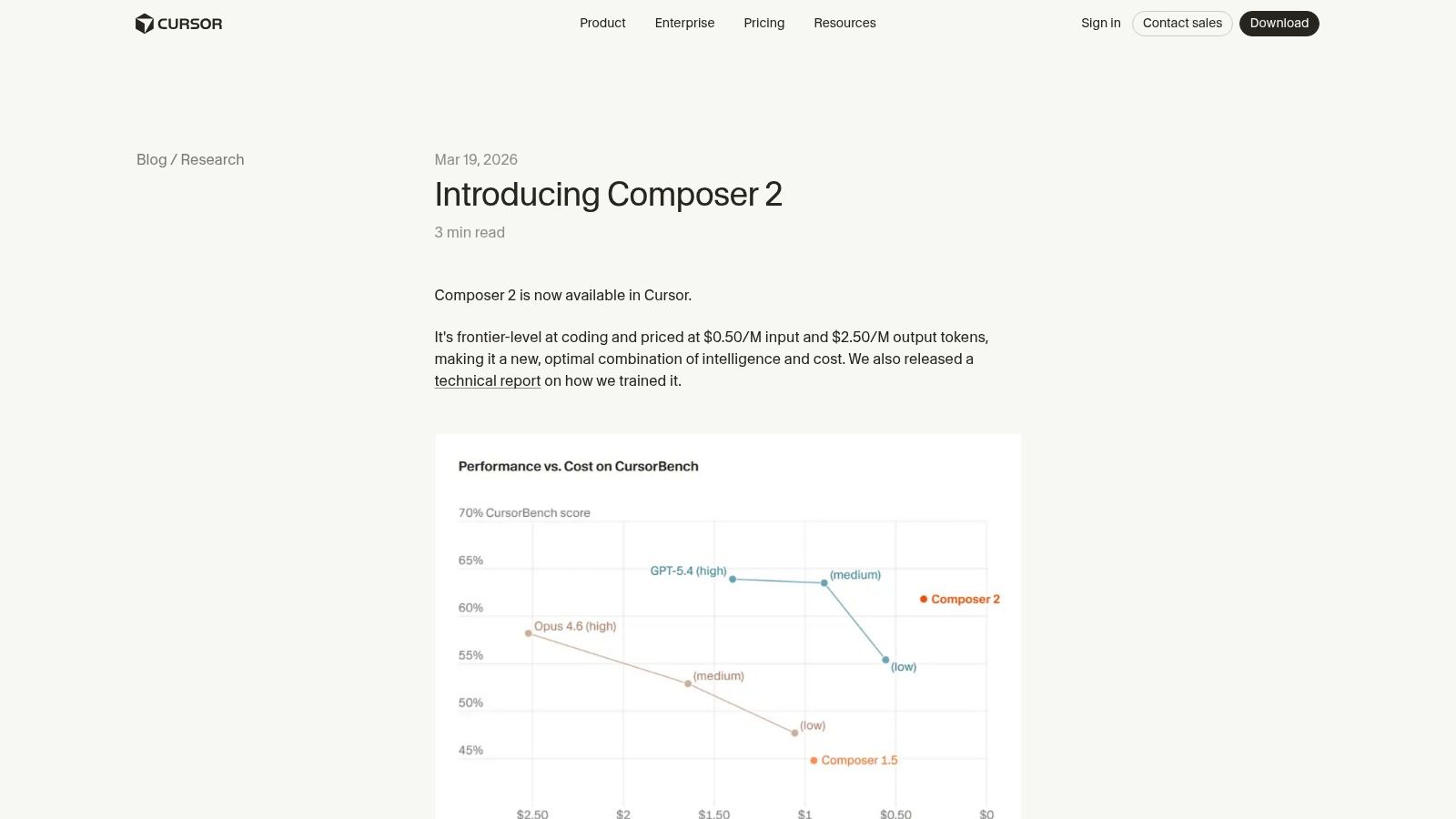
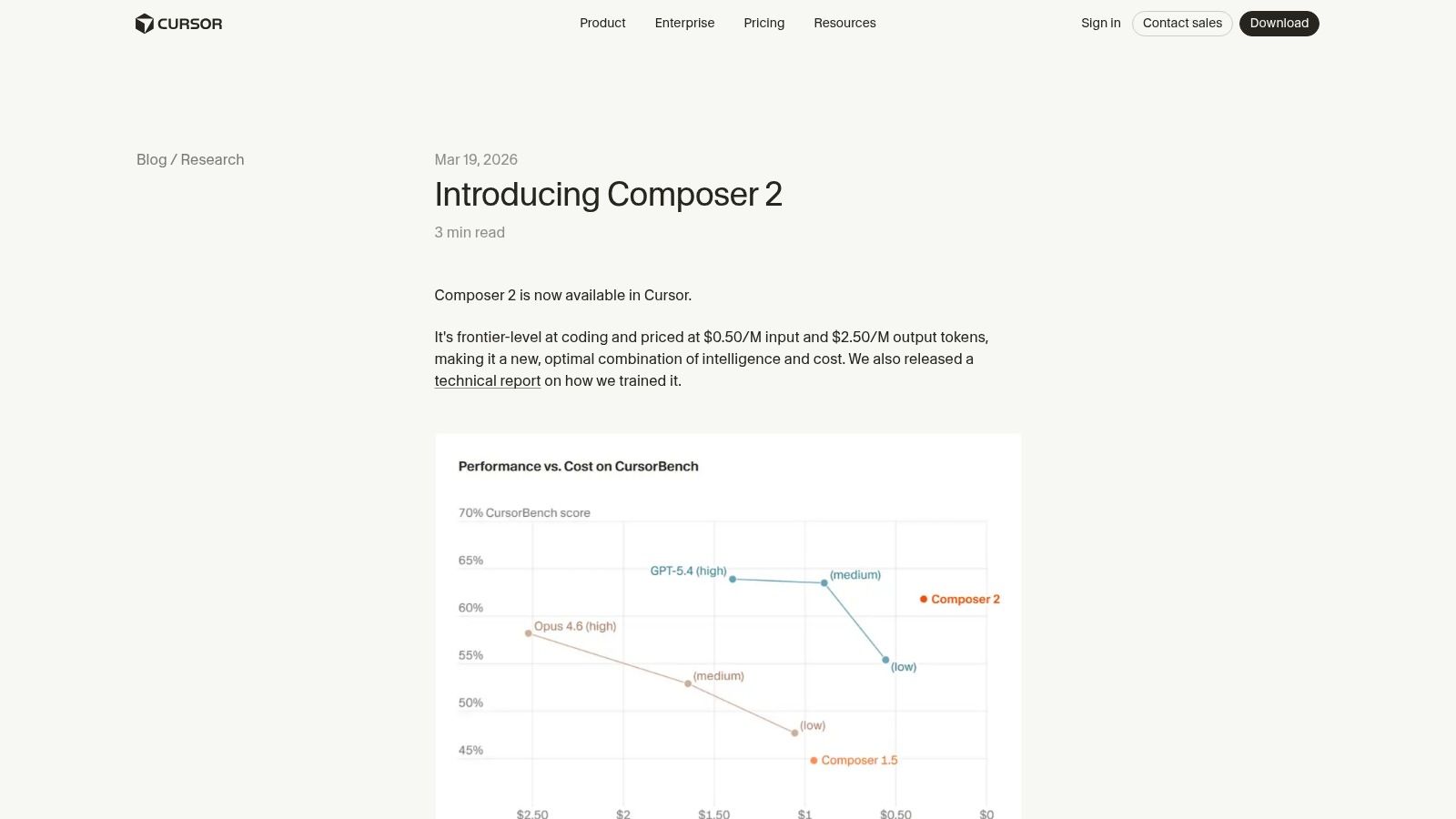
Composer 2 is the model I’d put in front of most developers first. Not because it wins every hard problem, but because it wastes the fewest credits on work that shouldn’t have been expensive in the first place.
Inside Cursor, native models usually have one big edge over third-party picks. They fit the product’s editing flow better. Multi-file diffs, tool use, and agentic handoffs feel tighter, so you spend less time re-prompting and less money cleaning up awkward edits. That matters more than headline token pricing.
Where it earns its keep
Cursor’s own research note on Composer 2 describes it as frontier-level at coding and positions it as a low-cost combination of intelligence and price. In practice, that shows up in very normal work: adding tests, wiring simple endpoints, adjusting UI states, and making coordinated edits across related files without turning a small task into a long debate.
I also like it as the safe default in teams that don’t want everyone hand-picking models all day. If you’re evaluating Cursor itself, the Oryndex Cursor profile is a useful starting point for comparing where it fits in a broader AI dev stack.
Practical rule: Use Composer 2 for implementation, not for ego. If the task is mostly execution, let the native workhorse do it.
A real trade-off exists, though. Composer 2 is strong when the request is concrete. It’s less compelling when you need deep architectural judgment across services, subtle production debugging, or a plan with risky business logic implications. That’s when I step up to a stronger reasoning model.
2. Anthropic Claude Sonnet 4.6
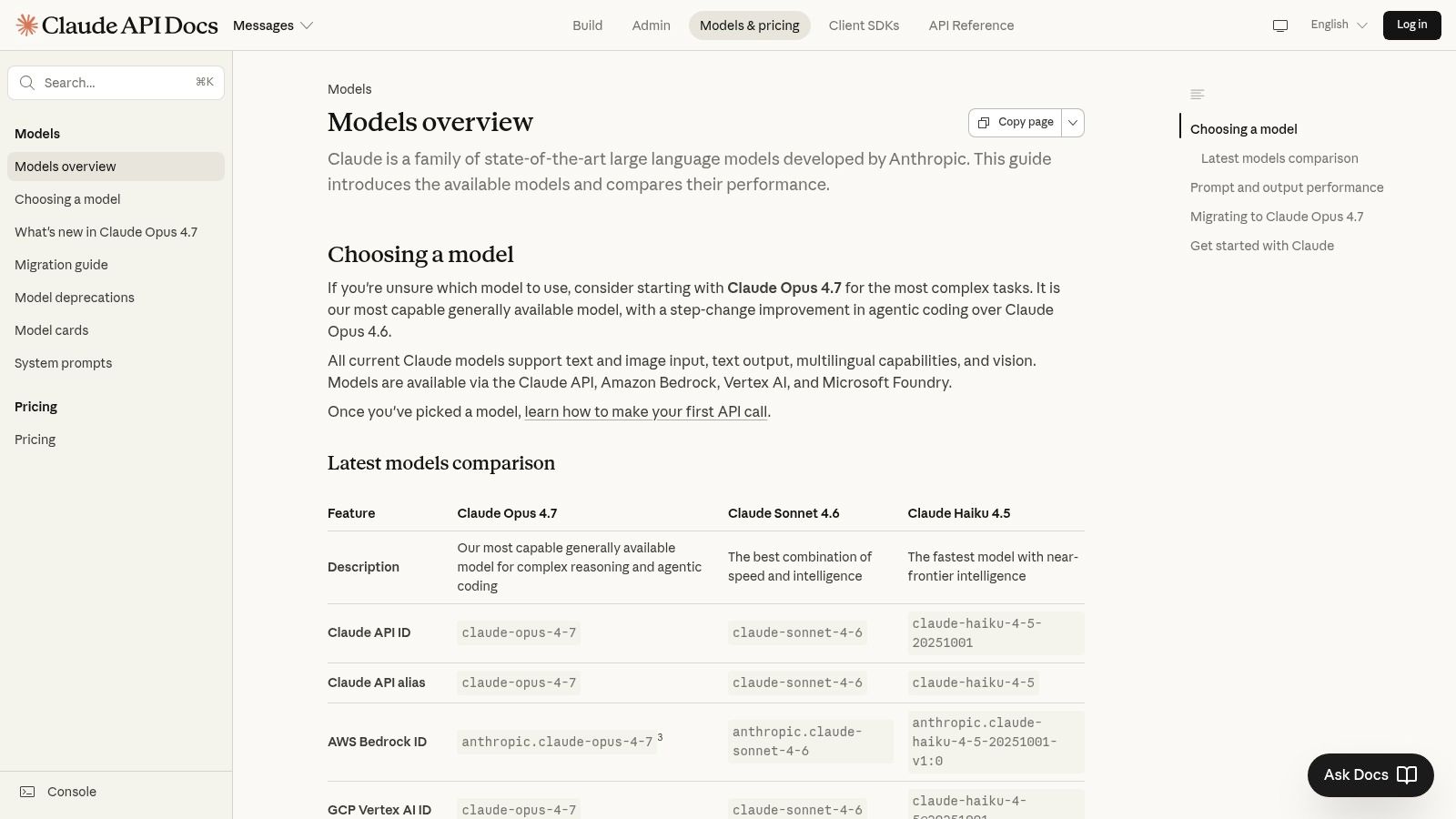
Claude Sonnet class models are the ones many teams end up trusting as a daily driver once they move past bargain-only routing. You pay more than you do for the cheapest options, but you often recover that cost by getting a better first pass on tricky refactors and larger code reviews.
That’s the key distinction. Cheap per token isn’t always cheap per useful task.
Best use case
I reach for Sonnet when a task sits in the annoying middle. Not simple enough for a budget model. Not serious enough to justify the heaviest premium model. Think broad refactors, dependency cleanup, test failure triage, or reviewing a feature branch that touches multiple concerns at once.
The catch is billing visibility. A builder guide on Cursor model selection highlights a blind spot many users learn the hard way: credit-based pricing can produce nasty overages during intensive sessions, especially when premium models and large context windows get involved. That fits what I’ve seen. Sonnet is a good worker, but it gets expensive when people keep tossing entire codebases into context out of habit.
For teams trying to rein in that behavior, this guide on cutting Claude Code costs is worth keeping nearby.
- Use Sonnet for review-heavy work: It’s a strong fit when quality matters more than raw speed.
- Avoid lazy context stuffing: Bigger context can help, but it can also inflate spend.
- Escalate sparingly: Save your top-end reasoning model for the messy problems.
3. Anthropic Claude Haiku 4.5
Haiku 4.5 is one of the few models I’m comfortable recommending aggressively for day-to-day work. It’s fast, it’s light, and for repetitive engineering chores, it usually gets you most of the value without the premium-model invoice.
That’s why it belongs near the top of any list of the most cost-effective models in Cursor for 2026.
What it handles well
Haiku shines on tasks that are annoying, frequent, and low risk. Boilerplate generation. Documentation cleanup. Simple migrations. Test scaffolding. API wrapper code. Small refactors where you already know the shape of the answer and mostly need speed.
The trade-off is obvious after enough use. Haiku can move confidently in the wrong direction on architectural work. It also tends to flatten nuance when debugging weird interactions between services, auth layers, and data flow. For that reason, I like it best as a first-pass executor, not a final authority on anything risky.
When the task is repetitive and the acceptance criteria are obvious, the cheapest good model often beats the smartest expensive one.
If you’ve ever watched a premium model spend extra tokens explaining a trivial fix you could have verified in seconds, Haiku feels refreshing. It stays moving. That’s useful in Cursor, where a lot of real work is incremental rather than dramatic.
One counter-intuitive opinion from the trenches: teams often underrate cheap fast models because they test them on hard prompts. That’s backwards. Test them on the boring prompts your team sends all day. That’s where savings happen.
4. Google Gemini 3 Flash

Gemini 3 Flash earns its spot because advertised token pricing is only half the story. In Cursor, the cheaper model is the one that finishes routine work in one pass, stays fast inside agent loops, and avoids unnecessary escalations. Flash does that well.
I reach for it on tasks that have width instead of depth. Large file reads, codebase summaries, repetitive edits across multiple files, implementation follow-through after the design is already settled. In those cases, Flash often produces a lower cost per useful task than stronger reasoning models that spend extra tokens thinking through a problem you already scoped.
That distinction matters. A lot of developers compare models by list price and miss the operational cost of retries, slow responses, and overkill reasoning. Flash is one of the better fits for teams that use Cursor as a high-frequency execution layer, especially solo builders, startup engineers, and product-minded developers who need steady throughput more than premium analysis.
The trade-off shows up fast on messy work. Flash is capable, but it is not the model I trust first for architecture decisions, subtle debugging across several systems, or prompts that require judgment under ambiguity. Give it a bounded objective and clear constraints. It usually pays off. Ask it to resolve competing design priorities and investigate a weird production failure at the same time, and the savings disappear.
For model selection, I use a simple rule. If the task is already specified and success is easy to verify, start with Flash. If the task involves hidden edge cases, unclear ownership between components, or a decision you do not want to revisit later, pay for a stronger model earlier.
If you want a practical reference point for the Gemini family before choosing a Cursor default, the Oryndex Gemini model directory is a useful comparison page.
Field note: Flash is strongest when the prompt reads like a ticket with acceptance criteria, not like an open-ended request for senior engineering judgment.
Used that way, Gemini 3 Flash is one of the better budget workhorses in Cursor. It keeps throughput high, handles broad implementation work competently, and protects premium-model budget for the prompts that need it.
5. Google Gemini 3.1 Flash Lite
Flash Lite is the model category I hand to teams that run lots of tiny actions through agents. If your Cursor workflow resembles a conveyor belt of edits, checks, rewrites, and summaries, this kind of ultra-budget model is often where real savings show up.
It’s not glamorous. That’s why it works.
Best for token-heavy grunt work
Some tasks don’t deserve a premium brain. Bulk docstring generation, repetitive cleanup, low-risk file sweeps, repetitive test stubs, formatting-adjacent edits, and large-volume rewrite jobs all fit here. The mistake is expecting a lite model to do strategic planning. It won’t, at least not reliably.
When people get frustrated with budget models, they often used them for the wrong kind of prompt. Flash Lite isn’t for deciding whether your service boundary is wrong. It’s for doing the cleanup after you already made that decision.
A practical approach looks like this:
- Route repetitive edits here: Keep low-risk, high-frequency work off your premium models.
- Constrain the prompt tightly: Lite models improve when the task shape is explicit.
- Promote only after failure: Don’t escalate before you’ve tested the cheap path.
This is one of those cases where cost-effectiveness is mostly operational discipline. The model can save you money, but only if your team stops sending every minor task to a model designed for harder reasoning.
6. OpenAI GPT 5 Mini
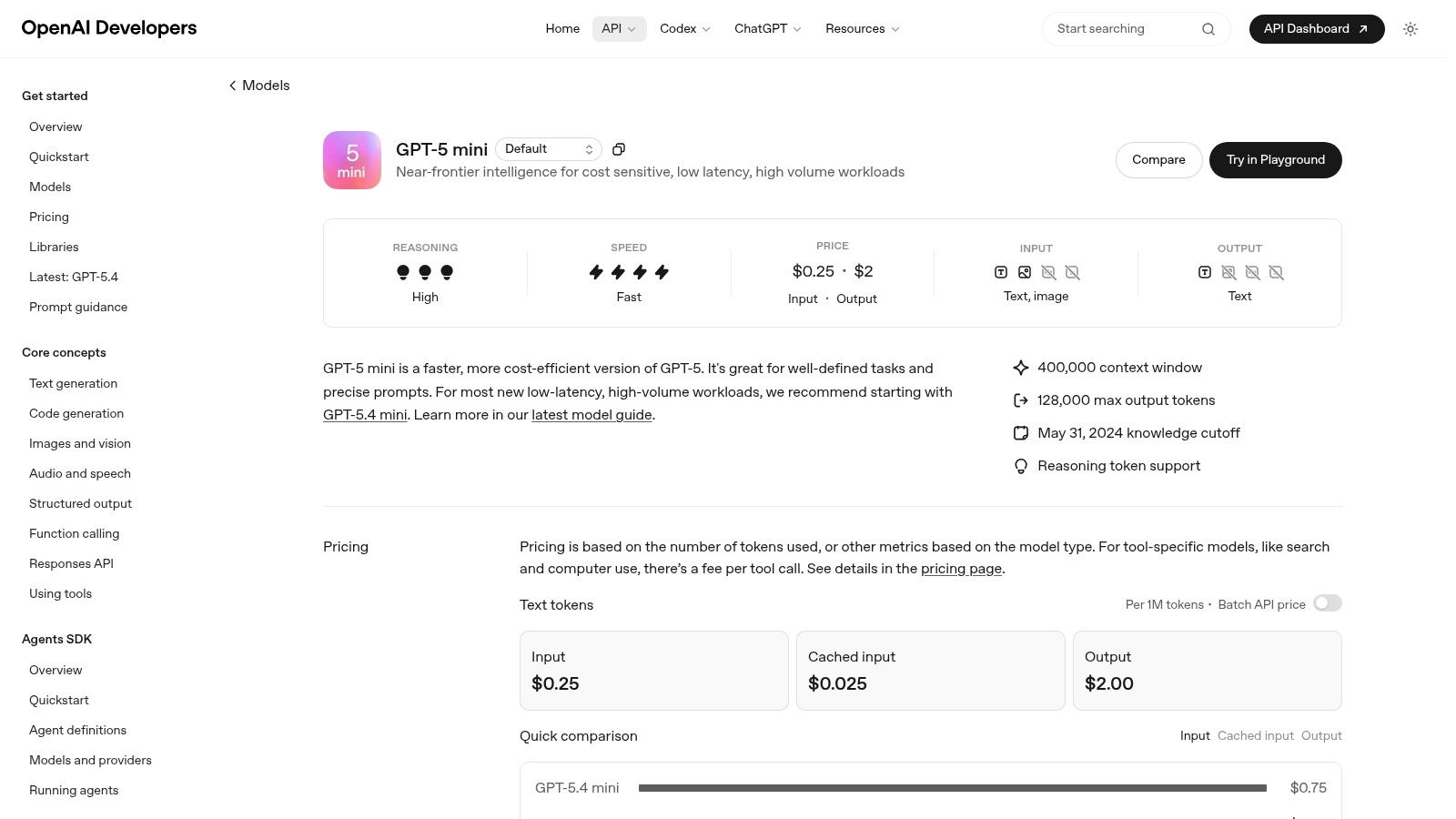
GPT 5 Mini is the kind of model I like for “chatty coding.” Lots of back-and-forth. Lots of little edits. Plenty of clarifications. It’s usually a better fit than a full premium model when the session is long but the technical difficulty stays moderate.
That distinction matters in Cursor because iterative sessions can gradually accumulate cost even when no single prompt looks expensive.
A solid default for routine loops
The budget case for smaller GPT models shows up clearly in developer discussions. The Cursor forum thread on economical models describes GPT-5-mini as super cheap or free for small-context tasks and places GPT-5.1-Codex-Mini-High among the strongest low-cost execution picks in practical use. That’s a useful mental model even if your exact routing differs. Mini models are for work loops, not moonshots.
If you’re comparing OpenAI options in a broader stack, the Oryndex OpenAI tools page helps sort where these models fit.
I wouldn’t use GPT 5 Mini as my first pick for difficult debugging across several interacting services. I would use it all day for smaller refactors, doc updates, light code generation, and “make this cleaner without changing behavior” prompts.
GPT 5 Mini is often cheaper in practice than a stronger model that needs fewer calls only in theory. Real developers interrupt, redirect, and retry. Mini handles that pattern well.
7. OpenAI o3 mini
o3 mini sits in a useful niche. It’s not the cheapest pure executor, but it can be more cost-effective than a non-reasoning model when the task needs a plan before it needs code.
That’s why I keep it in rotation for agent-style workflows.
When reasoning saves money
If a model can outline a clean fix path, sequence tests sensibly, and avoid thrashing, it may save credits even if its base cost is higher than the cheapest alternatives. o3 mini can do that on tasks like multi-step bugfix planning, deciding implementation order, or breaking a feature request into safe sub-actions.
The caution is hidden complexity. Reasoning-oriented models can burn more than you expect on prompts that look simple but trigger extra internal work. In Cursor, that means you should reserve them for jobs where planning quality clearly changes the outcome.
I’d use o3 mini for:
- Patch planning: When you need the order of operations before touching files.
- Test strategy: When a bug spans application logic and verification steps.
- Structured tool use: When the agent benefits from a clear chain of actions.
I wouldn’t use it for churn work like repetitive UI cleanup or broad naming changes. You’re paying for a planning advantage. If the task doesn’t need that advantage, it’s wasted spend.
8. OpenAI GPT 5.4 Mini
GPT 5.4 Mini earns its keep when the job is too important for the cheapest tier and too small to justify a premium model. That sounds narrow. In Cursor, it comes up all day.
I use it as a controlled execution model. Give it a bounded task with clear acceptance criteria, and the cost-to-useful-output ratio is usually solid. Give it vague product thinking, broad architecture questions, or a messy repo-wide change, and the value drops fast.
Best use case: high-volume subtask work
GPT 5.4 Mini fits the middle of a routing stack. A stronger model can decide the approach, identify edge cases, or map the files involved. Then GPT 5.4 Mini handles the repetitive but still meaningful work: helper functions, targeted test files, doc updates, small refactors, and cleanup passes that still need some judgment.
That division matters more than the raw token price. The key question in Cursor is not "what is cheapest per token?" It is "what finishes the task with the fewest retries, least supervision, and lowest chance of creating follow-up work?" GPT 5.4 Mini scores well when the scope is tight and the instructions are explicit.
Prompt shape matters a lot here.
Good prompts are constrained, file-aware, and easy to verify. Bad prompts ask for strategy, trade-off analysis, or large cross-cutting changes. If you keep it on short execution loops, it stays cost-effective. If you ask it to reason far beyond the local task, you start paying for correction passes.
It also works well as a team default in shops where model discipline is inconsistent. A lot of developers will not route every request perfectly inside Cursor. In that environment, a capable mid-cheap default limits waste better than giving everyone a stronger model and hoping they use it carefully.
9. Google Gemini 3 Pro
Gemini Pro is where I land when Flash feels too shallow but a top-end premium model feels excessive. It’s the “serious but not extravagant” option. That middle ground is more useful than people think.
A lot of engineering work is exactly that. Serious, but not extravagant.
The middle lane that actually matters
Gemini Pro earns its place in architecture reviews, migration planning, deeper codebase comprehension, and debugging sessions where context breadth matters. It’s often more cost-effective than a frontier model because it gives enough reasoning to prevent obvious mistakes without charging you premium rates for every turn.
The trap is using it for bulk edits. That’s a bad trade. If the work is mostly mechanical, Flash-tier models are usually a better fit. Pro should be the escalation path when the cheap model starts missing the point, not the default for every prompt.
I’ve had good results using this progression:
- Start with Flash or Haiku: Cheap first pass.
- Move to Pro when logic gets tangled: Use it for understanding, not mass output.
- Escalate again only if uncertainty remains: Don’t skip the middle lane.
That routing discipline matters more than brand preference. The most cost-effective models in Cursor for 2026 aren’t just individual winners. They’re the right pairings between task type and model depth.
10. Cursor Composer 2 Fast variant
The Fast variant of Composer 2 is what I use when I want the IDE to stay snappy during flow work. Not every coding session is a deep problem-solving session. Sometimes you’re just moving through a stack of obvious edits and want low friction.
That’s where this variant wins.
Why speed changes cost
Fast responses don’t just feel better. They change behavior. Developers retry less, interrupt less, and avoid context drift because the model stays close to the editing loop. In practical terms, that can make a fast low-cost model more economical than a “smarter” model that slows the team down and invites extra prompting.
Cursor’s native approach also helps avoid some of the pricing surprises that come from indiscriminate premium routing. The AI models directory at Oryndex is handy if you want to compare this strategy against a broader set of model options.
The hidden risk to watch is complacency. Fast variants can make mediocre reasoning feel acceptable because the turnaround is so good. Don’t let speed hide failure. If the model starts looping, missing edge cases, or producing shallow patches, escalate quickly.
Speed is part of cost-effectiveness. A model that keeps you in flow can be the cheapest option even when it isn’t the absolute lowest-priced one.
Top 10 Cursor Models: 2026 Cost-Effectiveness Comparison
| Tool | ✨ Key features | ★ Quality | 💰 Value | 👥 Target audience | 🏆 Best for |
|---|---|---|---|---|---|
| Cursor Composer 2 | ✨ Multi-file diffs, IDE agents, low latency | ★★★★☆ | 💰 High price‑performance | 👥 In‑IDE teams, agents | 🏆 Cost‑effective multi‑file edits |
| Anthropic Claude Sonnet 4.6 | ✨ Strong coding + large context, prompt caching | ★★★★★ | 💰 Moderate (balanced) | 👥 Devs doing refactors & reviews | 🏆 Large‑context code reviews & refactors |
| Anthropic Claude Haiku 4.5 | ✨ Very low latency, high throughput | ★★★☆☆ | 💰 Very low | 👥 High‑volume doc/code tasks | 🏆 Bulk edits, docs & test scaffolds |
| Google Gemini 3 Flash | ✨ Fast inference, 1M token context | ★★★★☆ | 💰 Low | 👥 Teams needing quick, cheap turns | 🏆 Fast refactors & content transforms |
| Google Gemini 3.1 Flash‑Lite | ✨ Ultra‑budget, throughput‑optimized | ★★★☆☆ | 💰 Extremely low | 👥 High‑volume pipelines & agents | 🏆 Token‑heavy bulk modifications |
| OpenAI GPT‑5 Mini | ✨ 5‑series tools, large context | ★★★★☆ | 💰 Low‑moderate | 👥 Routine coding & docs | 🏆 Long, chatty edit loops |
| OpenAI o3‑mini | ✨ Structured reasoning, function calling | ★★★★☆ | 💰 Moderate | 👥 Agent builders needing planning | 🏆 Multi‑step plans & function calls |
| OpenAI GPT‑5.4 Mini | ✨ Quality uplift over earlier minis | ★★★★☆ | 💰 Low | 👥 Cost‑sensitive dev workflows | 🏆 Fast iterations & delegated subtasks |
| Google Gemini 3 Pro | ✨ Stronger reasoning, 1M context | ★★★★★ | 💰 Moderate‑high | 👥 Architects, complex migrations | 🏆 Deep code understanding & reviews |
| Cursor Composer 2 (Fast) | ✨ Latency‑optimized Composer mode | ★★★★☆ | 💰 Excellent for speed | 👥 Rapid iteration & UI teams | 🏆 Quick iterative refactors & tweaks |
Build Smarter, Not Harder
The cheapest model in Cursor often produces the most expensive workflow.
What matters is cost per useful task: one clean refactor, one correct migration plan, one review pass that catches the underlying bug. Advertised token price matters, but inside Cursor it is only part of the bill. Retry loops, bloated context, weak file selection, and unnecessary premium calls usually cost more than the model table suggests.
After a lot of time tracking sessions, the pattern is consistent. Cheap models win when the task is narrow and execution-heavy. Stronger models earn their keep when the failure cost is high, such as architecture changes, risky refactors, or debugging across several interacting files. Teams that ignore that split usually overspend in two ways at once. They burn premium credits on routine edits, then still escalate later because the first pass was shallow.
Cursor pricing also punishes messy habits. Long Composer sessions with too much attached context can get expensive fast, especially when a premium model keeps rereading large files and producing partial answers. That is usually a workflow problem before it is a model problem.
My recommendation is simple:
- Set a cheap default: Use Composer 2 Fast, Claude Haiku 4.5, Gemini Flash, or a mini-tier model for routine edits, tests, docs, and repetitive cleanup.
- Escalate with intent: Switch up only for architectural decisions, ambiguous debugging, migration planning, or high-risk code review.
- Keep context tight: Include the files the model needs now, not every file that might matter later.
- Watch for wandering sessions: The expensive session is usually the one with five follow-ups, shifting goals, and repeated re-reads.
- Use a three-model stack: One budget executor, one balanced reviewer, one premium fallback covers most real development work.
This is the setup that holds up for solo developers and small teams. AI spend rarely spikes because of one dramatic choice. It creeps up through dozens of routine prompts that should have stayed on a cheaper model. Cursor's pricing flexibility helps, but only if the model choice matches the task.
The practical rule is blunt. Use the smartest model you need, not the smartest model available.
If you’re thinking about AI systems beyond the editor, this broader look at AI marketing analytics is a good reminder that model discipline matters across the whole stack, not just in code generation.
Oryndex is a strong fit if you want to build a cleaner AI stack without spending hours sorting through vendor noise. The Oryndex directory helps founders, builders, and operators find vetted tools by actual use case, compare categories quickly, and identify practical options for coding, automation, documentation, marketing, and operations without drowning in hype.