
How to Save Tokens in Claude Code Using Opus Plan Mode

Matic Pogladič
24 April 2026

Opus Plan Mode saves tokens by using Opus for high-level planning and Sonnet for code execution, which cuts costs on typical tasks because execution usually consumes 60 to 80% of the token budget in a coding session, according to ToolStackHub’s documented workflow. In practice, builders use it to get strong reasoning up front, then shift the expensive bulk work to a cheaper model.
That sounds backward at first. Paying for a more expensive model to save money usually looks like a bad trade.
But in Claude Code, the expensive mistake isn't planning. It's wandering.
A lot of token waste comes from the same pattern: Claude reads too much, explores the wrong fix, revisits the same files, then starts over. When that happens on a paid model, costs rise fast and your session limit disappears before the useful work is done.
Your Guide to Efficient Claude Development
If you're building with Claude Code on a real budget, the main problem isn't whether Opus is smart. It is. The problem is whether you're paying Opus to do work that Sonnet can handle just fine.
That's where How to Save Tokens in Claude Code Using Opus Plan Mode becomes less of a feature tutorial and more of a budget discipline. You use Opus to map the job, identify edge cases, and make the hard calls. Then you let Sonnet execute the plan.
For startup founders, this matters because AI coding costs don't usually spike from one dramatic task. They leak through routine usage. A long debugging loop, a vague refactor prompt, a context window full of irrelevant files. Small waste, repeated daily.
Practical rule: Spend premium tokens on decisions, not typing.
One useful habit is checking your workflow against tools that help compare Claude usage patterns and alternatives. If you're evaluating how Claude fits into your stack, this Claude tools view from Oryndex is a clean starting point.
Why founders feel the burn first
Founders and solo builders often run into the problem earlier than bigger teams. They stay inside one session too long, ask broad questions because they're moving fast, and mix product planning with implementation in the same context. That creates messy sessions.
The counter-intuitive part is this: the cheapest Claude workflow often starts with a more expensive model. Not for long. Just long enough to avoid going the wrong direction.
What actually works
The workflow that holds up in practice is simple:
- Plan with Opus: Use it for architecture, edge cases, and sequencing.
- Build with Sonnet: Let it handle file edits, code generation, and routine execution.
- Review before commit: Catch a flawed plan before it becomes a long implementation loop.
That isn't glamorous. It is effective.
The Dual-Model Strategy Behind Opus Plan Mode
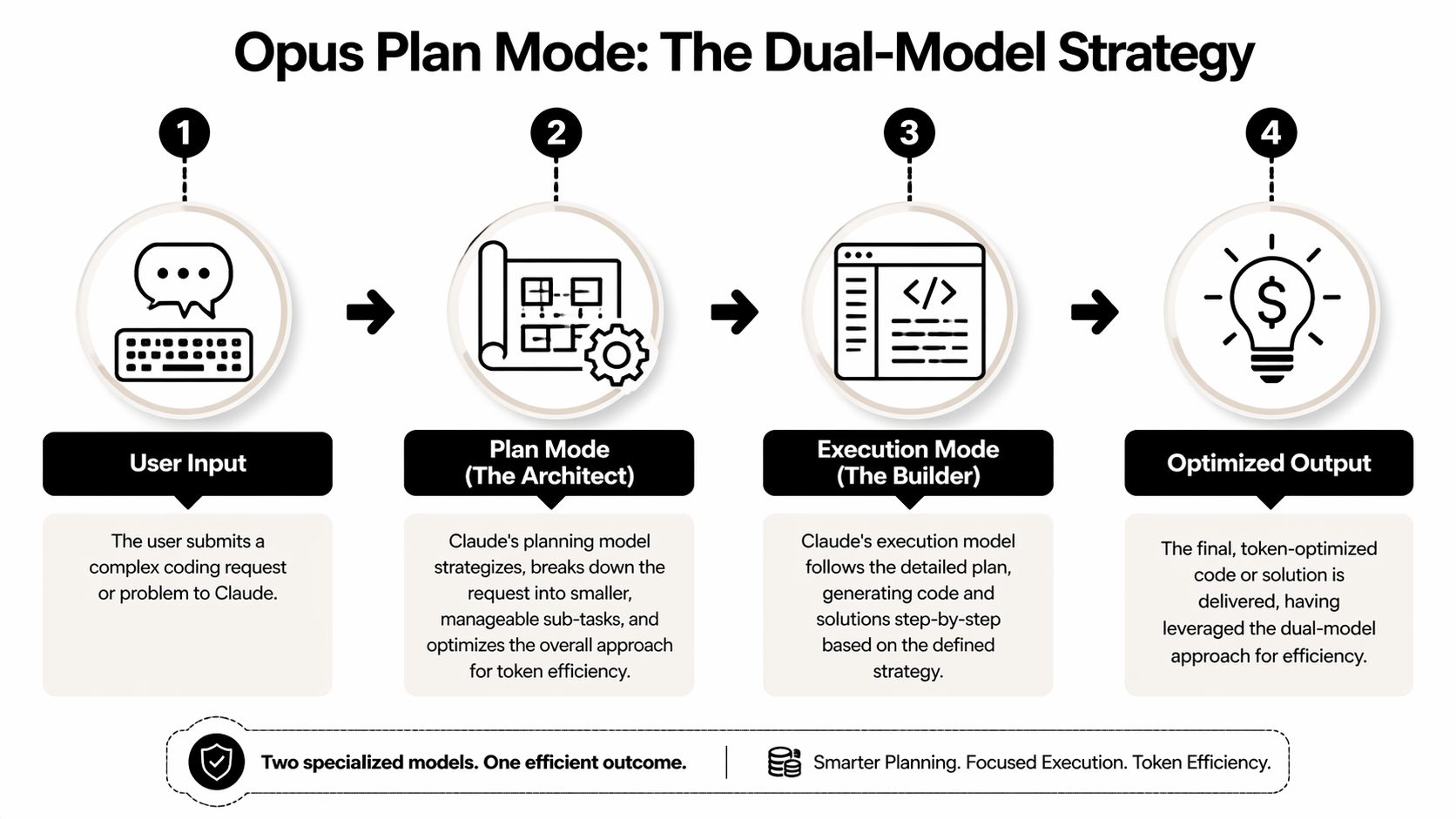
Think of Opus as the architect and Sonnet as the builder.
You don't hire the architect to carry lumber. You hire them to produce the blueprint, identify structural risks, and make sure the work won't need to be torn down halfway through. Once the plan is solid, the builder can move fast.
That is the logic behind Plan Mode.
What the split actually does
Claude Code can burn tokens in ways that don't feel obvious while you're working. It rereads files. It revisits assumptions. It follows a line of reasoning that sounds plausible, then collapses when one hidden dependency shows up.
According to MindStudio’s breakdown of Opus Plan Mode token savings, Opus Plan Mode implements a dual-model architecture that switches between Opus for planning and Sonnet for execution, and this improves token efficiency by preventing Claude from pursuing incorrect solution paths. That matters because wrong-path exploration is described as the single largest source of token waste in development workflows.
In unstructured sessions, teams report a familiar pattern:
- Claude rereads the same files
- Analysis loops drag on
- A weak early assumption infects the rest of the session
- The work gets scrapped and restarted
Those aren't small misses. They are token multipliers.
Why this works better than default Opus everywhere
Many users assume the strongest model should stay active for the entire session. That feels safer. It often isn't cheaper or cleaner.
A better approach is to reserve Opus for moments where judgment matters most:
- Understanding the task
- Breaking work into steps
- Finding edge cases
- Choosing the approach
Then Sonnet takes over for the repetitive and execution-heavy portion of the job.
If Claude gets the approach wrong at the start, every later token is working against you.
That is why Plan Mode tends to outperform brute force usage. You are not just swapping models. You are reducing the odds of expensive drift.
If you're trying to tighten Claude spend across a team, this guide on cutting Claude Code costs complements the same operating principle from a broader budgeting angle.
Your First Opus Plan Mode Workflow
Plan Mode earns its keep on work that is small enough to ship today and messy enough to waste tokens if Claude guesses wrong.
A good first test is an analytics change that crosses layers. Add a new event when a user exports a report, update the API route that records it, and touch the frontend component that triggers it. That kind of task has enough surface area for planning to matter, but it still lets you judge whether the upfront Opus spend paid for itself.

Start with the command and a scoped request
Inside Claude Code, begin with:
/model opus-plan
Then ask for a plan, not code.
Instead of: Add analytics tracking to the dashboard
Use: Plan the changes needed to add analytics event tracking when a user exports a report. The backend route already exists. I need to validate event naming, identify affected files, flag edge cases, and keep the change minimal.
That prompt does two jobs. It narrows scope, and it tells Opus what decisions matter before Sonnet starts generating edits. Good prompt engineering is mostly about removing ambiguity early.
What a useful first plan looks like
A workable plan should give you enough detail to approve or reject the approach in under a minute.
Look for:
- Affected files: Routes, components, helpers, tests, and any schema definitions
- Order of operations: The sequence that avoids rework
- Risk points: Duplicate events, bad naming, missing auth checks, null states
- Open questions: Facts Claude should confirm before writing code
If the plan is vague, the workflow is already slipping. Ask follow-up questions before you approve execution.
This is the break-even point founders often miss. Opus planning costs more up front, so it only saves money if that plan prevents a bad implementation pass, a rewrite, or another long context rebuild later. On a narrow single-file edit, the math often fails. On a change that touches backend logic, frontend behavior, and event semantics, it usually works in your favor.
Review the plan like the person paying the bill
Do a fast review with three checks.
Wrong assumptions
Claude may infer an event schema, auth rule, or dependency that does not exist.Scope creep
Plans often expand from "add tracking" to "clean up the analytics layer." Reject that unless you asked for it.Missing constraints
State what cannot change. Backward compatibility, naming conventions, and release timing matter.
One correction here is cheaper than ten corrections after code generation.
Once the plan is sound, tell Claude to implement it. Then review the diffs before you ask for polish, tests, or follow-on cleanup.
Later in the workflow, if you want a visual walkthrough of Claude Code operation in practice, this demo is worth watching after you've tried the command yourself:
A routine that holds up under budget pressure
For everyday feature work, use this sequence:
- Activate Plan Mode
- Request a scoped plan with constraints
- Correct assumptions and trim scope
- Approve implementation
- Review diffs before expanding the task
This adds a small planning cost at the start. In return, you reduce the expensive failure mode where Claude writes plausible code for the wrong shape of problem. That is the trade-off. If you are building on a tight budget, judge Plan Mode by whether it cuts rework, not by whether the first response is cheaper.
If you're comparing structured Claude workflows with automation-heavy alternatives, this look at Claude Code routines versus n8n helps clarify where each style fits.
Advanced Token Saving With Model Routing
Plan Mode is one piece of a broader discipline: model routing. That means matching the model to the task instead of treating every coding request like it deserves premium reasoning.
Most development work doesn't.
According to MyDataSchool’s token-saving guide, model routing delivers 60 to 70% cost reductions by matching computational intensity to task requirements. The same source says Sonnet handles 70 to 80% of daily development work, including tests, simple edits, and code explanations, while Opus should be reserved for complex multi-file refactors and architecture decisions.
What a realistic week looks like
A founder shipping product in Claude Code usually has a mixed week, not a single type of task.
On Monday, you might debug a weird auth issue. On Tuesday, add tests and cleanup naming. On Wednesday, rethink a data flow across several files. If you leave Opus active for all of it, you pay top-tier rates for low-stakes execution.
That is avoidable.
Model Selection Guide by Task
| Task Type | Recommended Model | Rationale |
|---|---|---|
| Multi-file refactor with architectural risk | Opus | Better suited for planning and tradeoff-heavy decisions |
| New feature with several dependencies | Opus Plan Mode | Use Opus to map the approach, then Sonnet to execute |
| Writing tests for known behavior | Sonnet | Clear execution task with limited ambiguity |
| Small bug fix in a known file | Sonnet | Doesn't usually justify premium planning overhead |
| Code explanation or file-by-file edits | Sonnet | Routine development work fits lower-cost execution |
| Repetitive formatting work | Haiku | Useful for lightweight repetitive tasks when quality demands are lower |
A practical routing framework
Use this quick filter before you start:
- How many files are involved
- How ambiguous the requirement is
- How expensive a wrong turn would be
- Whether the task is mostly reasoning or mostly output
If the answer is "one file, clear ask, low risk," start with Sonnet.
If the answer is "several files, fuzzy requirements, hidden dependency risk," start with Opus or Opus Plan Mode.
What not to do
A lot of builders make one of two mistakes.
The first is Opus everywhere. It feels premium but burns budget. The second is Sonnet everywhere. That works until a tricky task goes sideways and you waste time on retries, follow-up prompts, and corrections.
The middle ground is where the savings live.
Working heuristic: Use Opus when a bad decision will force rework. Use Sonnet when the decision is already made.
There are also supporting habits that make routing work better in longer sessions:
- Keep guidance files tight: Large instruction files add overhead every turn.
- Reduce output noise: Compressed CLI output keeps context cleaner.
- Compact earlier than you think: Don't wait until the session feels bloated.
If you want more ideas in the same category, these Claude Code token management hacks are useful once model selection is already under control.
Common Pitfalls and When Not to Use Plan Mode
Here's the part most articles skip: Plan Mode is not automatically the right choice.
That sounds odd in a guide about using it. It is still true.
The tradeoff for Opus planning on small tasks hasn't been properly measured. According to this discussion of the break-even gap for Opus Plan Mode, sources recommend Plan Mode to prevent wrong-path waste, but none provide concrete data on when the upfront Opus reasoning cost breaks even for smaller jobs. The same source notes that Opus costs roughly 5x more than Sonnet, which makes this decision important for budget-conscious builders.
When to skip planning
If the task is tiny, planning can be overhead.
Examples:
- Rename a variable in one file
- Fix a typo in a validation message
- Explain what a short function does
- Add a small test for an obvious path
- Update a config value with clear instructions
For work like that, Sonnet is usually enough. Starting with Opus can cost more than the mistake risk justifies.
A founder-friendly skip checklist
Skip Plan Mode when most answers below are "yes":
- Single-file task: The work is tightly scoped.
- Obvious implementation: There are few real design choices.
- Low downside: If Claude gets it slightly wrong, the fix is quick.
- Minimal context needed: You don't need broad repo understanding.
- No hidden dependency risk: The change won't ripple through the system.
If several answers are "no," planning becomes more attractive.
Other mistakes that erase the benefit
Even when Plan Mode is the right call, poor usage can wipe out the savings.
One common problem is the vague opener. If you say, "help me improve the dashboard," Claude has to spend tokens guessing your intent. Another is treating the plan as ceremonial and approving it without review. That invites expensive execution on bad assumptions.
A third problem shows up in larger AI workflows, where routing decisions are buried inside orchestration. If you're building a broader stack, the idea of an AI control layer is useful because it frames model choice as governance, not just convenience. That mindset helps teams stop defaulting to one model for everything.
Planning is insurance. Don't buy the expensive policy for a loose cabinet hinge.
My counter-intuitive view is simple: many solo builders would save more money by getting stricter with task scoping than by obsessing over model settings. A sharp prompt to Sonnet often beats a fuzzy planning session with Opus.
Measuring Your ROI on Token Savings
Opus Plan Mode only deserves a place in your workflow if it earns back its upfront cost.
That means measuring break-even, not just admiring cleaner plans. If Opus spends extra tokens to map the work, the execution phase needs to save enough Sonnet tokens, rework, or failed attempts to justify that spend. For a founder on a tight budget, that is the only question that matters.
Claude Code gives you a practical way to track this. Use /usage before planning starts, after the plan is approved, and again when implementation is done. After a few sessions, you can compare the same class of task across two paths: direct Sonnet execution versus Opus planning followed by cheaper implementation. As noted earlier in Prosper in AI’s Claude token optimization guide, good measurement also depends on basic context hygiene, including keeping CLAUDE.md tight and using .claudeignore to keep junk out of the prompt.
What to log
Keep the log simple so you will maintain it:
- Task type: bug fix, feature build, refactor, test generation
- Path used: Sonnet direct, Opus direct, or Opus Plan Mode plus execution model
- Token checkpoints: before plan, after plan, after execution
- Result: shipped cleanly, needed rework, or abandoned
- Time cost: minutes to first acceptable result
This produces a usable decision framework fast. If Plan Mode consistently reduces retries on multi-file work, it is paying for itself. If a narrow task finishes in one clean Sonnet pass, planning was overhead.
A simple rule works well. Plan Mode tends to break even on tasks with real dependency risk, unclear implementation order, or enough surface area that one wrong turn causes several more prompts. It usually loses on short, obvious work where the model can act immediately and the correction cost is low.
The controls that make ROI easier to see
Do the cheap fixes first. Otherwise you end up blaming model choice for waste caused by bad context management.
- Check /usage at the same milestones each session. Consistent measurement matters more than perfect measurement.
- Keep CLAUDE.md focused. Long standing instructions raise the cost of every turn.
- Use .claudeignore aggressively. Generated files, dependencies, and logs should not ride along in active context.
- Reset between unrelated tasks. Old context inflates spend and muddies your comparison.
Treat token spend like any other operating metric. Founders already track CAC and infrastructure costs because small inefficiencies add up once usage grows. AI coding spend deserves the same discipline, especially if you are deciding between planning-heavy workflows and cheaper execution-first loops.
If you need a basic framework to calculate your ROI, use it here. The inputs are simple: extra planning cost, reduced execution cost, less rework, and faster completion. For a broader benchmark on model economics, this guide to the most cost-effective models in Cursor for 2026 is a useful parallel. The principle is the same. Pay for the expensive model only when the decision quality changes the outcome.
Oryndex helps founders and operators cut through tool noise when building an AI stack. If you're comparing coding assistants, workflow tools, or automation products and want a curated shortlist instead of vendor hype, explore Oryndex.