
Cut Costs for Claude Code: Save 50-80% on AI Bills

Matic Pogladič
22 April 2026

Teams overspend on Claude Code for one simple reason. They treat model choice as a preference instead of a routing decision.
The fastest savings do not come from telling engineers to use AI less. They come from sending each job through the cheapest path that still clears the quality bar. That was the big shift for us. Once we stopped treating every prompt like a premium reasoning task, spend dropped fast without slowing delivery.
The pattern is predictable. A developer keeps a long session alive, pastes in broad context to be safe, and runs routine edits through the same expensive setup used for architecture work. The bill grows from accumulated token volume and poor task routing, not from a handful of obviously bad requests.
A better way to manage Claude Code spend is to use a tiered strategy.
Start with low-friction controls such as default model selection, tighter thinking budgets, and more aggressive context cleanup. Then add workload routing. Put repetitive edits, summarization, and prep work on cheaper paths. Reserve premium reasoning for the small slice of tasks where it changes the outcome. If you want a quick way to evaluate those trade-offs, this Claude cost planning tool is a useful starting point.
That mental model matters more than any single tip. "Just use Sonnet" is better than doing nothing, but it is still incomplete. Real savings come from stacking simple toggles first, then introducing hybrid model workflows and team-level guardrails. That is how you cut Claude Code spend without turning the tool into something engineers avoid.
Your Introduction to Smarter Claude Code Spending
Teams do not cut Claude Code costs by rationing usage. They cut costs by routing work by value.
That shift changed everything for us. Spend fell once we stopped treating every prompt like a premium reasoning problem and started treating model choice, context size, and task prep as separate cost controls.
The expensive mistake is easy to miss because it looks reasonable in the moment. An engineer keeps a long session open, pastes in extra files to be safe, and runs routine edits through the same high-cost path used for architecture work. Nothing looks reckless. The waste shows up later in repeated token spend and bloated context, not in one obviously bad request.
A cleaner mental model is to sort Claude Code work into three layers:
- Low-cost execution: routine edits, test updates, boilerplate generation, simple refactors, and docs work
- High-value reasoning: design trade-offs, ambiguous debugging, tricky reviews, and tasks where a wrong answer creates rework
- Pre-model cleanup: log trimming, file selection, summarization, and context reduction before the model sees the prompt
That third layer is where many teams miss easy savings. If the model keeps rereading setup text, giant files, or repeated instructions, you are buying tokens that do not improve the answer.
Practical rule: Pay for reasoning when reasoning changes the outcome. Everything else should get cheaper treatment or less context.
Good cost control works in tiers. Start with simple toggles such as default model selection, tighter session hygiene, and smaller prompts. Then fix workflow issues such as repeated context and poor task routing. After that, add hybrid patterns where cheaper models handle prep and premium models handle the narrow slice of work that justifies the price.
That is the part most advice misses. "Just use Sonnet" is better than nothing, but it is still a one-lever answer to a multi-lever problem. The bigger win comes from deciding which jobs need strong reasoning, which jobs need clean inputs, and which jobs should never hit an expensive path in the first place.
I use a utility-bill mindset here. The monthly total matters, but the useful question is what keeps the meter running. If that framing helps, how to read a utility bill is a surprisingly good parallel for AI spend.
If you want a fast way to pressure-test those choices, this Claude cost planning tool is a practical starting point.
Where the ROI Comes From
ROI comes from stacking controls in the right order.
First reduce waste. Then route work by difficulty. Then reserve premium reasoning for the tasks where quality has clear business value. That sequence is how Claude Code spending becomes predictable, instead of something that creeps up one long session at a time.
How to Read Your Claude Code Bill
A Claude Code bill is a usage report with prices attached. Read it that way and the savings opportunities become obvious.
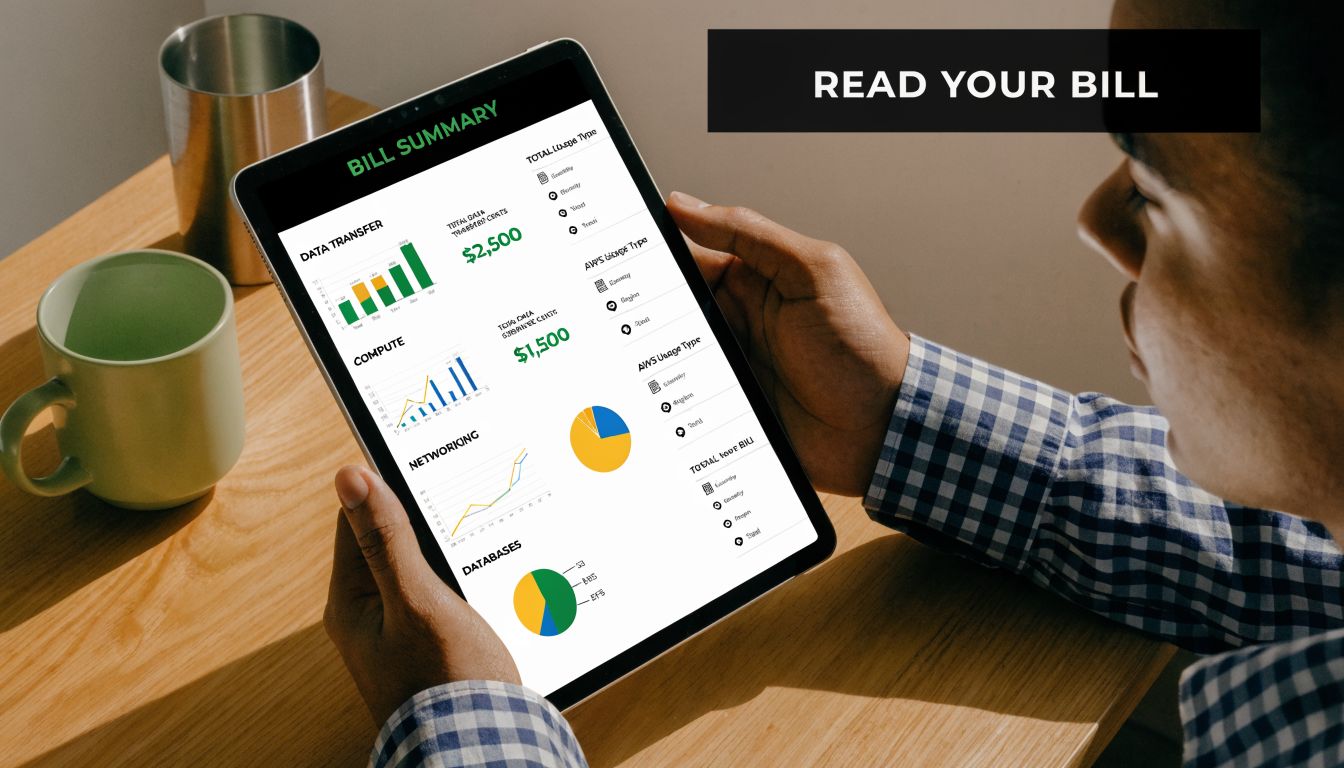
The right comparison is a utility statement. The monthly total matters, but the useful question is what kept the meter running. If that framing helps, this guide on how to read a utility bill mirrors the right mindset for AI spend surprisingly well.
Two drivers matter most
Nearly every Claude Code invoice comes back to two variables:
| Cost driver | What it means in practice | Why it matters |
|---|---|---|
| Model choice | Which model handles the task | Higher-capability models usually cost more |
| Token volume | How much context goes in and how much output comes back | Bigger sessions inflate spend |
That sounds obvious. It still gets missed in day-to-day engineering work.
Teams usually notice the model first because the label is visible. The larger source of waste is often token volume. Long chat histories, repeated instructions, pasted logs, and unnecessary files turn normal requests into expensive ones. That is the first mental shift I want teams to make. Do not read the bill as "which model did we buy." Read it as "what kind of work did we keep sending, and how much text did we force the model to carry each time."
As noted earlier, the cheaper default model is the right starting point for most coding tasks. The mistake is stopping there. If you switch models but keep sending bloated sessions, your bill still stays high.
Why context gets expensive fast
A large context window feels efficient because it saves setup time for the developer. It often does the opposite for cost.
Every extra file, repeated system prompt, stale exchange, and oversized paste adds to the token load. Claude Code is not pricing only the last line you typed. It is pricing the full working set attached to that request. On long sessions, that accumulated context is where spend starts to drift.
Your prompt isn't just the sentence you typed. It's the entire baggage train attached to that sentence.
This is why compaction, prompt reuse, and cleaner session boundaries pay off so fast. They reduce repeated token processing instead of asking the model to reread the same material on every turn. For practical tactics, this article on Claude Code token management hacks is worth reading.
A simple pre-flight cost check
Before starting a task, run three checks:
- Does this task need premium reasoning, or just solid implementation?
- Am I sending raw context that could be filtered or summarized first?
- Will this setup be reused enough to justify the initial context load?
Those questions catch waste early.
If the answer to the second or third question is yes, the problem is usually workflow design, not tool pricing. The teams that keep spend under control treat model routing and token volume as engineering constraints. That is the difference between a bill that feels random and one you can predict.
Quick Wins to Cut Costs by 50 Percent Today
The fastest savings come from better routing, not heroics. Teams that cut spend quickly stop treating every prompt like a high-stakes reasoning job and start setting cheap defaults first.
I’ve seen the same pattern on engineering teams: costs spike because the expensive path becomes the default path. Fix that, and the bill drops without slowing delivery.
Set a cheaper default first
Start with the model that is good enough for normal software work, then escalate only when the task proves it needs more reasoning.
For day-to-day coding, that usually means using Sonnet as the baseline for implementation, test fixes, routine refactors, and file-level edits. Reserve premium reasoning for cases like architecture trade-offs, ambiguous bugs, or tasks that have already failed once on the cheaper tier.
A simple operating rule works well:
- Default to Sonnet for standard development work.
- Escalate on failure or ambiguity, not on instinct.
- Drop back down after the hard step so one difficult task does not drag an entire session onto a more expensive track.
That reset discipline matters. Premium model inertia is one of the quietest budget leaks in Claude Code.
Cap unnecessary thinking
Reasoning tokens are useful when the task is sufficiently complex. They are waste when the model is writing a unit test, cleaning up types, or patching a small function.
Set a ceiling before the session gets expensive:
export MAX_THINKING_TOKENS=10000This works because it changes the default behavior early. Instead of waiting for a bloated session to show up on the bill, you put a guardrail in front of routine work.
Compact with intent
Compaction saves money only if the summary preserves the details that matter for the next turn. Generic summaries often keep too much chatter and drop the implementation details you need.
Use a focused instruction:
/compact Focus on code samples and API usageThe best compaction prompts are specific about what survives. Code paths, API contracts, error states, and open decisions should stay. Repeated exploration, dead ends, and stale examples should go.
Shrink startup context
A lot of waste happens before the model answers anything. Large instruction files, pasted logs, and static guidance that gets attached to every session can make a simple task expensive from the first request.
Three changes usually pay off fast:
- Keep CLAUDE.md short and current. If it reads like a wiki, it is probably costing you money on every session start.
- Move static guidance into on-demand skills or task-specific docs. Load it only when the task needs it.
- Filter logs before they hit the model. Send error lines, stack traces, timestamps, and a small amount of surrounding context instead of the full raw file.
That last one is an easy win. A 5,000-line log rarely needs model attention. A filtered 40-line excerpt often does.
If you are deciding whether to keep optimizing Claude Code or switch tool classes for part of the workload, this comparison of open code tools versus Claude Code is a useful reference. If your team is benchmarking other options at the same time, review these Claude code alternatives.
Use caching only where repetition exists
Caching works best when the same stable context shows up repeatedly. Good candidates include repo conventions, long system instructions, scaffolding templates, and repeated task wrappers in automation.
Do not assume caching helps every workflow. If each request has different structure, different files, and different instructions, cache hit rates stay low and the savings barely move.
The mental model is simple. First, cut unnecessary context. Second, cap expensive reasoning. Third, reserve premium models for the work that earns the extra cost. Those three changes usually get the first big drop without a migration or workflow rewrite.
The Hybrid Model Strategy for Deeper Savings
The big savings show up when you stop treating Claude Code as one tool with one price. Treat it as a routing layer. Different work deserves different cost ceilings.
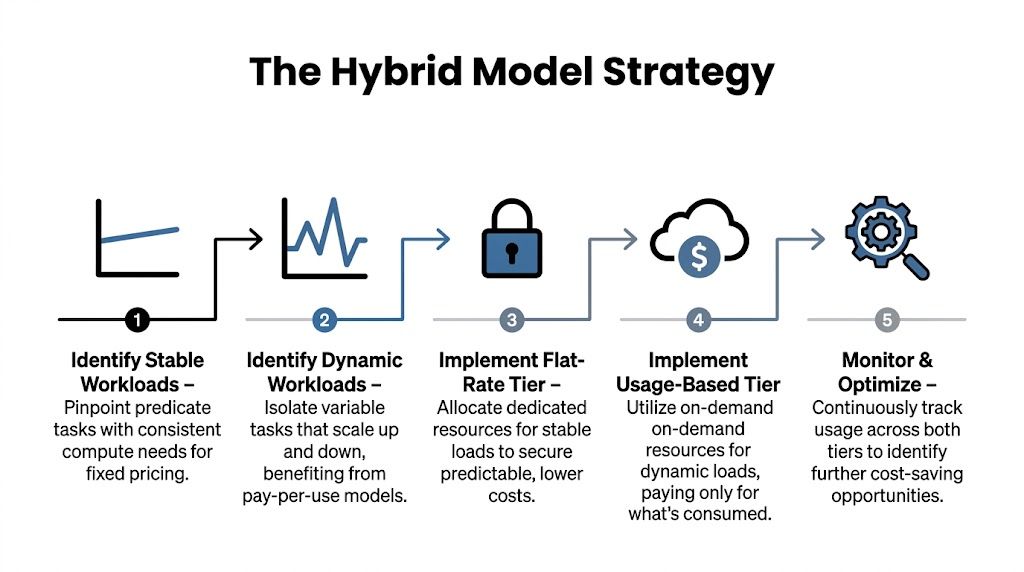
Use subscriptions for exploration and API for throughput
The first shift is separating discovery from execution.
Interactive work has different economics than bulk work. During discovery, engineers ask follow-up questions, inspect files, test assumptions, and change direction quickly. A subscription plan fits that behavior well because the value comes from speed and iteration, not from tightly controlled per-call efficiency.
Once the task is clear, the economics flip. Repetitive edits, large refactors, file-by-file transformations, and scripted generation are better handled through the API, where you can batch work, cap scope, and control retries. That is where I usually see the first serious drop in spend.
A practical pattern looks like this:
- Use Pro for discovery. Explore the codebase, narrow the task, and get the prompt or procedure right.
- Switch to API for execution. Run the repetitive or large-scale portion once the instructions are stable.
- Chunk the work. Split by module, directory, or task type so failures stay cheap and reruns stay small.
- Return to interactive mode for judgment calls. Use the premium loop again only when the work becomes ambiguous.
That handoff matters. The expensive mistake is staying in interactive mode after the thinking is done.
Add cheaper models for the repetitive middle layer
There is also a middle tier that many teams ignore. Some coding work is too large for comfortable interactive use, but too simple to justify premium reasoning on every pass.
That middle tier includes tasks like boilerplate expansion, repetitive test generation, straightforward migrations, format normalization, and low-risk code transformations. In those cases, a cheaper model can carry a lot of the volume while Claude handles planning, edge cases, and final review.
The mental model is simple:
- Premium model: architecture decisions, debugging unclear failures, risky refactors, final judgment
- Mid-cost or cheaper model: repetitive implementation, broad but predictable edits, low-risk generation
- API automation: high-volume execution with bounded prompts and clear acceptance checks
Consequently, hybrid setups become more than a pricing tweak. They become an engineering pattern.
If you are evaluating where Claude should sit relative to open or lower-cost options, this roundup of Claude code alternatives is a useful comparison point.
Think in workload classes, not brand loyalty
A common mistake is picking one favorite model and forcing every task through it.
That works for a week. It fails when usage scales, prompts get longer, and delivery pressure pushes people toward the fastest apparent option instead of the cheapest acceptable one. Cost control gets much easier when you classify work before you choose a model.
I use three questions:
- Does this task require judgment or just coverage?
- Will the prompt stay stable across many runs?
- Is the failure cost low enough to use a cheaper model first?
Those questions usually expose the right routing path quickly. Hard debugging with messy context goes to the premium lane. Wide, repetitive edits go to a cheaper lane. Large structured jobs go through the API with guardrails.
Teams building repo-aware assistants or retrieval layers around this approach should also decide what context needs to be fetched on demand instead of pasted into every prompt. Tools in the vector database tooling ecosystem can help shape that boundary.
The best savings usually come from architecture choices. Discipline helps, but routing rules cut more spend than good intentions ever will.
Building a Cost-Aware Engineering Workflow
Manual savings don't scale. One careful engineer can keep their own bill tidy. A team cannot rely on that forever.

If you want cost control to hold up under real delivery pressure, it has to be operational. That means scripts, rules, and defaults that reduce bad choices before they happen.
Turn judgment into policy
The strongest teams write down routing rules so developers don't make the same pricing decision from scratch every day.
A workable policy might sound like this:
- Use Sonnet for standard coding work: Keep the fast path cheap and predictable.
- Require justification for premium escalation: Expensive reasoning should be an intentional choice.
- Preprocess noisy inputs outside Claude Code: Logs, diffs, and generated files should be trimmed before submission.
- Compact long sessions before context drifts: Don't let stale history become a silent tax.
This isn't bureaucracy. It's guardrails.
A small shell wrapper can help enforce it by selecting a model based on task type, prompt template, or directory scope. The point isn't perfection. It's consistency.
Add checks before expensive prompts leave the terminal
Another useful move is preflight validation. If a prompt includes massive files, repeated boilerplate, or obvious junk, the developer should know before the model ever sees it.
That can be as simple as local checks for:
- Prompt size warnings: Flag sessions with unusually large input payloads.
- File pattern exclusions: Keep build artifacts, generated bundles, and irrelevant logs out of the context.
- Task-type presets: Apply different defaults for refactoring, debugging, and documentation.
A lot of teams already do this kind of gating for tests and formatting. AI spend deserves the same treatment.
If you're building repeatable automation around these behaviors, this comparison of Claude Code routines versus n8n workflows is useful because it highlights where lightweight routines stop scaling and where workflow orchestration starts making sense.
Make the team see the spend
Cost awareness improves when the numbers are visible close to the work.
That doesn't require a fancy platform. A shared dashboard, a simple report from local usage files, or a daily summary by project is often enough to change behavior. Once engineers can see which prompts are bloated and which jobs are cheap, they start adjusting on their own.
Here's a practical example of the kind of operational thinking that helps teams get there:
Culture beats reminders
The wrong way to manage AI costs is sending Slack messages about "being careful." That fades in a week.
The right way is to make low-cost behavior the default path. Good wrappers, compact prompts, standard model routing, and visible usage data do more than reminders ever will. Engineers usually don't resist efficiency. They resist friction and ambiguity.
Build around that truth and the savings tend to stick.
Common Pitfalls and Hidden Cost Traps to Avoid
The common assumption is that more model power is always safer. In practice, it's often just lazier.
The fastest way to lose the savings you've earned is to keep one expensive habit alive because it feels convenient. Claude Code spend gets inflated less by dramatic mistakes and more by quiet defaults that nobody revisits.
Model inertia is real
A developer switches to a premium model for a hard debugging session. The problem gets solved. Then they stay on that model for test cleanup, documentation, and routine edits.
That's not malicious. It's normal. It's also wasteful.
The fix is procedural. Tie premium usage to a task class, not a mood. If the hard part is over, downgrade immediately.
Expensive models often solve the first hard problem, then coast through a dozen cheap ones on your bill.
Long-lived context can become dead weight
Persistent history feels productive because the assistant "remembers." But memory has a carrying cost.
Once a session has drifted through multiple objectives, every new request can inherit old baggage. The result is a slower, more expensive interaction with less focus. If the current task no longer depends on the old context, cut it loose.
A fresh session is often cheaper and cleaner than trying to salvage a bloated one.
Third-party wrappers can hide bad defaults
Integrated tools sometimes make Claude Code easier to use while making cost behavior harder to inspect. Broad context injection, aggressive file inclusion, and generic system prompts all add up.
That doesn't mean wrappers are bad. It means you should audit them the same way you'd audit a CI action or deployment script. Look for what they send by default, how they compact context, and whether they let you control model routing.
The hidden trap isn't the vendor. It's the assumption that convenience settings are cost-aware. They usually aren't.
Frequently Asked Questions About Claude Costs
Teams that cut Claude spend hard usually ask the same four questions. The answers are less about model loyalty and more about routing work to the cheapest option that still clears the quality bar.
When is Opus worth paying for
Pay for Opus when better reasoning changes the outcome enough to justify the price. I use that bar for messy root-cause analysis, architecture trade-off work, and debugging paths where one bad assumption can burn hours of engineer time.
For cleanup, rote refactors, format changes, and predictable code generation, the premium tier usually loses on ROI. The useful rule is simple. Buy premium reasoning for high-uncertainty work, then step down as soon as the task becomes procedural.
What's the most overlooked way to lower repeat-task costs
Task specialization.
A lot of teams keep trying to squeeze savings out of prompts alone. That helps, but the bigger gain often comes from separating repeated work from open-ended work. If bug triage, log labeling, doc transforms, or test-case normalization follow a stable pattern, route those jobs to a cheaper model or a narrowly scoped pipeline with tighter prompts and smaller context.
That shift matters because repeat work fails in predictable ways. Once the task shape is stable, paying for broad reasoning on every run is usually waste.
Should I replace Claude Code with open models entirely
Usually, no.
A full replacement sounds clean on paper, but it creates operational drag if the open model needs extra scaffolding, retries, or human correction to match output quality. Savings disappear fast when engineers become the glue code between weak generations and production-ready results.
The better pattern is hybrid by default. Use open models for preprocessing, bulk edits, simple code transforms, and queue-based background work. Keep Claude for tasks where judgment, iteration speed, and lower supervision cost matter more than raw token price.
How do I know whether my current workflow is inefficient
Watch the behaviors, not just the bill.
If engineers keep one long session alive across unrelated tasks, costs rise. If they paste full files when a function, stack trace, or diff would do, token spend climbs without improving answers. If premium model use spreads from one hard problem to every follow-up task, the workflow has no routing discipline.
The fix is to audit by task class. Break usage into buckets like exploration, implementation, review, triage, and documentation. Once you can see which bucket is burning money, the right optimization becomes obvious.
If you're sorting through AI developer tools, coding assistants, and workflow software and want a cleaner way to compare them, Oryndex is worth a look. It curates vetted tools for builders and operators, so you can evaluate options with less noise and less vendor hype.