
SQL Artificial Intelligence: Transform Your Data

Matic Pogladič
21 April 2026

SQL artificial intelligence usually works best as an extension of the data stack you already trust, not as a replacement for it. The useful pattern is straightforward. Keep your relational database as the system of record, then add AI for natural-language querying, in-database prediction, vector search, and query optimization where each piece earns its complexity.
Founders often hear a narrower story than reality. One vendor pushes text-to-SQL. Another sells vector search. A database platform promises built-in ML. In practice, teams get the best results by treating SQL and AI as one operating model that spans all four areas. If you are comparing options, a curated set of SQL AI tools and platforms can help frame the trade-offs.
The reason to start here is practical. Your finance data, product events, customer records, and reporting logic already live in SQL. Keeping AI close to that foundation usually reduces data movement, shortens testing cycles, and makes access control easier to manage.
This pattern also fits the broader shift toward AI systems that act on structured business data, as described in Agentic AI and the banking operations revolution.
For early-stage teams, the winning move is rarely a full rebuild. Add the right AI layer on top, inside, or beside your SQL stack, then measure whether it improves speed, accuracy, and operational control.
SQL Is Not Dead It Is Learning to Speak AI
Startups do not usually outgrow SQL. They outgrow vague interfaces, scattered data ownership, and workflows that force people to translate business questions into analyst tickets.
I have seen teams rip out Postgres after hearing that relational databases were legacy infrastructure. Six months later, they were juggling a vector database, an orchestration layer, a retrieval service, and a new argument about where customer truth lived. The stack looked modern. The operating model got worse.
Augment your SQL stack before you replace it.
SQL artificial intelligence means adding AI capabilities around a SQL database so people can query data in natural language, run model-driven analysis closer to the data, combine relational and vector search, and improve query performance without rebuilding the system of record.

Why the old narrative is wrong
The old pitch said SQL was too rigid for AI. In practice, AI systems become more useful when they sit near structured data with clear schemas, permissions, and business definitions.
That is why SQL has held its ground through every platform shift. Companies still need a dependable way to store orders, subscriptions, product usage, support events, and financial records. AI changes how teams access and act on that data. It does not remove the need for a stable relational core.
The interesting shift is not "AI replacing SQL." It is SQL becoming the coordination layer for several AI patterns at once. Natural-language querying gets business users to answers faster. In-database ML keeps scoring and feature logic close to governed data. Vector support lets teams combine semantic search with relational filters. Query optimization uses models to improve how the database itself runs. Treated separately, these look like product categories. Treated together, they form one practical operating model for builders.
What founders should take from that
Founders should evaluate SQL and AI by control, speed, and accuracy, not by how futuristic the architecture diagram looks.
If a sales lead asks, "Which accounts expanded after support volume dropped?" the team should not need an analyst to handcraft every join. If operations wants to catch broken records before they poison a forecast, the answer should not be exporting CSVs into disconnected tools. The better question is: which AI capability belongs closest to your SQL data, and which one should stay outside the database?
That decision has real trade-offs. Keeping AI close to SQL usually reduces data movement and simplifies governance. It can also constrain model choice or tie you to database-specific features. Pulling work into external services gives more flexibility, but adds latency, synchronization overhead, and more places for access control to drift.
The broader trend is the same in regulated industries. Agentic AI and the banking operations revolution describes systems that connect automation to governed business data rather than bypassing it. That pattern applies just as well to startups. Reliable autonomy starts with reliable data boundaries.
If you want a fast view of vendors building around this model, browse this directory of SQL AI tools and platforms.
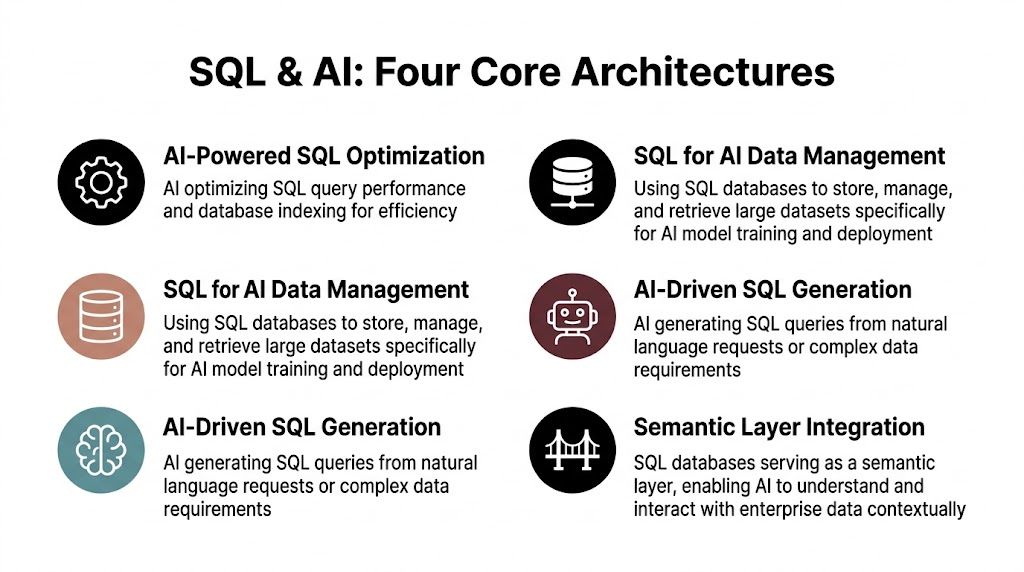
The Four Core Architectures of SQL and AI
There isn’t one single sql artificial intelligence pattern. There are four.
Treat them as different architectural moves, not competing ideologies. A founder who mixes them up usually buys the wrong tool.
AI generated SQL
This is the easiest entry point. A user asks a question in plain English, and a model translates it into executable SQL.
Think of it as a translator sitting between a person and the database. The database doesn’t change. The interface does.
This pattern works well when:
- Business users need self-service access without waiting on analysts
- Teams already trust their warehouse schema and want faster query authoring
- You need a narrow assistant for reporting, campaign targeting, or internal metrics lookup
It fails when teams assume language understanding is enough by itself. If the model doesn’t know your schema, naming conventions, or business definitions, it will produce plausible nonsense.
In database machine learning
This pattern keeps model-related work inside the database or warehouse environment instead of constantly moving data out to another runtime.
The analogy is an in-house workshop. Rather than shipping raw materials across town, you process them where they already live.
For a startup, that can simplify a lot:
- Less data movement
- Fewer fragile sync jobs
- Cleaner governance for sensitive tables
- Tighter feedback loops between analytics and prediction
This is often the right fit for forecasting, anomaly detection, scoring, or classification jobs that depend heavily on structured records.
Vector integration inside or beside SQL
Now the database needs to support meaning, not just exact matches. That’s where embeddings and vector search come in.
Call it a smart index. A normal index helps you find rows by exact value. A vector index helps you find rows by semantic similarity.
This matters when your product needs:
- Semantic search over product descriptions
- RAG over support tickets, docs, or account notes
- Similarity matching for content, items, or incidents
- Hybrid retrieval that mixes structured filters with semantic recall
A lot of teams overcomplicate this stage. They create a separate vector system too early, then discover they still need SQL filters for account status, region, date range, or permissions. That’s why vector support close to SQL is attractive.
If you’re mapping agent workflows across systems, this guide to multi-agent architectures is useful because it shows how specialized agents depend on shared context and controlled handoffs. The same principle applies here. Semantic retrieval is only useful when the agent can tie it back to structured facts.
ML powered query optimization
This is the least flashy pattern and often the most valuable. AI or ML techniques help the database choose better execution paths, indexing strategies, or workload behavior.
It’s the autonomous mechanic. Nobody brags about it in a product demo, but everyone notices when performance improves.
Snowflake is a strong example. According to the Snowflake Cortex AISQL overview, the company is integrating LLMs directly into the SQL engine, and internal benchmarks show up to 70% reductions in query runtime and costs for operations like FILTER and JOIN.
That matters because AI features are only useful if they scale under real workloads.
A simple way to choose
| Pattern | Best first use case | Main risk |
|---|---|---|
| Text to SQL | Self-service analytics | Hallucinated joins or wrong business logic |
| In-database ML | Scoring and prediction on structured data | Treating SQL like a full ML platform for every task |
| Vector integration | Semantic search and RAG | Weak access control or poor metadata filters |
| AI optimization | Faster and cheaper workloads | Blind trust in automation without query review |
For builders exploring retrieval and semantic tooling, this curated view of embedding tools is a practical way to compare categories without getting buried in vendor claims.
The winning stack usually isn’t the most novel one. It’s the one where structured data, semantic context, and operational controls stay aligned.
Practical Integration Patterns and Prompts
The difference between a solid pilot and a frustrating one usually comes down to context. Most failed sql artificial intelligence demos don’t fail because the model is weak. They fail because the prompt is blind.
A founder asks, “Show me our highest-value inactive customers,” and the model has no clue whether “inactive” means no login, no order, no payment, or no support activity. It guesses. The output looks polished. The query is wrong.

Text to SQL works when the prompt knows your schema
The most useful pattern for an early-stage company is often a thin Text-to-SQL layer on top of a warehouse or application database replica. It gives non-technical users access without opening production write paths.
Bad prompt:
“Find average order value by customer.”
That’s too vague. The model doesn’t know table names, key relationships, or whether refunds should be excluded.
Better prompt:
“Generate SQL for schema: customers(id,name); orders(customer_id,amount). Query: avg order per customer.”
That style of schema-aware prompting is directly reflected in the AWS guide to Text2SQL and generative AI, which also notes that using RAG to provide schema context can improve Text-to-SQL accuracy by 15% to 25% in enterprise tests. The same source says Spider benchmark scores can improve from 60% to 85% with fine-tuning and in-context learning, enabling non-SQL users to query data 5x faster.
That’s the practical lesson. Don’t ask the model to “know your business.” Give it the pieces.
A realistic startup workflow
Say your marketing lead wants a campaign list of customers who bought once, spent above your typical threshold, and haven’t returned recently. There are two sane ways to support that request.
One approach is analyst-mediated. The lead files a request, waits, gets a CSV, then asks for revisions.
The better approach is controlled self-service:
- Mirror the needed tables into a reporting-safe environment
- Provide schema and metric definitions to the model
- Constrain output to read-only SQL
- Add a validator that checks table names, joins, and row limits
- Show both the SQL and the result so a human can spot bad assumptions
That final step matters more than people think. Hiding the SQL makes trust harder, not easier.
RAG with SQL in plain English
RAG sounds abstract until you map the actual flow:
- Collect the source material from docs, tickets, product notes, contracts, or CRM text fields
- Create embeddings so the system can retrieve semantically related passages
- Store the metadata you’ll need for filtering, permissions, customer scope, and freshness
- Retrieve relevant context based on the user’s question
- Pass the retrieved context plus schema definitions into the model
- Generate SQL or an answer grounded in those inputs
- Log everything for review, especially failures and ambiguous requests
A lot of teams forget the metadata step. Then retrieval returns the right paragraph from the wrong tenant or an outdated policy note. That’s not an AI problem. It’s a systems design problem.
For moving data from scattered SaaS tools into a warehouse before you add any AI layer, products in the Airbyte category are often part of the first workable setup.
Practical rule: If a business term matters, define it explicitly in the retrieval context. Don’t expect the model to infer your revenue logic from table names.
Prompt patterns that hold up better
Use these prompt ingredients consistently:
- Schema context first. Name the tables, columns, and join keys.
- Business rules second. Define terms like active customer, qualified lead, net revenue, or churned account.
- Output constraints third. Ask for read-only SQL and require explicit joins.
- Examples last. Give one or two valid query patterns from your own environment.
A compact template looks like this:
| Prompt element | Why it matters |
|---|---|
| Schema description | Prevents invented tables and columns |
| Metric definitions | Reduces semantic drift |
| Few-shot examples | Steers style and join logic |
| Execution constraints | Lowers risk from expensive or unsafe queries |
There’s a good short demo worth watching before building your own layer:
What not to automate too early
Don’t start with unrestricted natural-language access to your production database.
Don’t let the model write data.
Don’t assume your semantic layer exists just because your tables are documented. In many startups, business logic lives in a founder’s head, two dbt models, and a Slack thread from six months ago. Until that logic is written down, Text-to-SQL will keep sounding smarter than it is.
Key Tool Categories for Your AI Data Stack
Tool selection gets messy when every vendor claims to be an AI data platform. Ignore the slogans and sort the market by job.
That makes buying easier.
AI native cloud databases and warehouses
These platforms bring AI functions into the environment where your structured data already lives. The appeal is obvious. Less data movement, fewer glue services, and one permission model if you set it up well.
When evaluating them, look for:
- Native AI functions inside SQL workflows
- Clear controls for who can call models and on which data
- Support for mixed workloads such as analytics, retrieval, and transformation
- Strong observability so you can inspect execution and failures
This category is strongest when your team already has warehouse discipline and wants to keep the center of gravity there.
Bolt on Text to SQL and BI layers
These tools sit above the database and make querying easier for business users. They’re often the fastest way to test demand for self-service analytics.
The right question isn’t “Can it generate SQL?” Most can. Ask instead:
- Does it understand our semantic definitions
- Can it show the generated SQL
- Can we restrict it to approved tables and views
- How does it handle failed or ambiguous prompts
A pretty chat UI doesn’t mean much if the product can’t respect your warehouse conventions.
Vector extensions and semantic retrieval layers
This category matters when keyword search no longer captures meaning. Some teams keep vectors in a separate system. Others use extensions close to relational data so filters and permissions stay simpler.
That trade-off depends on your product shape. If your retrieval logic constantly mixes semantic similarity with structured filters, keeping those paths close can reduce operational complexity. If you need highly specialized retrieval behavior, a separate vector service may still make sense.
If you’re comparing dedicated retrieval products, this Pinecone tools page is a useful jumping-off point for feature review.
Transformation and orchestration tools
This layer is less glamorous and more important than founders expect. AI only helps if the underlying data is stable enough to trust.
Strong transformation and orchestration tools help with:
- Schema normalization across apps and events
- Freshness management so answers reflect current state
- Lineage for tracing where fields came from
- Testing so AI doesn’t sit on broken models
Most “AI reporting” problems turn out to be data modeling problems wearing a chatbot costume.
A founder level buying filter
Use this quick screen before any purchase:
| Category | Primary job | What to verify first |
|---|---|---|
| AI-native database | Bring AI to governed data | Permission model and workload fit |
| Text-to-SQL layer | Make querying accessible | Semantic accuracy and SQL transparency |
| Vector layer | Support semantic retrieval | Metadata filters and access control |
| Orchestration stack | Keep data usable | Testing, lineage, and reliability |
Buy for the bottleneck you have. Not the architecture diagram you admire.
Performance Security and Governance Best Practices
The most expensive SQL AI mistake isn’t picking the wrong model. It’s shipping without guardrails.
Teams often spend weeks on prompt quality and almost no time on query control, embedding security, or audit trails. That order should be reversed.

Performance needs hard limits
AI-generated SQL can be syntactically correct and still be operationally terrible. A founder sees a chart. The warehouse sees a giant scan.
Put controls in place:
- Read-only execution by default for model-generated queries
- Row and time limits to stop runaway jobs
- Approved views instead of raw base tables where possible
- Query review logs so you can inspect expensive patterns
- Fallback paths when the model can’t produce a confident result
A small counter-intuitive point. Restricting the model often improves user satisfaction. People prefer a clear refusal over a slow, expensive, misleading answer.
Security gets harder with vectors and hybrid retrieval
Many teams are significantly underprepared in this area. Once you combine structured data with embeddings, you create a second representation of sensitive information that often gets less scrutiny than the source tables.
According to the Milvus article discussing AI databases, SQL, and compliance, a 2025 report flagged 40% higher breach risks in AI-SQL integrations in sensitive sectors like healthcare, often due to unencrypted vector embeddings. The same source says 2026 Gartner data shows 65% of major enterprises retain SQL for compliance strengths in regulated industries.
Those two points fit together. Teams want AI features, but they still trust SQL-based governance for a reason.
Governance is product design
Governance sounds bureaucratic until you have to answer basic questions from a customer, regulator, or enterprise buyer.
Questions like:
- Which data sources informed this answer
- Who had permission to query this account
- Was this result generated from current data or stale context
- Can we reconstruct the exact prompt, retrieval context, and SQL output
If you can’t answer those, the issue isn’t legal wording. It’s missing architecture.
Keep an audit trail for the full path: user request, retrieved context, generated SQL, execution result, and final answer.
A practical minimum standard
You don’t need a giant governance program on day one. You do need a minimum standard that survives contact with real customers.
Use this checklist:
| Area | Minimum guardrail |
|---|---|
| Query safety | Read-only mode and execution limits |
| Sensitive data | Mask or exclude PII from retrieval unless explicitly required |
| Embeddings | Encrypt and scope access like any other sensitive asset |
| Auditability | Log prompt, context, SQL, and result |
| Change control | Review schema changes that could break prompts or retrieval |
If you build these controls early, scaling gets easier. If you add them after launch, every shortcut becomes technical debt with compliance consequences.
Measuring Success and Evaluating Your SQL AI
A founder dashboard for sql artificial intelligence shouldn’t be full of vanity metrics. “Users asked more questions this week” tells you almost nothing.
The useful dashboard tracks correctness, speed, trust, and cost.
Metrics that matter for Text to SQL
Start with execution quality. The core question is simple: when users ask something reasonable, does the system generate SQL that runs and returns something useful?
Watch:
- Execution success rate for generated queries
- Human correction rate on model output
- Time from question to answer
- Repeat usage by non-technical teams
- Common failure classes such as bad joins, wrong filters, or metric confusion
If a system answers quickly but users keep checking with an analyst, trust is still low.
Metrics for optimization and retrieval patterns
For AI-driven optimization, measure database behavior, not chatbot satisfaction. You want to know whether the system reduces friction where it counts.
Track:
- Query latency trends
- Compute consumption
- Failure and timeout patterns
- Workload stability under peak use
For retrieval-heavy systems, focus on answer grounding:
- Whether retrieved context supports the answer
- How often users open the cited records or source snippets
- Whether stale or irrelevant context appears in outputs
A practical analytics reference point for these reviews is a curated stream of analytics insights for builders and operators.
The best review habit
Run a weekly sample review. Pull a small set of real prompts, inspect the retrieval context, inspect the SQL, and compare the answer to what a capable analyst would produce.
That habit catches drift early.
It also forces the right cultural shift. SQL AI isn’t “set and forget” software. It’s a data product with ongoing tuning.
Your Next Steps with SQL and AI
Teams often don’t need a grand AI data transformation plan. They need one useful win that doesn’t break trust.
Start there.
Pick one narrow problem
Choose a task with clear value and low blast radius. Good first candidates include internal analytics questions, campaign list generation, support knowledge lookup, or read-only sales reporting.
Avoid anything that writes back to production or makes decisions without review.
Add one pattern, not four
If your bottleneck is business access to reporting, start with Text-to-SQL. If your bottleneck is unstructured support knowledge, start with semantic retrieval tied to SQL metadata. If your warehouse bill is painful, optimization may come first.
The point is restraint. A focused pilot teaches more than a broad architecture deck.
Measure and govern from day one
Set success criteria before launch. Define what a good answer looks like, who can use the system, which tables are in scope, and how you’ll review failures.
That discipline pays off fast. The teams that get value from sql artificial intelligence are rarely the ones with the biggest model budget. They’re the ones that keep structured data, prompts, permissions, and feedback loops tightly connected.
Frequently Asked Questions About SQL and AI
Can I use AI with an older on-prem SQL database
Yes, if you create a safe access layer. In practice, teams usually expose a reporting replica, approved views, or a synced warehouse rather than letting a model talk directly to a transactional production database. That gives you better control over performance and permissions.
Do I need to fine-tune a model for Text to SQL
Not always. Many teams get good results by adding schema context, business definitions, and a few strong examples to prompts. Fine-tuning becomes more useful when your schema is large, naming is inconsistent, or business logic is unusually specific.
Can SQL handle AI workloads beyond reporting
Yes, in specific ways. SQL works well as the operational layer for structured data access, AI-assisted query generation, in-database analytics, and hybrid retrieval patterns. It isn’t automatically the best place for every model training workflow, but it is often the best place to anchor governance and data access.
What breaks most first implementations
Usually one of three things: unclear metric definitions, poor schema context, or weak security around retrieval and embeddings. The model gets blamed, but the underlying issue is usually system design.
If you’re building your stack and want a cleaner way to compare tools without drowning in vendor noise, explore Oryndex. It’s a curated discovery engine for founders, builders, and operators who want practical AI tools, clear categories, and faster decisions.