
Fathom AI Note Taker Review (2026): Is It Worth It?

Matic Pogladič
07 April 2026
Back to back calls create a predictable problem. You finish the meeting, open your notes, and realize the actual decision, the next step, and the one objection that mattered are already fuzzy.
Fathom ai note taker is an AI meeting assistant that joins Zoom, Google Meet, and Microsoft Teams calls, records them, transcribes the conversation, and produces a structured summary after the meeting. For founders, sales leads, and operators, it is worth serious attention because it removes note-taking overhead well, but it is not equally strong for every team, especially when meetings involve mixed accents, multilingual speakers, or global handoffs.
Most reviews stop at “it works.” That is not enough. The key question is whether it fits the way your team communicates.
What Is the Fathom AI Note Taker
If your day is packed with customer calls, hiring interviews, standups, and vendor check-ins, Fathom solves a simple operational problem. It captures what happened in the meeting so you can focus on the conversation instead of typing fragments into a doc.
At a practical level, fathom ai note taker is a meeting assistant for Zoom, Google Meet, and Microsoft Teams. It can auto-join scheduled calls, create a transcript, identify speakers, and generate a summary with action items and follow-ups.
That is the product in plain English.
What makes it popular is not just the transcription. It is the combination of low setup friction and a free plan that removes the usual anxiety around usage limits. For early-stage teams, that matters more than polished branding.
A founder usually wants three things from a note taker:
- Reliable capture: The tool should join calls without constant babysitting.
- Fast review: The summary should make sense without replaying the whole meeting.
- Useful handoff: Notes should move into the rest of the stack, not sit in another dashboard.
Fathom generally does those jobs well. It is one of the more practical options in the meeting assistant category because it stays close to the workflow people already have instead of forcing a new one.
The main caution is this. A lot of teams test AI note takers on neat internal meetings with native English speakers and clean microphones. Real operating environments are messier. Founder calls often include rushed talk tracks, mixed accents, weak wifi, and fast topic switching. That is where the genuine evaluation starts.
Key takeaway: Fathom is best understood as workflow infrastructure, not just a transcription app. If your business depends on call quality, follow-up speed, and searchable meeting memory, that distinction matters.
How Fathom Captures and Summarizes Your Meetings
The easiest way to understand Fathom is to think of it as a quiet court stenographer attached to your calendar. It shows up, listens, tags who spoke, and hands you a recap soon after the conversation ends.
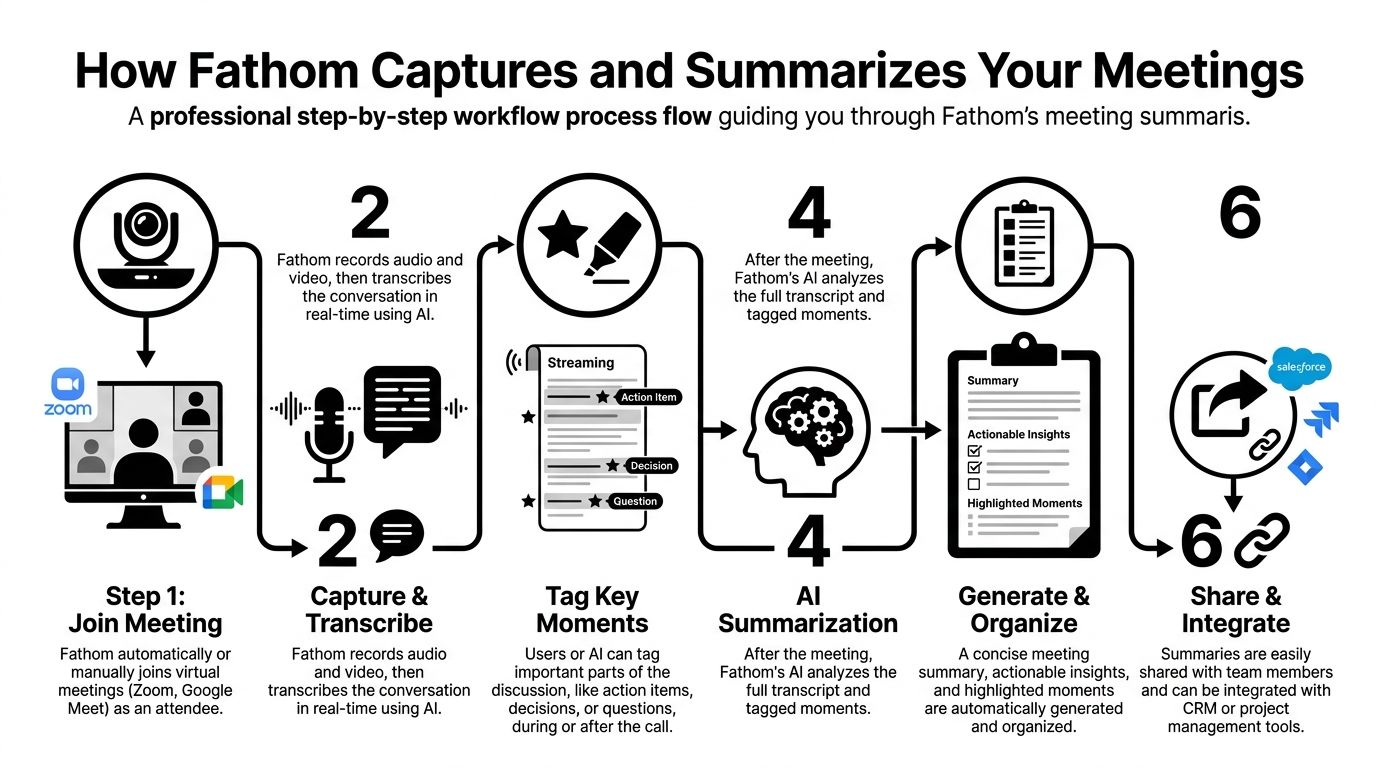
It starts with calendar and meeting access
Most users begin by connecting a work calendar and authorizing meeting platforms. Once that is done, Fathom can join scheduled calls automatically or be triggered manually.
This matters more than it sounds.
A lot of note-taking tools fail in the first minute. People forget to launch them, forget to hit record, or realize too late that the transcript is missing the intro where the prospect stated the actual budget concern. Automation fixes that.
Fathom supports Zoom, Google Meet, and Microsoft Teams. If your stack is already centered on those platforms, setup feels routine. If your company runs a mix of meeting habits across teams, it is still manageable, but Teams users should test more carefully before rolling it out broadly.
During the meeting it records, labels, and tracks
Once inside the call, Fathom captures the conversation and generates a transcript in real time. The useful part is not just the raw text. It is the way the transcript becomes navigable.
You can usually review by speaker, scan the flow of the discussion, and jump back to specific moments. On a practical level, that means a founder can stop scribbling “pricing pushback” in a notebook and return to the exact exchange later.
In independent testing, Fathom achieved 87.3% average transcription accuracy across diverse real-world business calls, with 94% to 96% in ideal conditions, and it generated structured summaries in an average of 23 seconds post-meeting according to this ScreenApp review of Fathom note taker. That lines up with what operators care about most. Good enough accuracy in normal work, then a recap fast enough that the meeting is still fresh.
The transcript quality follows a simple rule. Clear audio produces better output. Busy rooms, technical jargon, speaker overlap, and stronger accents increase cleanup work.
That is not a flaw unique to Fathom. It is the operating reality of speech-to-text.
The summary is the primary product
Raw transcripts are useful, but they are not what saves time. The summary does.
After the meeting, Fathom turns the transcript into a structured recap. In the best case, it behaves like a sharp chief of staff who listened to the entire call and distilled the useful pieces into decisions, action items, and next steps.
Short version. Here lies the value.
For founders and operators, the most useful flow usually looks like this:
- Before the call: Connect calendar, confirm it will join, and make sure the right meeting is being captured.
- During the call: Stay present. Tag important moments if needed.
- After the call: Review the summary, correct anything sensitive or unclear, then push the notes into CRM or task systems.
If you are comparing categories, Fathom fits best among tools focused on AI transcription workflows rather than broad collaboration suites. That can be a strength. It does not try to be everything.
Tip: If your team works in noisy rooms or uses lots of product names and acronyms, test Fathom on a week of normal calls before you standardize it. AI note takers often look better in demos than in actual operations.
What works best in real usage
Three meeting conditions usually produce the cleanest output:
| Meeting condition | What Fathom handles well | What can slip |
|---|---|---|
| Clear audio and one speaker at a time | Speaker labeling, transcript accuracy, quick summaries | Very little |
| Typical office calls with some interruptions | Most action items and decisions | Minor wording errors |
| Crowded, fast, or multilingual calls | General meeting outline | Nuance, accents, and technical terminology |
This is the practical takeaway. Fathom is not magic. It is a fast, mostly reliable capture layer that works best when the call itself is reasonably intelligible.
Fathoms Core Features Founders Use
The long feature list matters less than the handful of tools people open every day. In practice, founders and operators do not need fifty clever buttons. They need accurate recall, fast follow-up, and less admin drag.

Fathom wins attention because its feature set maps directly to those jobs. It is also the #1 rated AI meeting assistant on G2 with 6,500 5/5 star reviews and the most installed app on the Zoom and HubSpot Marketplaces, while its free plan includes unlimited recordings, transcriptions, and summaries, according to Salesdorado’s Fathom review. That does not prove it is right for every team, but it does explain why so many teams test it first.
Summaries that reduce post-call cleanup
The most-used feature is the summary. Not because summaries are flashy, but because they cut the dead time between “meeting ended” and “work resumed.”
A good summary helps with:
- Sales calls: It pulls out objections, next steps, and stakeholder names.
- Internal meetings: It surfaces owners and pending decisions.
- Client work: It gives account leads something shareable without writing a fresh recap.
The catch is that summaries are only as useful as the meeting structure. If a conversation jumps between roadmap, pricing, hiring, and support issues, the summary can flatten those threads together. Structured calls produce better summaries than chaotic ones.
Clips are more useful than anticipated
Shareable clips sound like a nice extra until you use them in a real workflow. Then they become one of the strongest parts of the product.
A clip is helpful when text loses the point. That happens often.
A founder can send a short moment from a discovery call to a product lead instead of rewriting what the buyer said. A customer success lead can share the exact renewal concern with a manager. A recruiter can flag a candidate answer without making the hiring panel watch the whole interview.
That speed matters. So does context.
CRM sync is where ops teams get real value
For many operators, the transcript is only the beginning. The central question is whether meeting data reaches the system of record without manual copying.
Fathom’s native integrations with tools like HubSpot and Salesforce are what make it operationally useful. If the note taker only creates another inbox of information, it adds clutter. If it pushes summaries and follow-up context into CRM, it starts to earn its place.
Three practical gains show up quickly:
- Reps log less manually
- Managers review calls with more context
- Pipeline notes stop living in private docs
This is the difference between a neat productivity app and a tool that changes team behavior.
Keyword alerts and templates help repeatable teams
Operators running recurring calls often care less about the transcript itself and more about pattern capture. Keyword alerts help when you want to know how often a topic comes up across meetings, whether that is pricing pressure, integration requests, or churn risk.
Custom summary templates are useful for a different reason. They reduce cleanup by forcing a more repeatable output shape.
That sounds small. It is not.
When every discovery call summary follows roughly the same frame, handoffs improve. When every hiring interview recap follows a common format, reviews move faster. Standard structure lowers friction.
Here is a quick breakdown of the core features that matter most:
| Feature | Why teams use it | Best fit |
|---|---|---|
| AI summaries | Fast recap and follow-up | Founders, sales, ops |
| Clips | Share exact moments with context | Product, CS, hiring |
| CRM sync | Reduce manual logging | Revenue and RevOps |
| Keyword alerts | Track recurring themes | Managers and operators |
| Templates | Standardize notes across call types | Teams with repeatable workflows |
A short product walkthrough helps if you want to see how those pieces come together in use:
My counter-intuitive take is this. The flashy AI layer is not the reason Fathom is valuable. The boring parts are. Auto-join, clean playback, transcript links, and summary structure do more for daily execution than most “intelligence” features.
Real-World Workflows for Founders and Operators
Features only matter when they survive contact with a real schedule. Fathom is most useful when it becomes part of a repeatable operating rhythm, not a novelty app people check once and forget.
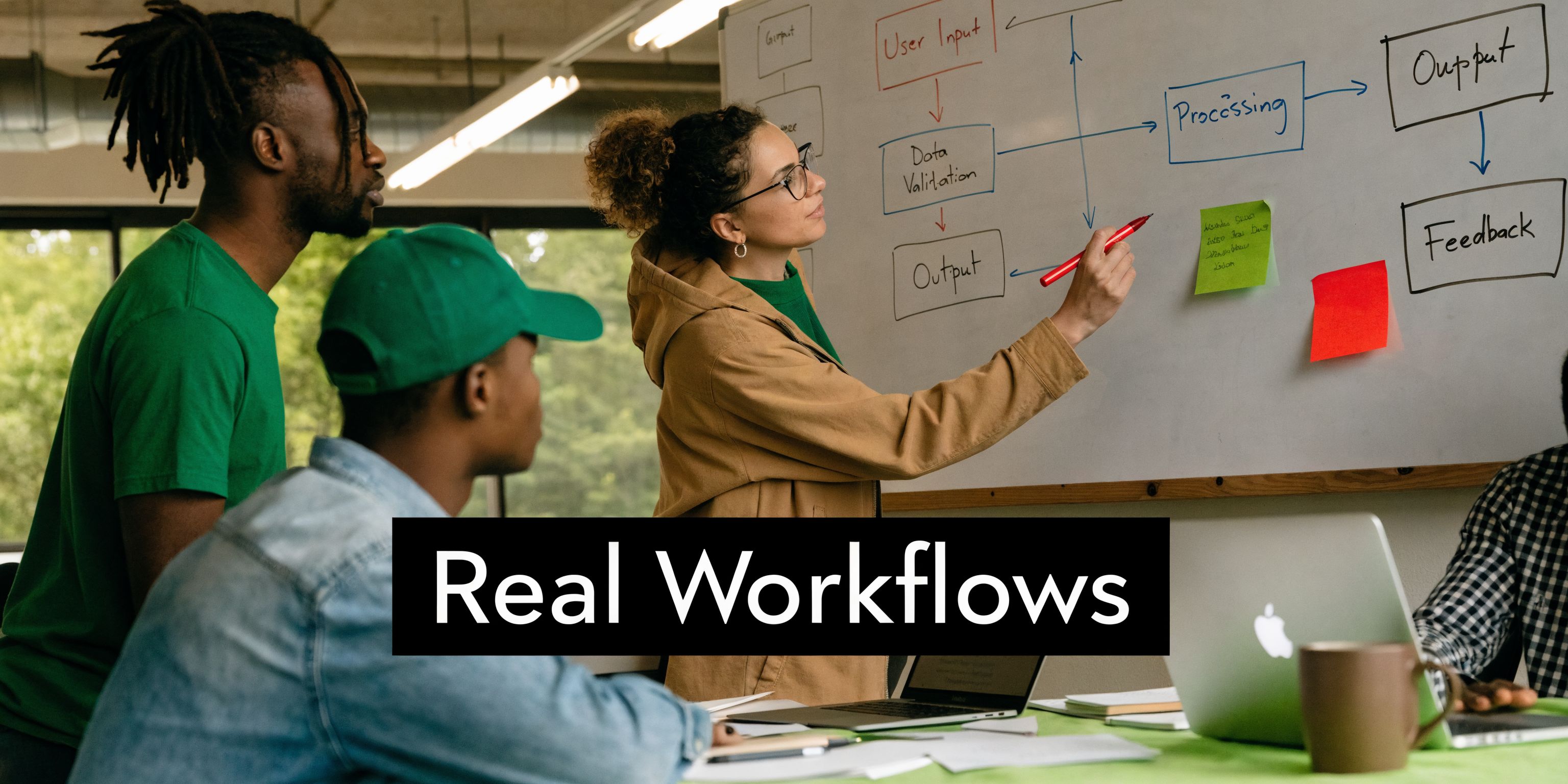
Founder workflow for discovery calls
A founder on early sales calls usually has two jobs at once. Run the conversation well, then remember enough detail to update pipeline notes and send a useful follow-up.
That split attention hurts both.
With Fathom, the cleaner workflow is straightforward. Let it join automatically, stay focused on the buyer, then use the summary to verify pain points, decision criteria, and next steps. If your CRM is connected, the meeting context can move into your sales process without another round of copy-paste.
The practical win is not just speed. It is fidelity.
A handwritten note might say “integration concern.” The transcript often shows the actual issue, such as data ownership, implementation sequence, or who on the buyer side needs sign-off. Those details matter when the founder revisits the account a week later.
Ops workflow for internal project meetings
Operations teams live in the land of half-decisions. A meeting ends, everyone leaves with a slightly different interpretation, and then Slack fills up with “just checking” messages.
Fathom helps most when you use it as a source of record for internal syncs. Not every sync. The ones where ownership and follow-up are likely to get muddy.
A strong pattern looks like this:
- Capture the meeting: Let Fathom record and transcribe the call.
- Review the recap: Confirm action items and correct any ambiguous language.
- Push next steps outward: Move action items into your task system or automation flow.
- Share the link selectively: Send the summary to only the people who need execution context.
For teams already automating internal workflows, a tool like Zapier AI can help route outputs into the rest of the stack. The meeting note itself is useful. The operational handoff is where the impact shows up.
Tip: Do not dump every meeting summary into every channel. Operators get more value by creating a tight distribution rule for who receives what.
Product workflow for user feedback calls
Product managers often struggle with a familiar problem. They know what users said, but they cannot carry the urgency and tone of the original moment into roadmap discussions.
Clips and transcripts become more persuasive than summaries here.
A PM can pull the exact moment where a customer describes the friction, share it with design or engineering, and remove two rounds of interpretation. That is especially useful when the issue is emotional or situational, not just functional.
An example workflow:
- Conduct the user call with Fathom active.
- Review the transcript for feature requests, workarounds, and frustration points.
- Clip the strongest moments.
- Share the clip inside the product discussion instead of paraphrasing the feedback.
The advantage is clarity. Nobody has to guess what the customer meant.
What these workflows have in common
The teams that get the most out of Fathom tend to treat it as operational memory. They are not using it just to “have a transcript.” They are using it to reduce context loss between the meeting and the next action.
That works especially well when:
- calls happen frequently
- handoffs matter
- the same themes repeat across meetings
- people need evidence, not just recollection
The weak use case is random, low-stakes conversation capture with no downstream process. If nobody reviews the summary, shares clips, or updates systems, the tool becomes shelfware fast.
Fathom Pricing Privacy and Compliance Explained
The reason many teams try Fathom in the first place is simple. The free tier removes most of the friction.
Fathom’s free plan includes unlimited recordings, transcriptions, and AI-generated summaries, which is the clearest reason it stands out for individuals and small teams handling frequent calls. For a founder, that means you can run a normal meeting load without immediately hitting a usage wall.
That is a strong value proposition.
Why the free plan matters operationally
Most AI note takers become expensive exactly when your meeting volume increases. Fathom avoids that pressure on the front end, which makes it easier to test across a real week of customer calls or internal syncs.
This is especially relevant for people with high call volume, such as sales reps, agency leads, and founders doing customer discovery. If the free plan is too restrictive, teams never get enough live exposure to know whether the product fits.
Fathom also differentiates itself by not using customer data for AI training on the free tier, as noted earlier in the source-backed product coverage. For teams working with sensitive conversations, that trust signal matters.
Privacy questions to ask before rollout
Even when the price is easy to justify, data handling still deserves scrutiny. Meeting assistants sit in high-trust conversations. That changes the standard.
Before any rollout, decision-makers should verify:
- Who can access recordings and transcripts
- Whether meetings auto-join by default
- How recordings are shared internally
- What controls exist for sensitive calls
- How CRM sync affects downstream visibility
The auto-join point is easy to overlook. It is convenient, but it can also create awkward situations if a bot appears in meetings where recording should not happen. Teams should define clear meeting rules before broad deployment.
Compliance fit depends on your workflow, not the marketing page
For privacy-sensitive teams, the right question is not “does this tool mention compliance?” The right question is “does our actual usage pattern stay inside our risk tolerance?”
A few examples make that concrete:
| Scenario | Fathom fit | Main concern |
|---|---|---|
| Standard sales and discovery calls | Strong | Internal access controls |
| Internal project meetings | Good | Distribution discipline |
| Sensitive HR or legal-adjacent discussions | Cautious use | Recording permissions |
| International customer calls | Mixed | Language accuracy and nuance |
If privacy and governance are a major buying criterion in your stack, it is worth reviewing adjacent tools in the privacy and compliance category so the note taker fits the broader operating model, not just the meeting layer.
My practical advice is conservative. Start with low-risk calls, set clear recording rules, and test how summaries and transcripts move through your systems before opening access widely.
The Pros and Cons A Balanced Verdict
Fathom has an easy case for itself. It is simple to adopt, useful on day one, and unusually generous on the free plan. For solo founders, lean sales teams, and operators buried in recurring meetings, that combination is hard to beat.
The product also does the boring things well. Joining calls, creating usable transcripts, surfacing action items, and making clips shareable are not glamorous features. They are the ones teams rely on.
Where Fathom is strongest
Fathom is a strong fit when your meetings are mostly in English, reasonably structured, and tied to repeatable workflows.
The best-fit teams usually care about:
- Reducing note-taking overhead
- Improving CRM and follow-up hygiene
- Sharing key moments without manual recap
- Keeping meeting history searchable
In those environments, Fathom feels practical rather than experimental. That is a good thing.
Where teams should be careful
A key limitation is Fathom’s performance with non-English languages and global teams, where user reviews and forum discussions point to accuracy drops with certain accents and less language coverage than alternatives like Bluedot, which supports over 100 languages, according to Bluedot’s overview of Fathom alternatives.
This is the part many glowing reviews skip.
If your company runs multilingual customer calls, mixed-language internal meetings, or handoffs across Europe, Asia, and North America, the issue is not just transcript neatness. It is operational risk. A missed nuance in a sales conversation or a misheard implementation detail can create cleanup work later.
Key takeaway: Fathom is excellent for many English-first teams. It is less dependable as a default standard for globally distributed companies with heavy accent variation or multilingual workflows.
My counter-intuitive opinion is that the free plan can hide this weakness at first. Teams adopt it quickly because the value looks obvious, then discover the edge cases only after they scale usage across different regions and speaker profiles.
The balanced verdict is simple. Fathom ai note taker is worth it for English-first founders, sales teams, and operators who want a low-friction meeting capture tool. It is not the safest default pick for global teams where language fidelity matters as much as convenience.
Top Fathom Alternatives and When to Choose Them
If Fathom fits your workflow, it is one of the best value picks in the category. If it does not, the reason usually comes down to one of three things. You want different language coverage, a different free-plan structure, or a different style of meeting workflow.
Fathom’s 85% to 95% transcription accuracy is comparable to top competitors like Fireflies at 90% to 95%, while its main edge is the unlimited free plan, whereas alternatives often limit free usage by minutes or storage, according to Meetingnotes.com’s Fathom vs Fireflies comparison.
That gives you a clear starting point. Compare based on fit, not hype.
Fathom vs top alternatives
| Feature | Fathom | Otter.ai | Fireflies.ai |
|---|---|---|---|
| Free plan philosophy | Unlimited recordings, transcriptions, and summaries | Free tier has stricter minute limits | Free tier has storage limits |
| Best known for | Strong value for high-volume meeting capture | Popular choice for live transcription use cases | Broad note-taking and meeting automation use cases |
| Accuracy positioning | Comparable to leading tools | Qualitatively useful for transcript-first workflows | Comparable top-tier range |
| Best fit | Founders, sales, ops teams with many calls | Users who prioritize live transcript workflows | Teams that prefer a different ecosystem balance |
When to pick Otter.ai
Choose Otter when live transcription behavior matters more than Fathom’s broader value proposition, or when your team already prefers a transcript-first workflow.
If you want a starting point for that route, Otter.ai remains one of the most recognizable alternatives.
When to pick Fireflies.ai
Choose Fireflies when your team prefers its workflow style or integration mix and the free-tier limits are acceptable. The practical comparison here is less about raw transcript quality and more about how the tool fits your stack and team habits.
When to stay with Fathom
Stay with Fathom if your team runs lots of calls, wants low friction, and does not need stronger multilingual depth.
This is especially true for:
- Early-stage sales teams
- Founder-led discovery
- Ops teams with recurring internal meetings
- English-first customer conversations
If your biggest concern is meeting volume and cost discipline, Fathom is hard to dismiss.
Frequently Asked Questions about Fathom AI
Can Fathom transcribe in-person meetings
It is primarily designed around online meetings on Zoom, Google Meet, and Microsoft Teams. For in-person use, the experience is less straightforward, and teams should test carefully if that is a major requirement.
Is there a mobile app for Fathom
The reviewed material indicates no mobile app for core on-the-go workflows. For desk-based teams, that is usually fine. For field teams or people who rely on phone-first meeting capture, it is a real limitation.
Can I upload existing audio or video files to transcribe
The source material used here does not confirm a broad file upload workflow as a core strength, so it is safer to evaluate Fathom primarily as a live meeting capture tool rather than an archive transcription system.
How does Fathom handle speaker identification
Fathom includes speaker detection and speaker labeling in transcripts. In normal business meetings, that is one of the more useful parts of the product because it helps teams trace action items and objections back to the correct participant. As with the transcript itself, performance is best when audio is clear and people are not talking over each other.
If you are building an AI stack and want to compare meeting assistants without digging through vendor fluff, Oryndex is a useful place to start. It helps founders and operators find vetted tools by use case, category, and practical fit, so you can choose faster and waste less time on noisy software lists.