
What Is Granola AI? (2026 Guide to the Bot-Free Meeting Assistant)

Matic Pogladič
03 April 2026

Granola AI is a meeting assistant that records your calls and generates notes without a bot ever joining the meeting. It works silently in the background by capturing audio directly from your device. This bot-free approach ensures your conversations remain natural and private, making it ideal for teams who find meeting bots disruptive.
I've tested dozens of these AI tools, and the subtle distraction of a bot in the virtual room is very real. It changes how people talk. Granola's core promise is to eliminate that digital third wheel, which genuinely improves the atmosphere for sensitive client pitches or internal strategy sessions. The conversations just feel more authentic. It is a powerful concept.
What is Granola AI?
Granola AI is a software application that automatically transcribes and summarizes your meetings. It captures audio from your Mac, Windows, or iOS device without needing an AI participant to join your call. This makes it a discreet and non-intrusive alternative to other meeting assistants. Its purpose is to create a searchable knowledge base from spoken conversations. It solves a real problem.
What does Granola AI do? It turns messy, spoken words into organized, shareable notes. Think of it as a silent partner for your team's collective brain, designed for busy founders, product managers, and team leads who jump from call to call. The value is not just in the automated notes. It is in the freedom it gives you to stay completely focused on the conversation. This is a strategic advantage.
The main features include:
Bot-Free Recording: The app silently captures audio from your device, so no one knows it’s running.
Automated Summaries: After the meeting, its AI processes the audio into a structured summary with key topics and action items.
Notion-Style Editor: The notes are presented in a clean interface that feels familiar, making them easy to edit and share.
Centralized Knowledge Hub: You can organize all notes into team folders, creating a shared memory bank for your entire team.
For those looking at the broader landscape, our guide on the best AI assistants for business provides a wider comparison. Granola’s angle is its focus on a seamless, private, and non-intrusive user experience. It’s for people who know being present is a power move.
How does Granola AI work?
Granola AI works differently from most meeting assistants. Instead of sending a bot to your call, it uses a lightweight app on your Mac, Windows, or iOS device to capture sound. This is how Granola AI works, and it's a fundamental shift in design. By recording audio directly from your system’s sound output, it feels less like an invasive tool and more like a native computer feature. It just sits quietly in the background.
The process is seamless. Granola detects when you join a meeting on platforms like Zoom, Google Meet, or Microsoft Teams and your microphone becomes active. It then starts transcribing the conversation in real-time on your device. Its AI engine identifies different speakers, figures out the main topics, and flags potential action items as they are spoken. It does this without disrupting the meeting.
This diagram shows the elegant simplicity of Granola's workflow.
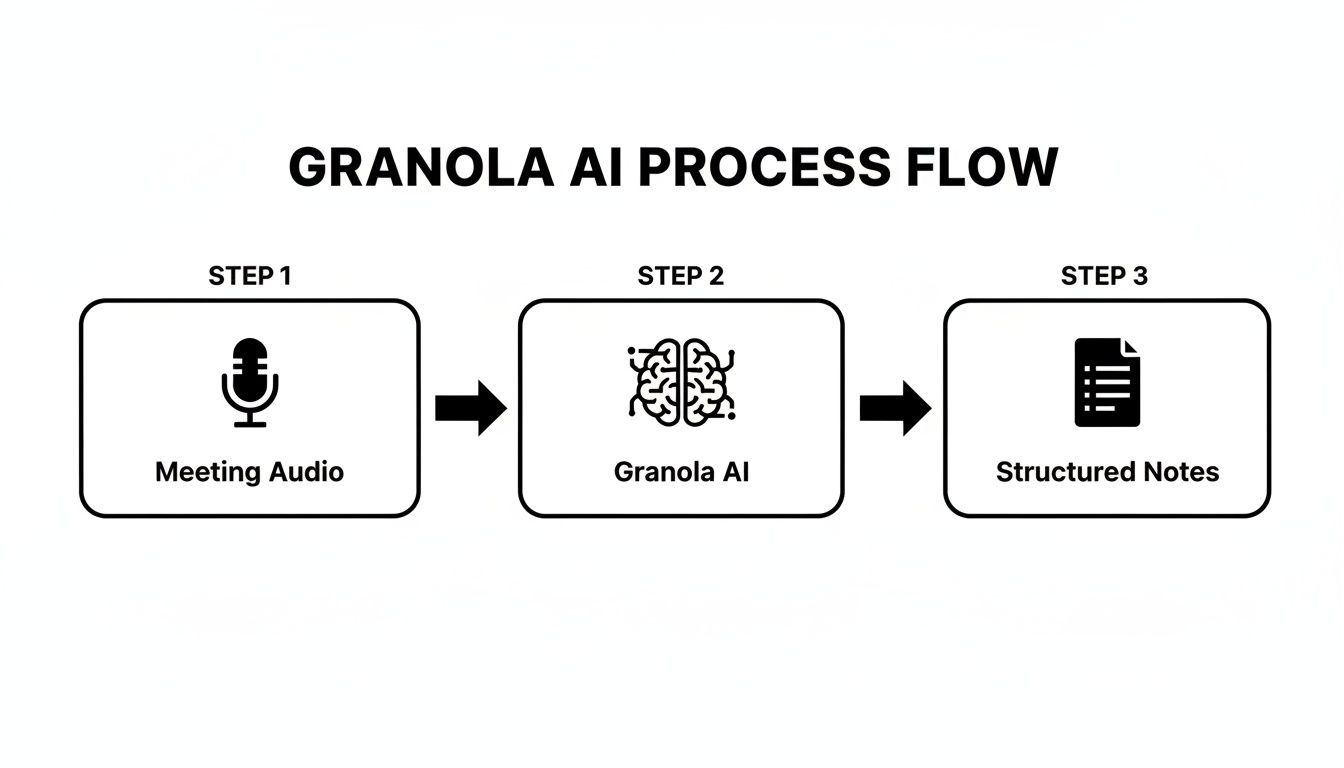
The on-device approach avoids the complexities and privacy concerns of external bots. It moves straight from local audio to intelligent output. This is a big reason why privacy-conscious teams are drawn to it. During a meeting, you can open a live transcript, which I've found to be a lifesaver. Once the call wraps up, the fully processed notes land in your Granola account, organized like a well-structured Notion page. The core mechanism is a hybrid of real-time transcription and post-meeting AI synthesis.
Users love this bot-free approach. Granola boasts a perfect 5/5 on G2 and 4.8/5 on Product Hunt. Reviewers consistently praise its ability to capture audio from any platform without the clunky 'bot joined' notification that plagues competing tools, a point highlighted in this detailed tldv.io Granola review. The technology merges classic speech-to-text with advanced language models, allowing it not just to write down what is said, but to understand it. For the technically curious, this is related to models in our overview of Retrieval-Augmented Generation (RAG).
How much is Granola AI?
Granola AI's pricing is not aimed at being the cheapest meeting assistant. It is positioned for professionals and businesses who understand the high cost of poor meeting documentation. What you pay for is the unique, bot-free recording experience and the incredibly well-structured notes. It costs what it's worth.
Granola's pricing is built to scale with you. The free plan is a test drive. The real power is in the paid plans.
The Free Basic plan is free, but with a 14-day note history, it is a brief trial.
The Individual plan is $18 per user/month, offering unlimited notes for a single user.
The Business plan is $14 per user/month, unlocking team folders and CRM sync.
The Enterprise plan is $35 per user/month for organizations with over 100 users, including SSO and advanced security.
The cost is an investment in focus. When you compare the monthly fee to the estimated $180 per employee that companies lose annually to administrative meeting tasks, the financial case makes a lot of sense. Looking at the price alone is a mistake. Many alternatives seem cheaper, but they often achieve that by having a bot join your call.
Granola AI Pricing vs. Competitors (2026)
| Plan | Price (per user/month) | Key Features | Best For |
|---|---|---|---|
| Granola AI (Business) | $14 | Bot-Free Recording, Team Folders, Notion-style notes | Teams prioritizing discreet, high-quality note-taking. |
| Fireflies.ai (Business) | $19 | Extensive CRM/PM Integrations, Video Recording | Teams needing automated workflows and deep system integration. |
| tl;dv (Pro) | $20 | Video Clipping, Speaker Labels in 20+ languages | Teams focused on visual communication and sharing video highlights. |
| Read AI (Enterprise) | Custom | Meeting Analytics, Engagement Scores, Sentiment Analysis | Sales and leadership teams focused on analyzing meeting dynamics. |
While the Enterprise plan might seem steep, its price is justified by critical security features. For companies handling sensitive data, those are non-negotiable. If you're looking for other options, explore more AI tools for business automation in our guide.
How to use Granola AI
Getting started with Granola AI is simple, but making it an essential tool takes more finesse. It starts with a smart setup. Download the app, grant it permissions for your microphone and calendar, and it will ask to record when a meeting starts. A single click is all it takes.
My one piece of advice for how to use Granola AI is this: prioritize your audio quality. A decent microphone is the key to getting high-quality output. While user reports cite transcription accuracy around 90-92%, that number depends entirely on how well the AI hears what's being said. Muffled audio will lead to a messy transcript. "Garbage in, garbage out" has never been more true. A quality external microphone will give you clean, actionable notes.
For teams, the first step is creating shared folders. This transforms Granola from a personal tool to a collaborative engine. A shared folder creates a central hub where every team member can find meeting notes. It ensures everyone is on the same page. This can change how a team operates. You can explore more ways to build a shared system with tools for a personal knowledge base.
After a meeting, don't just skim the transcript. Use the prompt feature to ask direct questions like:
"What were the key action items assigned to the marketing team?"
"Summarize the client's main concerns about the project timeline."
"List all budget figures mentioned."
This turns a static document into an interactive database. Finally, get into the habit of a one-minute manual review after each call. This tiny habit builds confidence in the system.
What is the best alternative to Granola AI?
The best alternative to Granola AI depends on your priorities. If bot-free recording isn't your main concern, other tools might be a better fit. The search for alternatives involves understanding trade-offs. It is not about finding a clone.
The two heavyweights are Fireflies.ai and tl;dv. Fireflies.ai is an integration powerhouse. If your team's workflow depends on piping meeting notes into systems like Salesforce or Asana, Fireflies is hard to beat. The trade-off is that it relies on a bot that visibly joins your call. This feels different from Granola’s silent recording. A whole different vibe.
If your meetings are highly visual, then tl;dv is the clear winner. While Granola focuses on audio, tl;dv is built for video. Its best feature is the ability to snip and share short video clips from your calls. This is perfect for sharing a product demo or isolating a key customer reaction. Granola does not play in the video space.
Another compelling alternative is Read AI. It moves beyond notes to analyze meeting dynamics. It provides deep analytics on participant engagement, talk-time distribution, and sentiment. This is gold for sales managers coaching their reps. It answers questions like, "Who dominated the discussion?"
My counter-intuitive take is this: sometimes the best alternative isn't another AI notetaker. For highly sensitive internal strategy sessions or board meetings, nothing beats a disciplined human notetaker using a simple shared document. It offers unparalleled security, nuance, and human discretion that AI cannot yet replicate. For a deeper look at the tech behind these tools, explore our guide on models like the popular Claude AI. Your choice comes down to your primary pain point.
Who owns Granola AI?
To understand who owns Granola AI, you need to look at its funding structure. Granola AI is a privately held company, so it's not on the stock market. Its growth has been funded by major venture capital firms. The company started with a simple mission. The founders wanted to fix the problem of forgetting what was said in a meeting. That idea was the seed for everything.
The story accelerated in early 2026. Granola AI closed a massive $125 million Series C funding round. This was a clear signal that it had graduated from a handy tool to a serious enterprise player.
The round was led by Index Ventures, a top-tier investment firm. As this TechCrunch article shows, the investment was a game-changer.
That cash infusion sent Granola AI's valuation to $1.5 billion. It officially earned it "unicorn" status. This was a massive vote of confidence from investors in the company's enterprise strategy. In less than a year, its valuation shot up 6x, from $250 million to $1.5 billion. This brought the company's total funding to $192 million. You can read the full story on this major funding milestone over at TechCrunch.
This funding gives Granola AI the firepower to compete with giants in the AI market. It validates their bot-free approach. Some notable companies using Granola AI include Asana, Gusto, and Mistral AI. Landing these clients proves Granola can handle the security and scale needs of modern businesses. That makes Granola AI a name you can trust.
Answering Your Top Questions About Granola AI
When people ask me about Granola AI, a few key questions always come up. Let's dig into the details on security, accuracy, and how it actually fits into your daily workflow so you can see if it’s the right fit for you.
Is Granola AI Secure?
Yes, and its security model is one of its biggest strengths. Granola’s approach feels fundamentally more private because it avoids inviting a third-party bot into your meetings.
Instead of a "Granola Bot" joining your call, the app records audio directly from your own device. This bot-free design means your conversations stay confidential without that feeling of being watched or monitored that you get with other tools. On top of that, it’s all protected with enterprise-grade encryption and solid data policies.
How Accurate Is Granola's Transcription?
Granola’s transcription is impressively accurate, often hitting the 90-92% range in my tests. But here’s the thing: that accuracy is almost entirely dependent on the quality of your audio. If you feed it a clear recording from a good microphone, you’ll get a transcript that’s nearly perfect.
My take on this is simple. You get out what you put in. Use a decent external mic and keep background chatter to a minimum, and the notes will be incredibly reliable. If you're using a tinny laptop mic in a loud coffee shop, you can't expect the AI to work miracles. This is a universal rule.
Does Granola AI Work With Microsoft Teams and Other Platforms?
It does. Granola works with pretty much any conferencing platform you can throw at it, including Microsoft Teams, Zoom, and Google Meet. Because it just captures the audio output from your computer, it doesn't really care what program is generating the sound.
This also means you can use it to record:
Standard phone calls you take on your computer or mobile.
In-person meetings by just placing your laptop or phone on the table.
Quick, impromptu brainstorming sessions anywhere, anytime.
That platform-agnostic design makes it an incredibly versatile tool for capturing important conversations, no matter how or where they happen.
Can I Use Granola AI on My iPhone?
Absolutely. The iOS app is really well-designed and syncs perfectly with the Mac and Windows desktop versions. This is where Granola shines for capturing those on-the-go conversations.
You can even start a recording with a single tap from your lock screen. It's perfect for those hallway chats at a conference or quick coffee meetings where a great idea pops up. All your notes are then synced across your devices, so you never lose a thing.
Does Granola AI Have a Free Plan?
Granola does offer a Free Basic plan, but you should think of it more as an extended trial than a long-term solution. It gives you a feel for the core features, like the AI-generated notes and bot-free recording.
The main limitation is that it only saves your note history for 14 days. For any kind of consistent professional use, you'll need to jump to one of the paid plans. Still, the free tier is a fantastic, no-risk way to see if the workflow clicks for you before you decide to subscribe.
Ready to streamline your own tool discovery? Oryndex is a curated directory of AI tools built for founders and operators. Find the right software for your needs by searching in plain English. Explore the Oryndex AI tool library.