
How to Automate Social Media Posts for 2026 Success

Matic Pogladič
24 March 2026
When most people think about automating their social media, they're usually just trying to claw back a few hours in their week. But looking at it that way is selling the concept short. True automation isn’t just a time-saver; it’s a strategic engine for growth.
Social media automation is essentially about using software to handle the repetitive parts of publishing content. This can be as simple as scheduling posts ahead of time or as sophisticated as building a workflow that automatically turns a new blog post into a series of tweets. The goal is to create a reliable system that guarantees a consistent presence across all your channels.
Why Social Media Automation Is a Strategic Necessity
If you’re still posting everything manually, you’re not just being inefficient—you're operating at a serious competitive disadvantage. The conversation has moved past if you should automate and on to how you should automate to scale your marketing.
I’ve worked with countless founders who transformed their operations by building a smart automation system. It’s never just about scheduling posts and walking away. It's about creating a predictable, data-driven machine that works around the clock. This frees you and your team from the drudgery of copy-pasting content, letting you focus on the work that actually moves the needle: engaging with your community, digging into performance analytics, and planning your next big move.
The Real Impact of Automation
The numbers don't lie. The market for social media automation tools was valued at USD 4.5 billion in 2024 and is on track to hit a staggering USD 12.8 billion by 2033. This explosive growth is happening for a reason—it delivers real results.
Teams that get automation right see an average engagement increase of 20–30% per post and spend 30% less time on content creation. If you want to dive deeper, you can explore the full market trends and statistics and see how it leads to a 14.5% jump in overall productivity and a 12.2% drop in marketing overhead.
These aren't just marginal improvements. A well-oiled automation strategy gives you the power to:
Maintain a Consistent Brand Voice: Your messaging stays cohesive and on-brand across every platform, even when you're offline.
Optimize Posting Schedules: You can use data to publish content exactly when your audience is most likely to see and engage with it.
Scale Content Distribution: Effortlessly push new blog posts, videos, and case studies to all your social channels without lifting a finger.
By systematizing your content distribution, you move from reactive posting to proactive brand building. Automation becomes the foundation that allows you to execute a sophisticated content strategy without getting bogged down in manual tasks.
Ultimately, understanding this strategic advantage is the first step toward building an effective system. Whether you're a solopreneur trying to do it all or a growing team looking to scale, a smart automation workflow is no longer a "nice-to-have." It's essential infrastructure for anyone serious about social media growth.
It’s tempting to jump right into the tools. We’ve all been there—you hear about a new automation platform and immediately think it will solve all your social media problems. But automating without a strategy is just a faster way to create noise.
The best automation systems are built on a solid plan, not just fancy software. Before you ever think about how to automate your posts, you absolutely must define why you're doing it. Your goals will guide every decision you make, from your posting frequency to the tools you end up choosing.
Start by getting crystal clear on what success actually looks like. Are you trying to build brand awareness? Drive targeted traffic to a new product launch? Or maybe you need to generate more qualified leads for the sales team? Vague objectives like "get more engagement" won't get you very far because they aren't measurable.
You have to attach a number to your goal. For example, instead of a weak goal like "increase traffic," a strong, actionable goal sounds like this: "Increase website referral traffic from LinkedIn by 15% over the next quarter." Now that’s a target you can build a real strategy around.
Define Your Content Cadence
With clear goals in place, your next move is to establish a content cadence. This is all about the rhythm and frequency of your posts. It’s not a race to see who can post the most; it’s about showing up consistently when your audience is actually listening.
The online habits of a B2B professional scrolling LinkedIn during their lunch break are completely different from a D2C customer browsing Instagram on a Sunday morning. Your cadence has to reflect that reality.
Here’s how you can figure out the right rhythm for your brand:
Dig into your analytics. Every social platform offers native analytics that show you exactly when your followers are most active. This is your starting point.
Find your peak engagement windows. Look for consistent patterns. Are people always liking and commenting on Tuesday and Thursday mornings? Those are your prime slots.
Set a starting frequency to test. On LinkedIn, you might begin with three posts per week. On X (formerly Twitter), where the feed moves much faster, you might try three posts per day. Run with it for a few weeks, then check the data and adjust.
The key takeaway here is that consistency is far more important than volume. A well-oiled automation that publishes great content three times a week, every single week, will always beat a chaotic manual effort that drops ten posts one week and goes silent the next.
Map Your Content Themes and Formats
Finally, you need to make sure your automated feed doesn't become a boring, one-note monologue of self-promotion. The easiest way to avoid this is by mapping out your core content themes against different post formats.
Think of it as a simple matrix. On one axis, you have your key topics (e.g., industry insights, company culture, product features). On the other axis, you have your formats (e.g., text-only, image, video, link). This simple exercise ensures your content stays fresh, varied, and valuable for your audience.
This blueprint is what separates strategic automation from a simple content-dumping machine. It turns your social media from a daily chore into a predictable system designed to hit specific business goals. With this plan locked in, you’re finally ready to choose the right tools for the job.
Picking Your Social Media Automation Stack
With a clear strategy mapped out, it’s time to choose your tools. Your automation stack is just the collection of software you’ll use to bring that strategy to life. Getting this right is critical. The right tools create a smooth, almost invisible workflow, while the wrong ones introduce friction and create more headaches than they solve.
The best choice for you really boils down to your goals, your budget, and how comfortable you are with technology. I've seen teams succeed with all kinds of setups, which generally fall into three categories.
Level 1: Dedicated Social Media Schedulers
For most people, the journey into automation begins with a dedicated scheduling tool. Think of platforms like Buffer, Hootsuite, or Vista Social. They're built to do one thing and do it extremely well: publish your content at the right time.
These are your workhorses for consistency. If your main goal is simply to stop posting in real-time and ensure content goes out during peak engagement hours, a scheduler is your best bet. You can sit down on a Monday, load up all your posts for the week, and trust the tool to handle the publishing.
Schedulers are fantastic for:
Batching content: Get everything approved and queued up in one go.
Simple distribution: Push the same core message, image, or link across multiple platforms from a single dashboard.
Ease of use: They are designed for marketers, not developers. The learning curve is usually very gentle.
For a lot of small businesses or solo operators, a solid scheduling tool is all the automation they need. The main limitation is that they operate in a silo—their power doesn't extend much beyond scheduling and publishing.
Level 2: Workflow Automation Platforms
Ready for something smarter? This is where workflow automation platforms like Zapier or Make come in. These tools aren't social media schedulers themselves; they're the glue that connects all your other apps. They let you build intelligent workflows that trigger automatically based on actions in other software.
Instead of just scheduling posts, you can create a "recipe" that watches your blog's RSS feed. The moment a new article goes live, it could trigger a workflow that creates a unique post for LinkedIn, a shorter, snappier version for X, and then adds both to your Buffer queue. All of this happens instantly, without a single click.
This approach turns your separate tools into a cohesive system. One action, like uploading a new customer testimonial video to a specific cloud folder, can kick off a whole sequence of promotional posts across your social channels.
These platforms give you incredible flexibility to design automations that fit your specific processes. If you want to dig deeper into building these kinds of smart systems, check out our guide on how to choose AI tools for business automation.
Level 3: Custom API Integration
The third and most advanced path is building your own solutions using social media APIs directly. This is definitely the "expert mode" of automation, as it requires a developer or a team with engineering skills.
With direct API access, you're not limited by what a third-party tool can do. You could write a custom script that monitors your e-commerce platform and automatically generates a celebratory graphic and post every time a product hits 500 five-star reviews. The possibilities are truly endless.
While this offers unmatched power and customization, it's also a serious commitment. It requires significant upfront development time and, more importantly, ongoing maintenance to handle API changes and bug fixes. This route makes the most sense for larger organizations with very specific, complex needs that off-the-shelf tools just can't meet.
Automation Tool Comparison
To help you decide, here’s a quick breakdown of how these different tool categories stack up against one another.
| Tool Category | Example Tools | Primary Use Case | Best For Teams That... |
|---|---|---|---|
| Scheduling Tools | Buffer, Hootsuite, Agorapulse | Queuing and publishing content at set times. | ...need to establish a consistent posting cadence without manual, real-time work. |
| Workflow Automation | Zapier, Make, IFTTT | Connecting different apps to trigger automated social media actions. | ...want to automate content promotion based on actions in other tools (e.g., new blog posts, videos). |
| Custom API Integrations | Custom Scripts (Python, Node.js) | Building completely bespoke solutions for unique data or triggers. | ...have development resources and require functionality that no off-the-shelf tool provides. |
Ultimately, there's no single "best" option—only the one that best fits your team's current needs and technical capabilities. Many businesses start with a simple scheduler and gradually incorporate workflow automation as their processes mature.
Building an Automated Content Pipeline That Doesn’t Run Dry
So you've got your automation tools picked out. That's the easy part. The mistake most people make is thinking the software is the solution. It’s not. An engine is worthless without a steady supply of fuel, and your automation stack will stall out fast without a smart content pipeline feeding it.
This is where the real work—and the real win—happens. We're talking about building a system to create, approve, and repurpose content so your automated channels are always filled with valuable material, not just the same three promotional posts on repeat. The goal is to build a content engine that practically runs itself.
Nailing Your Creation and Approval Process
First things first, you have to decide how the content actually gets made. This doesn't need to be some complex, over-engineered system. The only thing that matters is consistency. Maybe you block off every Monday morning to write a week's worth of posts, or perhaps you use an AI assistant to get rough drafts on the page. Whatever it is, make it a non-negotiable routine.
Just as important is a lightweight approval process. This is your quality control, ensuring everything that goes out is on-brand and accurate. But be careful—this can quickly become a bottleneck. I’ve seen more than one great automation plan grind to a halt because of a clunky, multi-stage approval chain.
Keep it simple:
A post gets drafted.
One key person reviews it.
It gets approved and added to the queue.
That's it. You can manage this entire flow in a tool you already use, like Notion, Airtable, or even a well-organized Google Sheet. The point is to catch mistakes without killing your momentum.
The Magic of Content Repurposing
Here’s the secret to keeping your pipeline full without burning out: content repurposing. This is how you get the highest possible ROI on your creative efforts. It’s the art of taking one substantial piece of content and slicing it up into a dozen smaller, platform-specific assets.
Think of your big content—like a blog post, webinar, or report—as a "pillar." From that one pillar, you can carve out an almost endless supply of "micro-content" for your social channels.
A single 2,000-word article, for example, can be spun into gold. We do this all the time. That one post can easily become:
A LinkedIn carousel walking through the main takeaways.
A series of 5-10 tweets, each pulling out a punchy statistic, quote, or tip.
An Instagram Story poll that engages your audience on a key idea from the article.
The script for a short TikTok or Reel explaining one of the core concepts.
This approach completely changes the game. It multiplies the value of every single thing you create and ensures your automated schedule is always stocked with fresh material. Your social media stops being a content treadmill and starts acting like the smart, efficient distribution network it's meant to be. Of course, having the right software helps, and you can find some great options in this list of top-rated social media management tools to power your repurposing workflow.
Putting Your First Social Media Automations into Practice
Alright, enough planning. Let's get our hands dirty and start building some automations that will give you back time, starting today. I'm going to walk you through a few practical examples using common tools. Think of these as foundational recipes you can adapt for your own unique content strategy.
Before we dive in, it helps to visualize the flow of your content. This is the simple, repeatable process that will feed your automations and keep your social channels active.
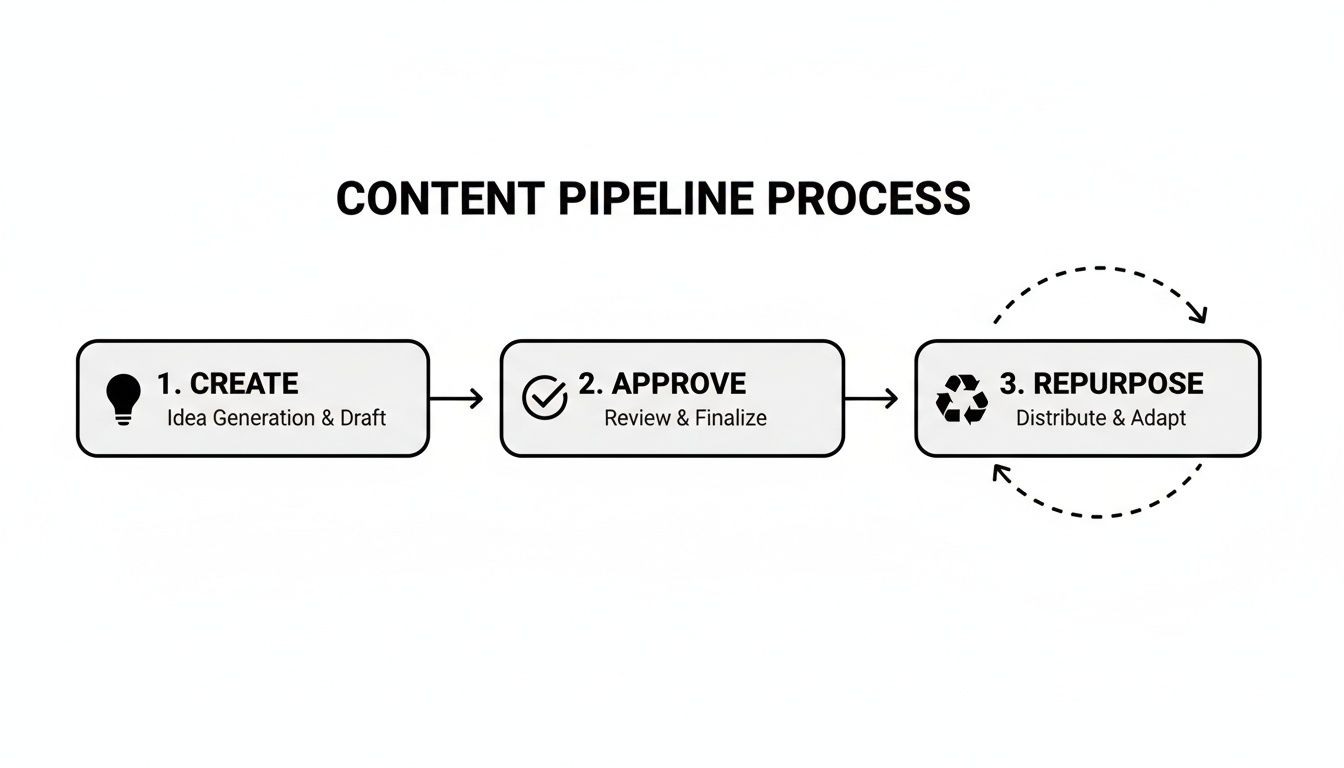
Essentially, you create content, get it approved, and then break it down into smaller pieces to be repurposed. This creates a continuous loop, ensuring your automation tools always have something to work with.
Automatically Share New YouTube Videos
A great first automation is connecting your content platforms. For instance, let's set up a workflow that automatically shares your new YouTube videos to Twitter and LinkedIn. A tool like Zapier makes this incredibly straightforward.
The process starts when you upload a "New Video in Channel" on YouTube. That's your trigger.
Zapier then performs the action: creating a post on your other social accounts. But you don't have to use the same generic message for everything. This is where you can get smart.
For Twitter: You can set it up to post something like, "New video just dropped! [Video Title] Watch it here: [Video URL]".
For LinkedIn: A more professional tone works better. Try, "We just published a new guide on [Video Title]. In this video, we explore [Video Description Snippet]. Check it out: [Video URL]".
What makes this work so well is the use of dynamic content. You’re pulling the title, URL, and description directly from the YouTube upload to craft posts that feel native to each platform, all without lifting a finger.
Turn Your Blog into an Automated Content Engine
Here’s another must-have automation: setting up an RSS-to-post workflow for your company blog. Your blog is a goldmine of content, and this ensures it gets the attention it deserves.
Nearly every blog platform generates an RSS feed—a structured file of your latest posts. You can plug this feed's URL (it usually looks something like yourwebsite.com/feed) into a workflow automation tool like Make or IFTTT.
Once connected to your social accounts, the tool will automatically grab the title and link from every new blog post and share it. It's a simple, set-and-forget way to drive traffic back to your site the moment you publish.
This single automation is one of the most effective ways to guarantee your long-form content gets immediate distribution. You hit "publish," and your social channels instantly come to life.
Connect Your Content Calendar to Your Scheduler
If your team uses a tool like Airtable or Notion for content planning, you can build a powerful bridge to your scheduling tool. The goal is to make the handoff from "planned" to "scheduled" completely seamless.
It all starts with a simple status field in your content calendar.
Imagine a column in your Airtable base labeled "Status." When a post is finalized, a team member changes its status to “Approved.” This one change can trigger a workflow that grabs the post copy, image URL, and publish date right from your Airtable record.
From there, the automation can create a new, perfectly scheduled post in a tool like Buffer. If you're weighing your options for a scheduler, our review of Buffer can give you a better idea of whether it’s the right fit.
This takes your content calendar from being a simple planning sheet and turns it into the command center for your entire social media output.
Monitoring Performance and Refining Your Strategy
Let's be clear: social media automation isn't a "set it and forget it" magic button. If you just let your tools run without ever looking back, you’re essentially publishing into a black hole. The real power of automation is unlocked in the feedback loop—monitoring what works, understanding why, and constantly refining your approach.
It's tempting to get hung up on vanity metrics like likes and follower counts. While they offer a quick pulse check, they don’t tell you if your strategy is actually moving the needle on business goals. You have to dig deeper and focus on the numbers that signal genuine audience intent.
Identifying What Truly Matters
To figure out if your automated posts are actually successful, you need to track metrics tied directly to your original goals. These are the numbers that will give you the hard data needed to make smart adjustments.
Here are the key performance indicators I always watch:
Click-Through Rate (CTR): What percentage of people who saw your post bothered to click the link? This is a raw, unfiltered measure of how well your copy and creative grabbed their attention.
Engagement Rate: This is more than just likes. Look at comments, shares, and saves. These actions show your content was valuable enough for someone to interact with it meaningfully.
Conversion Rate: Of the people who clicked, how many actually signed up, downloaded the guide, or bought the product? This is the bottom-line metric that proves your social ROI.
Reach vs. Impressions: Are you getting in front of new eyeballs (reach), or is the same audience seeing your posts over and over (impressions)? Knowing the difference helps you decide if your content is spreading or just saturating.
You don't need a complicated setup to track this. A simple dashboard in a tool like Google Looker Studio or even a well-organized spreadsheet can show you trends over time. This makes it instantly obvious which content formats are hitting the mark and which ones are just taking up space.
From Data to Actionable Insights
Once you have a steady stream of data, the real work begins: turning those numbers into concrete improvements. This is where you connect the dots between your performance metrics and the automations you built.
For example, maybe you notice that your automated LinkedIn posts scheduled between 4-5 PM have a consistently dismal CTR. That’s not a failure; it’s a signal to start testing a morning slot instead. If video clips are driving tons of comments but your text-only posts get crickets, that’s your cue to pivot your content pipeline toward more video.
Your analytics aren't just a report card; they're a roadmap. Use them to ask tough questions: Is this content pillar actually resonating? Are we posting too often on Platform X? Is this specific format driving qualified traffic or just empty clicks?
This data-driven cycle of iteration is what separates a basic scheduler from a sophisticated marketing engine. By constantly monitoring, analyzing, and tweaking, you ensure your automation is always getting smarter and delivering the maximum impact for your effort.
Clearing Up Common Worries About Social Media Automation
Look, I get it. The idea of automating your social media can feel a little... wrong. The biggest hang-up I hear from marketers is the fear that tools will make their brand feel distant and, well, robotic. It's a valid concern, but one that’s rooted in a few common misunderstandings.
Let's walk through the big questions that come up time and time again.
Will My Brand Sound Like a Robot?
This is always the first question, and it's a fair one. The short answer is no, but only if you approach it correctly. Automation is simply a delivery mechanism; it doesn't have a personality of its own. Your brand’s voice comes from the content you create, not the button you push to post it.
The mistake many people make is feeding their scheduler the same generic, promotional post on a loop. That will absolutely sound robotic. A smart strategy, however, involves building a strong content pipeline filled with a rich mix of material—real insights, behind-the-scenes content, customer stories, and repurposed blog posts.
Your automation system is just an executor. It follows the content plan you built. The human touch is in the strategy and the creative work, not in the manual act of publishing each and every post.
Does Automation Kill Engagement?
There's a persistent myth that social media algorithms somehow penalize scheduled or automated posts. From what I’ve seen, the exact opposite is usually the case. Consistency is a huge factor in the algorithm's eyes.
Automation allows you to show up consistently during peak engagement hours, even when you’re not at your desk. This discipline can significantly boost your visibility and interaction rates. Think about it: a well-crafted post that goes live when your audience is scrolling will always beat a rushed, manual post sent at a random, inconvenient time.
Platforms are designed to reward good content that keeps people engaged. How it got there is irrelevant to them.
How Can I Automate Without Missing Real-Time Moments?
You don't have to choose between the two. The most effective social media managers I know run a hybrid model. They use automation for the heavy lifting and save their own time and energy for the high-value interactions that actually build a community.
Here’s what that looks like in practice:
Automate the predictable stuff: This includes your scheduled blog post promotions, curated articles from other thought leaders, and recurring content pillars like a weekly tip or a Friday poll.
Handle the human stuff manually: This is where you shine. Jump into trending conversations, respond thoughtfully to comments and DMs, and share those spontaneous, of-the-moment updates that make your brand feel alive.
This balance gives you a reliable, consistent presence without sacrificing the agility needed to engage in real, authentic conversations.