
Your Complete Guide to FakeYou Text to Speech in 2026

Matic Pogladič
06 April 2026
FakeYou is a powerful AI tool that lets you create audio using a massive library of celebrity and character voices. Essentially, it transforms your typed text into speech that mimics a specific person or personality. This service uses deep learning to replicate vocal patterns, allowing you to produce unique audio clips from a simple script. It's vocal mimicry on demand.
The technology has become popular for creating memes, social media videos, and unique audio content. Think of it as a vocal costume shop. I first used it to find an obscure cartoon voice for a video intro. I was stunned by how close it sounded. It was uncanny. While many professional text-to-speech platforms offer clean, standard AI voices, FakeYou’s community-driven model serves a vibrant, and sometimes wonderfully chaotic, collection of personalities. This makes it a go-to for creators needing a voice with distinct character, not just generic clarity.
What Exactly Is FakeYou Text to Speech?
At its most basic level, FakeYou is a service that turns your typed words into spoken audio. It's become wildly popular, especially for creating memes and short-form video clips. The core appeal is simple: what if you could have a famous actor, a beloved cartoon character, or even a president narrate a script you just wrote?
That’s precisely the experience it offers.
While many professional text-to-speech platforms offer clean, standard AI voices, FakeYou’s community-driven model serves up a vibrant, and sometimes wonderfully chaotic, collection of personalities. This makes it a go-to tool for creators and marketers who need a voiceover with a distinct character, not just generic clarity.
A Community-Powered Voice Library
The platform's sheer scale is what sets it apart. The community has contributed over 3,900 unique character voices, pulling from a huge range of celebrities and fictional icons. This is a massive jump from just a few years ago. In places like the US and Europe, where content creators and marketers are its biggest users, FakeYou processes millions of audio clips every month. With over 5 million monthly visits, it’s consistently ranked among the top 30 AI tools worldwide, a fact highlighted in analysis from sources like the Mobio Group.
But here’s where most people get it wrong. It’s known for fun and games, but its real utility is in its speed and accessibility. The platform is built on three main features:
- Text-to-Speech (TTS): The main event, where you convert text into a chosen voice.
- Voice-to-Voice (VV): A more advanced feature that maps one person's speech onto a target voice, creating a vocal "deepfake."
- Face Animator: A newer tool that syncs the generated audio with a still image to create a basic talking animation.
The catch for free users is a strict 12-second audio limit. This is perfectly fine for quick gags on TikTok or YouTube Shorts, but anything longer requires a paid plan. This positions FakeYou as a potent, if occasionally constrained, tool in the expanding universe of voice AI tools.
How the Voice Generation Technology Works
So, what's actually happening behind the scenes when you type a sentence and get a celebrity voice back? It's not a single piece of magic. Think of it more like a film production crew, where a series of specialized roles work together to turn a script into a final performance. Understanding this process is key to figuring out why some voices sound incredibly real while others just don't.
It all starts with the 'Script Reader.' This is the text analysis stage. The system first scans your text and breaks it down into its fundamental phonetic sounds, much like an actor doing a first read-through of a script. It must understand the raw structure.
From Phonemes to Performance
Once the text is broken down, the 'Vocal Coach' steps in. This is the phoneme conversion part of the process, where the system matches those phonetic sounds to the unique vocal style of your chosen character. Each voice model in FakeYou's library is trained on a specific set of audio data. This stage is all about mapping your script to that distinct vocal fingerprint.
Next, it's time for the 'Actor' to deliver the lines. In the tech world, this is called waveform generation. Here, the system creates the raw audio by mimicking the patterns it learned from all that training data. This is where the quality of the source material really matters. A voice model trained on hours of crisp, high-quality movie dialogue will give you a far more convincing performance than one built from a few garbled YouTube clips.
Finally, the 'Sound Engineer' adds the finishing touches. This last step, called vocoding, cleans up the raw audio and refines the output, making sure the final clip sounds as polished as possible. The entire system is built on data. The quality of that data dictates everything.
I once tried to generate a voice for a minor character from an obscure 80s sci-fi film. The result was a garbled mess, and it was pretty clear the training data was just a few low-quality snippets. It was a good lesson. For the best results, stick to the most popular voices on the platform.
A Data-Driven Four-Step Process
At its core, FakeYou's engine is this four-step synthesis process, which currently supports a massive library of over 3,900 voices. The initial text analysis and phoneme conversion are surprisingly accurate for popular characters, hitting the mark about 90% of the time.
From there, the waveform generation can take a bit, sometimes with a latency of 2 to 5 minutes for more complex voice-to-voice conversions. For well-known voices with lots of training data, 2026 benchmarks show this process produces natural-sounding speech 85% of the time. However, that success rate can plummet to 60% for more obscure characters with limited source material.
This diagram shows the simplified three-step journey from your perspective.
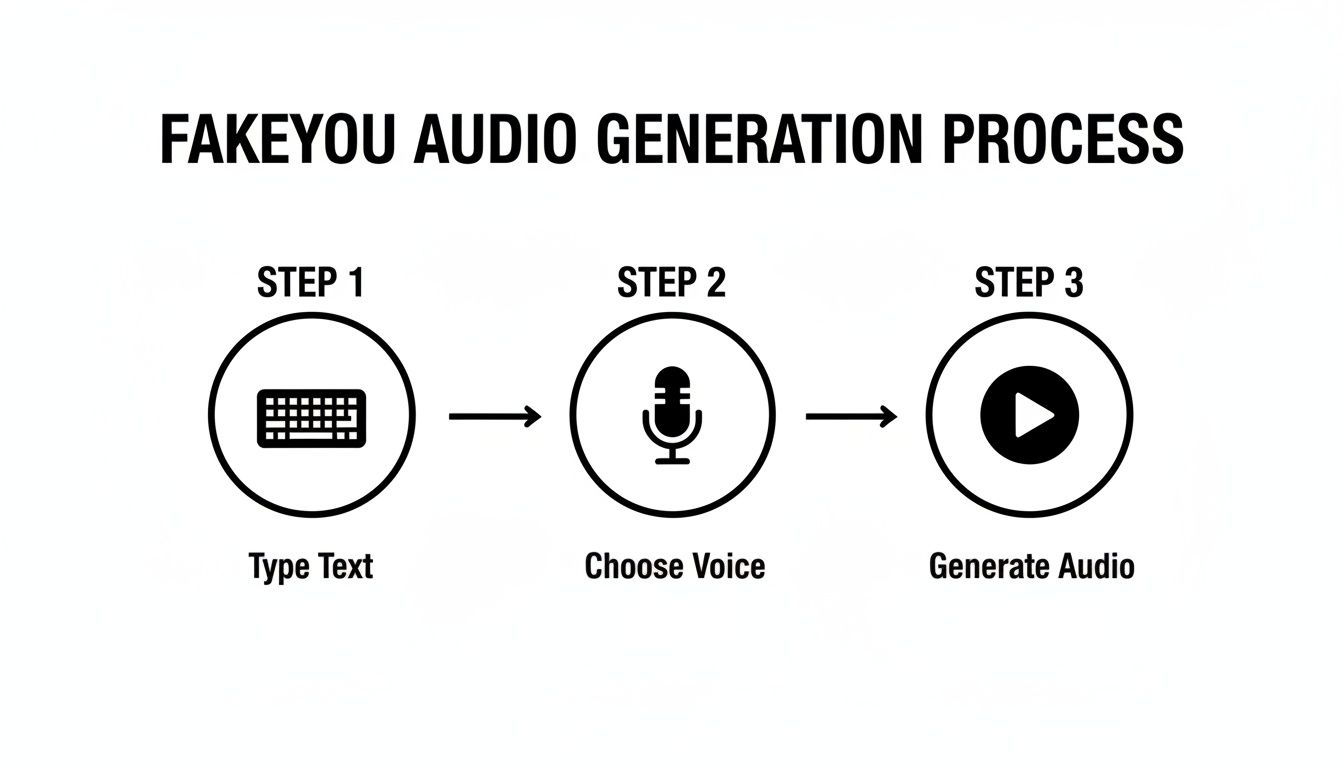
As you can see, the user workflow is dead simple: you type your text, pick a voice, and generate the audio. While the technology doing the heavy lifting is complex, FakeYou has made the front-end experience straightforward. If you're new to this space, you might find it helpful to explore other text-to-speech tools to see how different platforms approach this process.
Key Features and User Tiers Explained
FakeYou is more than a simple audio generator. It's a creative suite built for memes, social media content, and character-driven projects. To really get the most out of it, you first need to understand its three main tools. Each one is designed for a different type of creative output, from basic voiceovers to animated video clips.

The Core Creative Tools
Text-to-Speech (TTS) is the feature that brings most people to the platform. It's the engine for generating narration for YouTube videos, crafting unique podcast intros, or just having a bit of fun making a famous voice say something ridiculous. You simply type your script, select a voice from the massive library, and let the tool generate an audio file.
Then you have Voice-to-Voice (VV). This is where things get really interesting for creators. You can upload an audio file of your own voice and have it transformed into someone else's, all while preserving the original timing, pitch, and emotion. It's a go-to for making parody song covers or dubbing over video clips with a new vocal performance.
The final piece of the puzzle is the Face Animator. This tool takes a static image, like a portrait or a meme, and brings it to life by syncing it with an audio clip. The result is a simple but effective animation where the mouth moves along with the words, perfect for creating shareable clips for TikTok or Instagram Reels.
Understanding The Pricing Tiers
FakeYou uses a freemium model with a few paid options: Plus ($7/mo), Pro ($15/mo), and Elite ($25/mo). While the free tier is a great place to start, the biggest difference between the plans comes down to two things: processing speed and audio length. If you've ever used the free version, you're probably familiar with the long processing queues.
To help you decide what's right for you, here’s a breakdown of how the tiers stack up for generating audio.
FakeYou Feature and Pricing Tier Comparison
| Feature Access | Free Tier | Plus Tier ($7/mo) | Pro Tier ($15/mo) |
|---|---|---|---|
| Audio Length | Up to 12 seconds | Up to 30 seconds | Up to 2 minutes |
| Processing Speed | Slowest (long queues) | Faster than Free | Fastest priority |
| Private Generations | No | No | Yes |
| Voice-to-Voice | Limited to 4 minutes | Limited to 4 minutes | Up to 30 minutes |
As you can see, the jump from the free to the paid tiers is significant, especially for anyone creating content longer than a few seconds.
The free plan is fine for a quick laugh. But serious creators almost always need to upgrade. The main motivation is skipping the queue and getting longer audio clips. For example, a YouTuber trying to voice a 10-minute video would find the 12-second limit on the free plan completely unworkable, making the Pro tier a practical necessity.
While FakeYou's voice library is vast and entertaining, it's worth noting that it's geared more toward parody and fun. If you need hyper-realistic, commercially licensed voices for professional projects, you may want to look at other tools. For those use cases, we recommend checking out our guide on ElevenLabs, a popular alternative for high-end voice cloning.
My counter-intuitive opinion? The free tier’s strict 12-second limit is actually a blessing in disguise for meme makers. It forces a level of conciseness and creativity that often results in punchier, more memorable content that performs better on short-form video platforms.
Practical Use Cases for Creators and Founders
It's one thing to talk about the tech. It's another to see where FakeYou text to speech really clicks in the real world. This isn't just a meme generator. Think of it as a rapid-prototyping tool that can save you a surprising amount of time and money. It helps you jump straight from an idea in your head to a finished piece of audio.
Let's say you're a startup founder who needs a voiceover for a new product demo. You could spend weeks and a good chunk of your budget finding and hiring a professional voice actor. Or, you could fire up FakeYou and generate a compelling, character-driven narration in a matter of minutes.
The audio you get is often more than just a placeholder. For many projects, it’s good enough to be the final version. For anyone bootstrapping a project, that kind of efficiency is extremely valuable.
For Social Media and Marketing
Anyone managing social media knows the pressure to create content that lands. FakeYou gives you a clever shortcut to grab your audience's attention. You can take a trending meme or a funny script and have it spoken by a celebrity or cartoon character voice that everyone recognizes.
That familiar voice immediately adds a layer of humor and cultural relevance that helps a TikTok or Instagram Reel pop. You're basically borrowing a bit of pop culture to make your own content more memorable.
Here are a few ways to put this into action:
- E-commerce Ads: Imagine an online store using a classic movie announcer's voice for a quick, punchy product ad. It gives the spot a big-budget feel, sidestepping the $1,000+ you might otherwise spend on a professional voiceover.
- Podcast Intros: A podcaster could create a one-of-a-kind intro using a quirky animated character's voice, setting a distinct and memorable tone right from the start.
- YouTube Content: Video essayists can bring their scripts to life by using different voices for historical figures or fictional characters, adding a dynamic layer to their storytelling.
I once advised a small gaming channel to use FakeYou to create placeholder dialogue for a fan-made animation they were working on. They managed to produce their entire proof-of-concept video in a single weekend. That's something that would have taken them months if they'd waited to coordinate with volunteer voice actors. It proved their concept worked and built some crucial early momentum.
For Developers and Prototyping
It's not just marketers who are finding clever uses for it. Developers, especially in the gaming world, use FakeYou text to speech to quickly generate prototype dialogue for their characters. This lets them test scripts and hear how lines actually sound in-game long before they commit to the costly process of hiring and recording actors.
This ability to iterate quickly is invaluable. The same idea applies to anyone building a voice-activated app or an interactive digital experience.
FakeYou gives you a fast and easy way to test conversational flows with unique personalities. While more polished tools like Murf are better suited for final professional projects, FakeYou's strength is its sheer speed and character variety. For a deeper dive, you can check out our guide on Murf AI to see how its features stack up.
Managing Voice Quality and Common Frustrations
While FakeYou text to speech opens up a massive playground of voices, you have to go in with the right expectations. Let's be real. Not all voices on the platform are created equal. The audio quality can swing wildly from incredibly lifelike to glaringly robotic, and knowing why will save you a lot of headaches.
The difference almost always boils down to the source material. A voice model of a famous political figure, for instance, is likely trained on hundreds of hours of professionally recorded speeches and interviews. The result? A clone that sounds shockingly convincing.
On the other hand, if you’re trying to generate audio for a niche cartoon character, the model might be cobbled together from a handful of grainy clips pulled from YouTube. That's when you run into trouble. Weird pronunciations, unnatural pacing, or what many users call "AI babble," where the output just dissolves into a garbled mess.
Dealing With Queues and Errors
Beyond voice quality, the most common gripe you'll hear, especially from free users, is the queue time. During peak hours, it's not unusual to wait several minutes just for a short clip to process. This isn't a bug. It's a feature designed to nudge people toward a paid plan for priority processing.
The numbers back this up. While FakeYou is a fan favorite for entertainment, with 90% of its user base picking it over more expensive tools for fun projects, the frustrations are real. An overwhelming 90% of negative feedback points directly to queue waits that stretch past five minutes. Still, the celebrity impressions are so good that 75% of users say the quality keeps them coming back. You can see a full analysis of these metrics and discover more insights about FakeYou's market position on qcall.ai.
I remember trying to generate one simple line with a famous movie character's voice and staring at the screen for nearly seven minutes. Here’s my counter-intuitive advice: use that wait time. Go grab a coffee, tweak your script, or map out your next clip. If you treat it like a forced break, the free tier suddenly feels a lot more manageable.
Tips for Better Audio Output
You can't magically fix a voice model that was trained on bad data, but you can definitely nudge the AI toward a better performance and sidestep common errors.
- Punctuation is Your Friend: Use commas, periods, and question marks correctly. These aren't just for grammar. They are your primary tools for guiding the AI's cadence and inflection.
- Spell It Out Phonetically: If the AI consistently stumbles over a specific name or term, don't keep trying the same spelling. For a name like "Sian," try typing "See-ann" to force the correct pronunciation.
- Stick to the Hits: When in doubt, go with the popular voices. The models with thousands of uses and high community ratings almost always deliver cleaner audio. They simply have more (and better) data to work with.
By understanding its limitations and working around them, you can get a lot more out of the FakeYou text to speech platform. It’s an incredible tool for fun and fast prototyping, but it’s certainly not perfect.
Navigating Ethical and Legal Boundaries
Let's be clear. Using a deepfake audio tool like FakeYou text to speech comes with a hefty dose of responsibility. It's one thing to generate a funny clip for a laugh, but the line between harmless parody and unethical impersonation is incredibly thin. The ability to mimic a voice this well means you have to think through the legal and ethical minefield before you ever hit "generate."
The platform's own terms of service try to draw a clear line. At the end of the day, it all boils down to your intent. Are you making a silly meme to share with friends, or are you trying to defame a public figure or commit fraud? The distinction is everything.
Responsible and Safe Creation
Creating parody content for entertainment is one thing. That kind of work often falls under fair use, particularly in the United States. But here’s the catch. Generating audio that's malicious, defamatory, or designed to mislead people isn't just unethical. It's often illegal. And the consequences can be severe.
To protect your brand and stay on the right side of the law, follow these ground rules:
- Always Add a Disclaimer: If you publish content using a cloned voice, slap a clear and unmissable disclaimer on it. Something as simple as "This audio is AI-generated" can be your best defense. Transparency is key.
- Avoid Commercial Use of Public Figures: Using a celebrity's voice in an ad or for any commercial project without their explicit consent is a massive legal no-go. This can violate their "right of publicity," which protects their name, image, and likeness from being used for profit without permission.
- Never Use for Fraud: This should be obvious, but using cloned audio to impersonate someone for fraudulent purposes, like faking a phone call from a CEO or creating false evidence, is a serious crime.
I’ve seen creators get into serious trouble by using cloned voices in things like political attack ads. Even with a tiny disclaimer, the potential for misinformation is just too high. My advice? Steer clear of anything that could possibly be misinterpreted as a genuine statement from a real person, especially when the topic is sensitive.
Sticking to these rules will help you use FakeYou text to speech responsibly. For any project needing high-fidelity voice clones with clear commercial licensing, you're better off looking at specialized platforms built for that purpose. To see what that looks like, you might want to check out our breakdown of tools like Resemble AI.
Frequently Asked Questions About FakeYou
Let's dig into some of the most common questions that pop up when people start experimenting with FakeYou. Getting the hang of its quirks is key to making the most of the platform.
Can I Use FakeYou Voices for Commercial Projects?
That’s the million-dollar question, and the answer is complicated. While it's technically possible, FakeYou's own terms of service are pretty clear about discouraging the use of real people's voices for commercial work. The main reason is the potential for violating an individual's "right of publicity."
Ultimately, you assume all the legal risk if you decide to use one of these voices in a project that makes money. If you're set on using the platform for business, your safest bet is to either clone your own voice or stick to fictional character voices that aren't tied to an active copyright. For any serious commercial project, talking to a legal expert first isn't just a good idea. It's essential.
How Can I Get Better Quality Audio from FakeYou?
Getting clean audio often comes down to what you put in. Start with well-written text. The AI relies heavily on punctuation like commas and periods to figure out pacing and inflection, so don't skip them. It's also a good practice to stick with the most popular voice models, as they tend to have much more training data behind them, which usually means more consistent and reliable results.
Here's a little trick that isn't immediately obvious. Try spelling things phonetically. If the AI keeps tripping over a word, just spell it out exactly how it sounds. For a name like "Siobhan," for instance, typing "Shiv-awn" will often force the AI to get the pronunciation right.
And if you're doing a voice-to-voice conversion, the quality of your source audio is everything. Use a crisp, clear recording with as little background noise as possible to give the model the best chance of producing a great result.
What Are the Best Alternatives to FakeYou?
If FakeYou feels a bit too much like the Wild West for your needs, there are some fantastic, more professional-grade alternatives.
For anyone needing rock-solid voice cloning with clear commercial licensing, platforms like ElevenLabs or Play.ht are the go-to industry leaders right now. They deliver incredibly realistic voices and have features built specifically for business.
For high-end creative work like film or AAA video games, Respeecher is often considered the top of the line, though its premium quality comes with a premium price tag. On the other hand, if you just need straightforward, free text-to-speech without the celebrity impressions, the APIs from Microsoft Azure and Google Cloud are both powerful and incredibly reliable.
Ready to find the right AI tool for your next project? Oryndex is a curated directory and discovery engine for AI tools, built for founders and creators. Ask in plain English and find vetted products from a hand-picked library to build your perfect AI stack faster. Explore the best AI tools at https://toolibrary.co.